
What is Magic?
Magic is Salesmotion's AI-powered insight engine. It analyses all the signals collected for an account — news, earnings, hiring, podcasts, documents, and more — and distils them into a single, actionable briefing. Instead of reading through dozens of individual signals yourself, Magic synthesises everything and tells you what happened, why it matters, and exactly how to act on it.
Think of Magic as your AI research analyst: it reads everything, connects the dots, and hands you a ready-to-use briefing before your next meeting or outreach.
How to access Magic
Click Magic in the left sidebar navigation. Salesmotion will display AI-generated insights for your tracked accounts. Each insight focuses on a specific account and a particular cluster of signals that the AI has identified as meaningful.
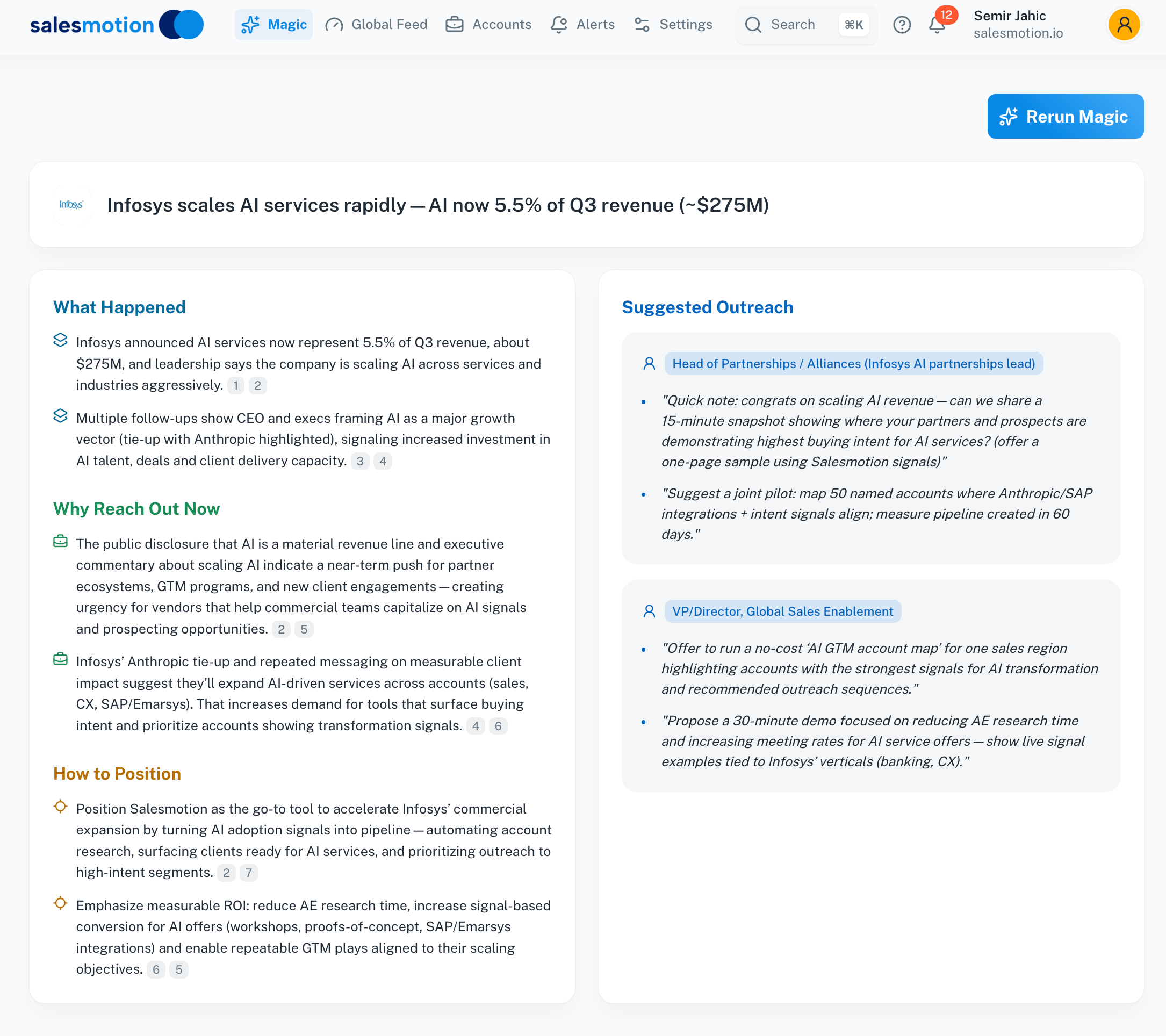 A Magic insight for Infosys — the AI has analysed earnings data and news signals to produce a complete briefing with positioning and outreach suggestions.
The four sections of a Magic insight
Every Magic insight is structured into four sections, each designed to take you from understanding to action:
What Happened
A concise summary of the key signals the AI has identified. This section pulls together the most important recent events — such as revenue milestones, strategic partnerships, executive commentary, or market moves — into a few clear bullet points.
In the example above, Magic identified that Infosys's AI services now represent 5.5% of Q3 revenue (approximately $275M), along with details about follow-up conversations with the CEO and a new tie-up with Anthropic.
Why Reach Out Now
This section explains the timing. It connects the signals to a reason for urgency — why this is the right moment to engage the account. Magic looks for inflection points like accelerating investment, strategic shifts, or new leadership priorities that create an opening for conversation.
How to Position
Tailored positioning guidance for your product in the context of what's happening at the account. Magic considers the account's current priorities and challenges, then suggests how to frame your value proposition in a way that resonates right now.
This section is particularly useful when you know your product well but need help connecting it to the prospect's specific situation.
Suggested Outreach
The most actionable section. Magic identifies specific personas at the account — with job titles and functional areas — and drafts outreach messaging tailored to each. You'll see:
- Target persona — The role and seniority level to contact (e.g. "Head of Partnerships / Alliances" or "VP/Director, Global Sales Enablement").
- Draft messaging — Suggested email content that references the specific signals, explains why you're reaching out, and proposes a conversation.
These drafts are designed as starting points. Personalise them with your own voice and any additional context you have about the contact.
Regenerating insights with Rerun Magic
Signals change constantly — new earnings reports are filed, new articles are published, new hires are announced. If you want Magic to re-analyse an account with the very latest signals, click the Rerun Magic button at the top of the insight.
This triggers a fresh AI analysis using all currently available signals, and the insight will update with new content. This is especially useful when:
- A major event has just occurred (e.g. an earnings release or acquisition announcement).
- You've added the account recently and more signals have been gathered since the first analysis.
- You want a fresh perspective before a scheduled meeting.
Tips for getting the most from Magic
- Use Magic before important meetings. Open the Magic insight for the account 10–15 minutes before your call. The "What Happened" and "How to Position" sections give you immediate context, and you'll walk into the meeting sounding prepared and well-informed.
- Share insights with your team. If you're in a team selling motion, share the Magic briefing with your solutions engineer or executive sponsor. It gets everyone on the same page quickly without requiring each person to do their own research.
- Use Suggested Outreach as a starting point. The AI-generated messaging is designed to be relevant and timely, but it's most effective when you add your personal touch. Edit the tone, add a mutual connection, or reference a specific conversation you've had.
- Rerun before big events. If you know an account is about to release earnings or has just made a major announcement, hit Rerun Magic to ensure your briefing reflects the latest information.
- Combine with the Signals tab. Magic gives you the synthesised view. If you want to dig deeper into any point it raises, navigate to the account's Signals tab to read the underlying signals in full.
- Check Magic regularly for new accounts. When you first add an account, Salesmotion begins gathering signals immediately. Come back to Magic after a day or two for a richer, more complete insight.
Frequently asked questions
How does Magic decide which signals to highlight?
Magic uses AI to identify the most significant and actionable cluster of signals for each account. It considers signal recency, importance, and relevance to sales conversations. Not every signal will appear in the Magic insight — it focuses on the signals that are most likely to create a conversation opportunity.
Can I generate Magic insights for any account?
Magic insights are available for all tracked accounts in your workspace. Accounts with more signals tend to produce richer and more detailed insights. For accounts with very limited public data, the insight may be shorter or less specific.
Is the suggested outreach sent automatically?
No. Magic never sends messages on your behalf. The suggested outreach is purely advisory — it appears in the Magic insight for you to review, edit, and send using your own email or outreach tools. You always have full control over what gets sent and when.