
What is the Contacts tab?
The Contacts tab on an account detail page shows you the key people associated with that account — executives, decision-makers, and other relevant contacts. For each person, Salesmotion provides professional details, AI-generated personality assessments, and personalised talking points designed to help you have more effective conversations.
This is one of the most powerful features in Salesmotion for sales professionals. Instead of spending time researching individual contacts across LinkedIn, company websites, and news articles, you get a comprehensive profile in one place — including insights into how each person prefers to communicate.
The contact list
When you open the Contacts tab, you'll see a list of contacts with the following information at a glance:
- Name — The contact's full name.
- Email — Available email addresses.
- Tags — Labels indicating the contact's relevance or role category.
- Current position — Their current job title and company.
- Previous position — Their most recent prior role, which can be useful for understanding their career trajectory.
Click on any contact to open the Contact Details drawer on the right side of the screen.
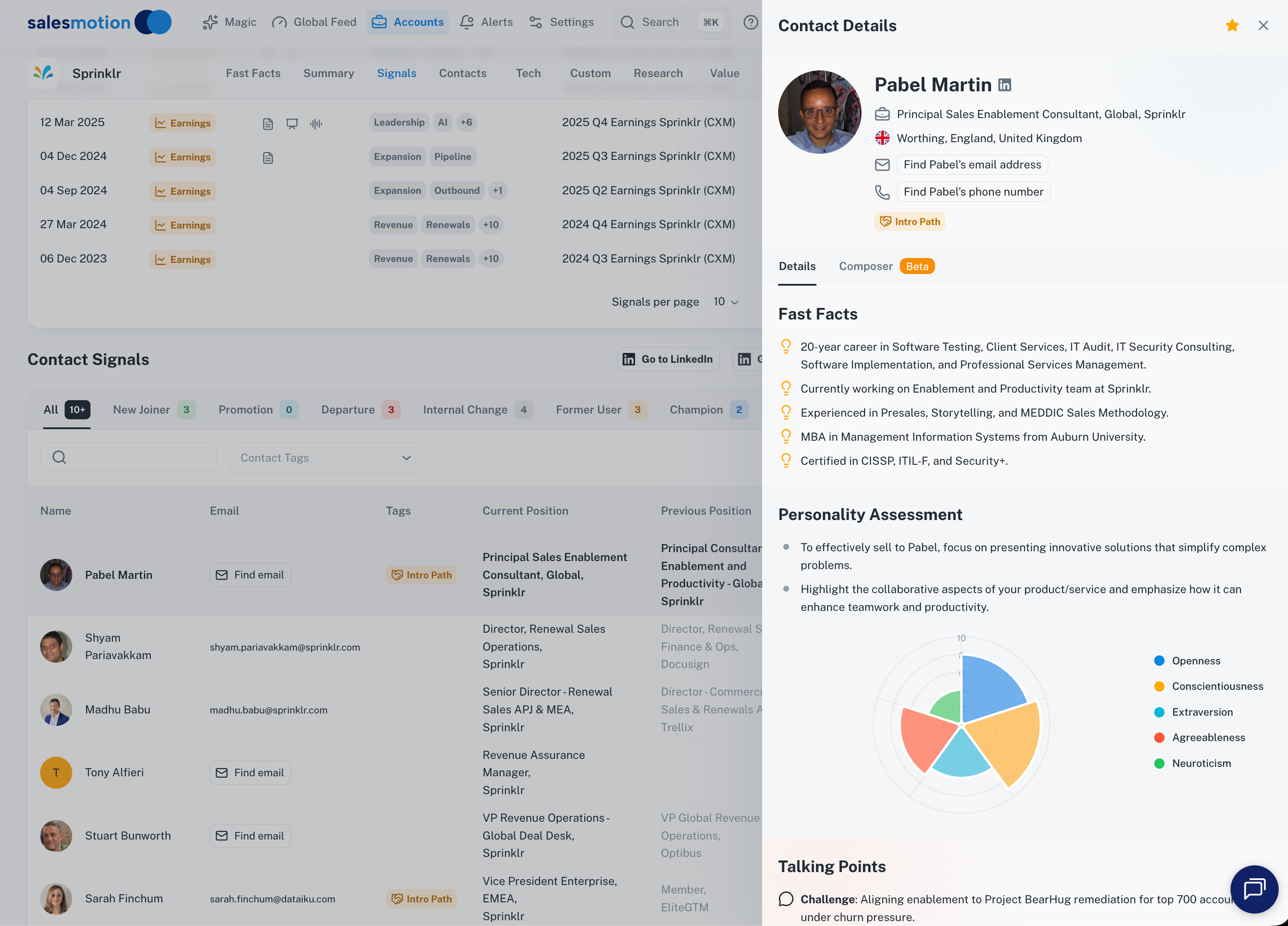 The Contacts tab for Sprinklr — the list on the left shows names, emails, and positions, while the detail drawer on the right shows AI-generated Fast Facts, Personality Assessment, and Talking Points for the selected contact.
Contact detail drawer
The contact detail drawer provides three rich sections of information:
Fast Facts
An AI-generated career summary that highlights the most important things to know about the contact. Fast Facts typically include:
- Career span — How many years of professional experience they have.
- Key expertise — Methodologies they're known for (e.g. MEDDIC, SPIN selling) or domains they specialise in.
- Certifications — Professional qualifications and certifications.
- Education — Relevant degrees and institutions.
- Notable achievements — Career highlights that may be useful conversation starters.
Fast Facts give you the "cocktail party version" of someone's background — enough to demonstrate you've done your homework without spending 30 minutes reading their full LinkedIn history.
Personality Assessment
This is where Salesmotion truly differentiates. The Personality Assessment uses AI to analyse publicly available information about the contact — their writing style, public statements, career choices, and professional history — and generates a five-factor personality profile based on the OCEAN model:
- Openness — How receptive they are to new ideas and approaches.
- Conscientiousness — How detail-oriented and process-driven they tend to be.
- Extraversion — How they prefer to engage — through energy and conversation, or through reflection and written communication.
- Agreeableness — How they approach negotiation and decision-making — collaboratively or assertively.
- Neuroticism — How they handle pressure and uncertainty.
The assessment is displayed as a radar chart for a quick visual overview, accompanied by bullet-point descriptions that translate each trait into practical selling guidance. For example, a highly conscientious contact may respond better to structured proposals with detailed ROI analysis, while a highly open contact may be more receptive to visionary pitches about innovation.
Talking Points
Below the personality assessment, you'll find Talking Points — personalised conversation starters tailored to the contact's role, responsibilities, and likely challenges. These are generated by AI based on the contact's profile and the account's current signals.
Talking Points help you move past generic opening lines and into conversations that feel relevant and informed. They're especially useful when you're reaching out cold or meeting someone for the first time.
Quick access to LinkedIn
Each contact profile includes a Go to LinkedIn link that opens the contact's LinkedIn page directly. This is useful for:
- Checking for mutual connections before reaching out.
- Reviewing recent posts or articles the contact has shared.
- Sending a connection request alongside your outreach.
Tips for getting the most from contacts and personality insights
- Review personality before every call. Even a 30-second glance at the Personality Assessment changes how you approach a conversation. If someone scores high on conscientiousness, lead with data and structure. If they score high on openness, lead with vision and possibility.
- Use talking points in outreach emails. The AI-generated talking points are designed to be relevant to the contact's specific role and challenges. Use them as inspiration for your opening lines or meeting agendas.
- Check previous positions for common ground. A contact's career history often reveals shared connections, industries, or experiences. Mentioning a previous company or role shows genuine preparation.
- Combine with Magic insights. Use the Magic feature to understand what's happening at the account level, then use the Contacts tab to understand who to reach and how to tailor your message to their communication style.
- Prepare for group meetings. If you're meeting with multiple stakeholders, review each person's personality profile in advance. Understanding group dynamics — who's analytical, who's the relationship-builder, who drives decisions — helps you navigate the room more effectively.
- Look at the radar chart for a quick read. When you're short on time, the radar chart gives you an instant visual summary of someone's personality profile. You don't need to read every bullet point — the shape of the chart tells you a lot at a glance.
Frequently asked questions
How accurate is the Personality Assessment?
The Personality Assessment is generated by AI based on publicly available professional information. It's designed to be a useful guide for tailoring your communication style, not a clinical diagnosis. Think of it as a well-informed starting point — it's most effective when combined with your own observations during conversations.
Where does Salesmotion get contact data?
Contact information is gathered from publicly available sources including company websites, professional directories, and other public databases. Salesmotion continuously updates contact data as new information becomes available.
Can I add or edit contacts manually?
Contact data in Salesmotion is automatically gathered and maintained. If you notice missing or outdated information for a key contact, reach out to your admin — they can provide guidance on how contact data is managed in your workspace.