The best sales prospecting platforms for 2027 fall into three groups: data providers such as ZoomInfo, Cognism and Lusha, workflow all-in-ones such as Apollo.io, and AI account-intelligence tools such as Salesmotion. Choose by the bottleneck in your sales process, not by feature count.
TL;DR: This guide compares 10 platforms: Salesmotion, ZoomInfo Sales, LinkedIn Sales Navigator, Apollo.io, Cognism, Lusha, Seamless.AI, Clay, LeadIQ and Clearbit (now part of HubSpot). If reps cannot find the right people, buy data. If they have contacts but struggle with timing and relevance, buy signal monitoring and research.
Your reps are following a common approach when pipeline gets thin. They open LinkedIn Sales Navigator, bounce into a data tool, copy details into the CRM, ask ChatGPT to draft an email, then still spend too much time deciding whether any of it is worth sending. By noon, they’ve touched a lot of tabs and moved very little revenue.
That’s why sales prospecting platforms matter now. The category has grown fast as AI moved from novelty to workflow. The global sales engagement platform market grew from $1.4 billion in 2020 to $4.5 billion by 2025, a 25.1% CAGR, according to SuperAGI’s market analysis. The practical takeaway isn’t just market momentum. It’s that prospecting software has shifted from a nice-to-have into part of the core operating stack for modern B2B teams.
The harder part isn’t finding a tool. It’s choosing the right kind of tool for your team’s maturity. Some platforms are best as raw data providers. Some are all-in-one systems for lean outbound teams. A newer category focuses on autonomous AI agents that monitor accounts, surface timing signals, and hand reps outreach with actual context.
If your team mainly needs contacts, buy a contact tool. If your team already has contacts but struggles with relevance, prioritization, and timing, buying more data won’t fix the problem. That’s where a lot of sales leaders waste budget.
One more point before the list. Better targeting and personalization only matter if your emails reach the inbox. If deliverability is already shaky, fix that in parallel with your prospecting stack. This guide on Mastering Email Deliverability Strategies is worth reviewing before you scale outbound.
1. Salesmotion
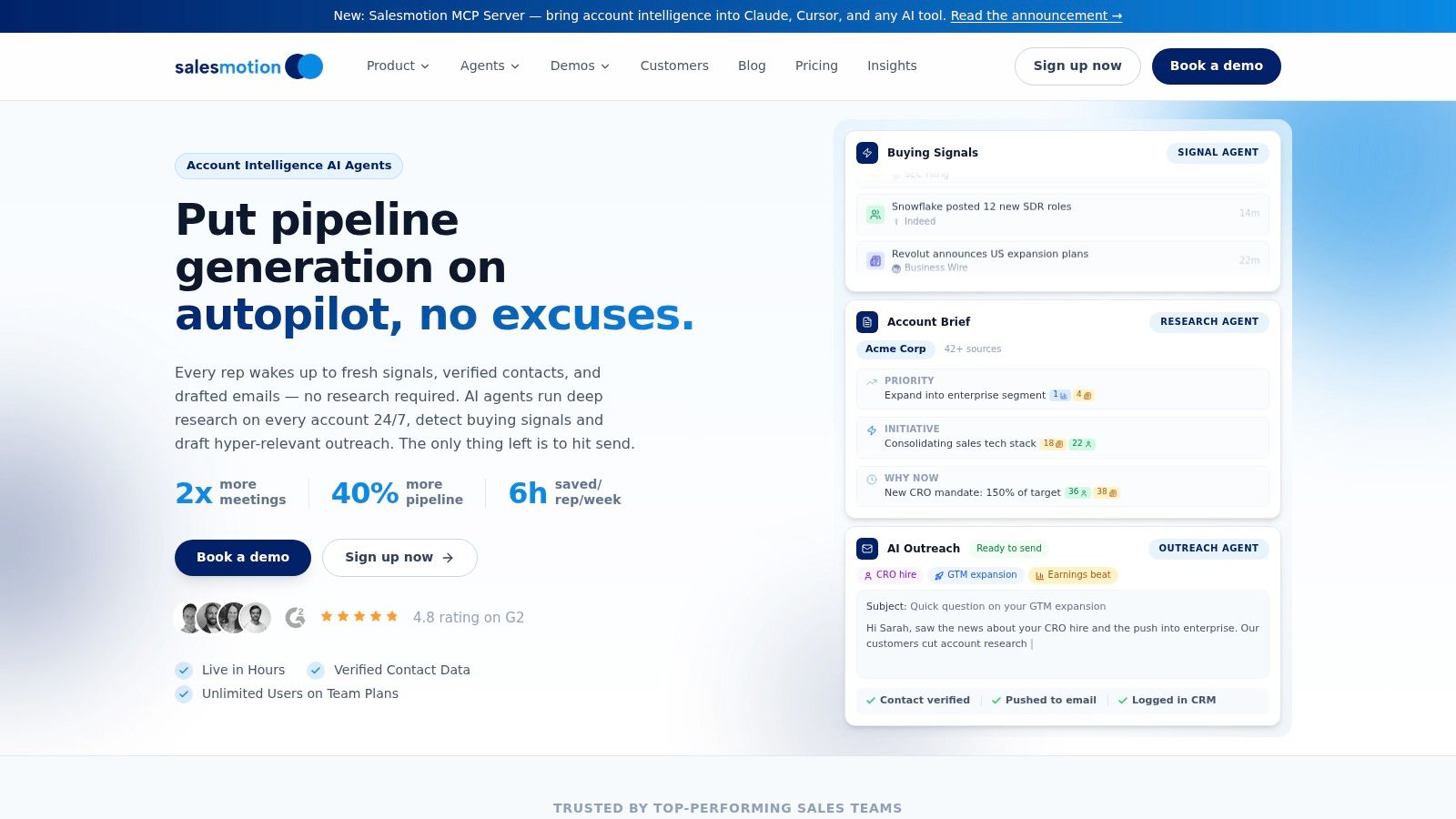
Salesmotion is the most interesting option on this list if your problem isn’t access to data. It’s what to do with the constant stream of account activity once you have it. Most sales prospecting platforms are still built around search, filters, and static enrichment. Salesmotion is built around continuous account intelligence.
It gives sellers three autonomous AI agents. Research Agent builds ongoing account briefs from public sources like earnings calls, SEC filings, job posts, podcasts, news, and company updates. Signal Agent watches accounts continuously and sends prioritized alerts into Slack, email, or CRM. Outreach Agent turns those signals into personalized outreach that reps can review and send through the tools they already use.
Why it stands out
The biggest difference is that Salesmotion doesn’t stop at “something happened.” It tries to answer the question reps care about. Why does this matter now, and what should I say about it?
That matters because signal overload is a real problem in modern outbound. Existing sales prospecting platforms often flood teams with alerts while leaving reps to decide what matters. Research summarized by Guideflow’s analysis of sales prospecting tools points to a gap around filtering and prioritizing signals into something actionable, instead of surfacing more noise.
Practical rule: If a tool gives your reps more alerts but not better decisions, it’s adding work, not removing it.
Salesmotion also fits the way teams already operate. It integrates natively with Salesforce and HubSpot, pushes outreach drafts to lemlist, and exposes a REST API and MCP server, so you’re not ripping out your stack to get value. That matters more than most vendors admit. Adoption usually dies when reps have to leave their core workflow.
Best fit and trade-offs
This is strongest for revenue teams that already know their target accounts and want better account coverage, account planning, and timing. Enterprise teams, strategic account teams, and managers trying to standardize rep preparation will get the most from it. It’s also a strong choice for teams tired of DIY prompt workflows that are inconsistent across reps.
A few trade-offs are real:
- Public-signal dependency: If your market has very little public activity, you’ll get less from always-on monitoring.
- Human review still matters: The output gets reps close to send-ready, but managers should still expect review before launch.
There’s also a useful strategic distinction between Salesmotion and traditional sales intelligence tools. Traditional vendors help you find people. Salesmotion helps reps understand why outreach is timely and relevant. That difference is covered well in this breakdown of B2B sales intelligence tools.
For teams dealing with weak “why now” messaging, this category is where the market is heading. Reviews of mainstream tools still focus heavily on static data and AI copy help, while monday.com’s roundup of prospecting tools highlights a broader gap around dynamic, ongoing account intelligence for planning and prioritization.
-
Pros
- Always-on monitoring: The agents keep working after the rep logs off.
- Actionable output: Briefs, prioritized signals, and outreach are connected in one flow.
- Source visibility: Insight tied back to original sources builds trust.
- Fast workflow fit: It works with existing CRM and engagement tools.
-
Cons
- Not ideal for pure list building: If all you need is emails and direct dials, a simpler data tool may be enough.
Website: Salesmotion
Comparing AI prospecting tools?
Most AI prospecting tools spit out generic emails. Salesmotion drafts outreach anchored to real signals.
Verified contacts + 24/7 signal monitoring + AI-drafted emails grounded in actual account research. $85/mo.
2. ZoomInfo Sales
ZoomInfo Sales is what many enterprise teams buy first when they want a single source of reference for contact and company data. It’s strong when the motion depends on scale, account coverage, org mapping, technographics, and broad workflow integration.
The strength here is depth. You get a large B2B database, company insights, org charts, direct dials, intent-oriented workflows, and mature governance controls. For large teams with procurement and admin requirements, that governance piece matters almost as much as the data.
Where ZoomInfo works best
If your outbound motion starts with “we need broad TAM coverage and role-based access control,” ZoomInfo makes sense. It’s especially useful for enterprise SDR teams, RevOps teams centralizing data standards, and account-based motions where reps need fast access to company context and stakeholder mapping.
It’s also a common benchmark against which other platforms get measured. If you’re evaluating the market, this overview of ZoomInfo alternatives including Salesmotion is useful because it separates data depth from workflow value.
ZoomInfo is often a system of record for prospect data. It’s not automatically the best system for relevance, messaging, or timing.
Real trade-offs
The trade-off to model is cost. ZoomInfo does not publish pricing, and Vendr reports a median contract of $33,500 a year based on 1,576 purchases. The second issue is one every data provider faces. Even a large database still needs rep judgment and occasional verification before send, especially in segments with frequent role changes.
That trade-off becomes more important as teams push for efficiency. DataIntelo’s market report on data-driven sales prospecting platforms describes broad adoption of AI-enabled sales software and the move toward cloud-based deployments, but the operating lesson is simple. More data only helps if reps can turn it into action quickly.
- Best for: Enterprise teams that need broad data coverage, governance, and mature integrations
- Skip it if: You’re a lean team looking for lightweight prospecting or signal-based account prioritization first
- Common stack fit: ZoomInfo plus Salesforce plus Outreach or Salesloft
Website: ZoomInfo Sales

“Consolidation of prospect company information that I can use frequently to be way better informed when I'm doing my outbound, preparing for a meeting, or building relationships. Ease of use and Customer Support is excellent.”
Werner Schmidt
CEO & Co-Founder, Lative
3. LinkedIn Sales Navigator
A rep opens Monday’s target account list and sees two decision-makers changed jobs over the weekend, a VP commented on a hiring post, and a former customer is now connected to the buying committee. That is the kind of prospecting moment LinkedIn Sales Navigator is built for.
Sales Navigator belongs in the signal layer of your stack. It helps teams spot professional movement early, add context to outreach, and prioritize accounts based on what people are doing now, not just what sits in a static database. If you are comparing categories, this breakdown of ZoomInfo alternatives including Salesmotion is useful because it separates data providers from workflow tools and newer AI-driven options.
The practical value is speed to relevance. Reps can see role changes, content activity, company updates, shared connections, and stakeholder movement without forcing a new behavior. Sellers already spend time on LinkedIn. Sales Navigator gives that time more structure.
It tends to work well for three use cases:
- Account-based prospecting: Follow target accounts and monitor stakeholder movement across the committee.
- Relationship-first outreach: TeamLink and connection paths help reps find warmer routes in.
- Message development: Profile activity and posted content give reps a reason to reach out that sounds current.
The trade-off is clear. Sales Navigator is built for LinkedIn search, alerts, InMail, and relationship mapping. Most teams pair it with a contact data provider and a sequencing tool. That matters in smaller teams especially, because adding Sales Navigator on top of a half-built stack can improve research while doing little for output.
Process maturity matters. A team with defined accounts, clear ICP rules, and reps who know how to personalize outreach will usually get strong value from Sales Navigator. A team still trying to build volume from scratch may get more immediate return from an all-in-one platform first, then add LinkedIn context later.
It also pairs well with teams trying to improve social selling discipline. For reps working account lists through mutual connections, engagement, and timely triggers, guidance on maximizing outreach on LinkedIn can help turn Sales Navigator activity into more booked conversations.
- Best for: Mid-market and enterprise teams running account-based or relationship-led outbound
- Skip it if: You need a single tool to source contacts, enrich records, and launch sequences
- Common stack fit: Sales Navigator plus a contact data provider plus Outreach, Salesloft, or a similar sequencing tool
Website: LinkedIn Sales Navigator
4. Apollo.io
Apollo.io is what a lot of lean outbound teams choose when they want one platform that gets them from list building to first touch without buying five separate tools. It combines contact data, sequencing, workflow automation, a Chrome extension, and AI assistance in one package.
For SMB and mid-market teams, that all-in-one model is the draw. Reps can search, enrich, write, and launch from a single environment. That usually means faster time to production.
Why Apollo is popular
Apollo is practical. It gives smaller teams a workable balance of database access and outreach execution without forcing enterprise-level spend. That’s why it’s often the first “real” outbound platform startups adopt after spreadsheets and lightweight enrichment tools stop scaling.
It’s also a strong option for teams that need:
- Fast list building: The database and extension make prospect capture easy.
- Built-in outreach: Sequences and workflow automation reduce tool sprawl.
- Lower operational friction: Admin overhead is lighter than in enterprise-heavy stacks.
Apollo also has strong market presence. Adoption data summarized in the same market view that tracks provider usage puts Apollo among the most visible players in day-to-day prospecting workflows, which matches its popularity with SMB teams.
What to watch before you commit
Apollo can feel excellent at first and restrictive later. Credit limits, feature gating, and higher-tier controls become more noticeable as the team grows. That’s usually the fork in the road. Early-stage teams love the consolidation. Mature teams may eventually want more control over data quality, routing, governance, or signal workflows.
If you’re weighing that trade-off, this page on Apollo alternatives helps separate “all-in-one convenience” from “best-in-class by function.”
Apollo also pairs naturally with strong LinkedIn workflows. If your reps prospect heavily through social plus email, this guide on maximizing outreach on LinkedIn is a useful companion read.
Apollo works best when speed matters more than perfect customization.
Website: Apollo.io

“This is my singular place that very simply summarizes a company's top initiatives, strategies and connects them to my solution. Something I would spend hours researching manually, now it's automated.”
Derek Rosen
Director, Strategic Accounts, Guild Education
5. Cognism
Cognism earns its place on this list because compliance isn’t a side note for many teams. It’s a buying requirement. If you sell across EMEA or operate in regulated environments, a GDPR-first posture changes the shortlist fast.
The platform is known for verified mobile numbers, email data, enrichment, and buying-signal packages, with particular appeal for teams prospecting across Europe. In practice, Cognism usually comes up when a team wants better global coverage and less legal anxiety.
Where Cognism shines
Cognism is a strong fit for international outbound teams that need a cleaner compliance story and solid EMEA coverage. If your reps do heavy calling, direct dials and mobile quality matter more than flashy AI copy features.
What I like about Cognism’s positioning is that it’s operational, not just promotional. Teams buying it usually know exactly why they’re buying it.
- Compliance-first teams: Useful for companies that can’t take shortcuts on data handling.
- EMEA-focused motions: Often shortlisted by teams that prospect heavily across Europe.
- Phone-heavy outbound: Mobile data quality matters if your motion includes serious dialing.
Trade-offs and team fit
The trade-off is familiar. Pricing isn’t public, so you’re in a sales process before you can model full cost. Packaging is split into Standard and Pro, with intent data in Pro and CRM Enrichment as an add-on, so compare like for like.
For smaller teams, that may be overkill. For larger international teams, it may be exactly the point. If you’re comparing lighter tools for contact lookup, this overview of Cognism alternatives is a useful reality check because those two products often get evaluated for very different operating needs.
Website: Cognism
6. Lusha
Lusha is one of the easiest sales prospecting platforms to deploy if your team mainly needs quick contact reveals and simple workflows. It’s popular with SDRs and founders because the value is obvious fast. Install the extension, reveal contact details, push to CRM, move on.
That simplicity matters. A lot of teams don’t need a massive data architecture problem solved. They need a rep to find a person, capture a number or email, and keep prospecting.
Why smaller teams like it
Lusha suits teams seeking rapid activation and consistent usage. The credit model is easy to understand, and the browser-first workflow aligns with how many reps prospect day to day.
It tends to work well for:
- Founder-led sales: Minimal setup, quick access, no big admin project
- Small SDR teams: Easy onboarding and straightforward browser capture
- Teams filling data gaps: Helpful as a companion tool rather than a full system
The downside shows up with scale. Larger teams often outgrow credit bundles, especially if phone-heavy workflows eat through usage quickly. At that point, Lusha can start feeling more like a tactical add-on than a strategic platform.
What it won’t solve
Lusha is built around contact access, and it has added buying signals and ICP scoring on top. Used for that job, it’s solid. Used as a cure for weak outbound strategy, it won’t help much.
Website: Lusha
7. Seamless.AI
This particular platform is a data-first option for teams that care about search flexibility, exports, and modular add-ons. The core value is simple. Reps can search for contacts in real time, access emails and phone numbers through the extension, and build lists without much friction.
Where it gets interesting is the breadth around the search engine. Buyer Intent, Job Changes, CRM Enrich, an AI assistant, and API and MCP access let teams shape the platform around their motion.
Good use cases
This platform works best for teams that want flexibility without committing to a fully bundled system. It’s useful when a team wants to test a provider, start with search and exports, then decide later whether to add automation or intent features.
That can be attractive for:
- Individual reps testing vendors
- Teams that want configurable add-ons
- Ops-minded groups that need export freedom
The catch
The final cost can be harder to model than it first appears. Seamless.AI is free for up to 50 credits, and its pricing page is a demo request form, so the economics of a paid plan only become clear in a quote.
That doesn’t make it a bad choice. It just means you should buy from a workflow map, not a feature page. If your team wants a flexible search engine for prospect data, Seamless.AI is worth a look.
Website: Seamless.AI
8. Clay
Clay fits a specific stage of prospecting maturity. Teams that have outgrown a single data vendor often hit the same wall. They want better coverage, richer account research, and tighter targeting logic than an off-the-shelf platform can provide.
Clay solves that by acting as a configurable workflow layer across multiple data sources, enrichment tools, and AI steps. RevOps teams can build provider waterfalls, route records through conditional logic, and create outbound workflows around their own ICP rules instead of accepting a fixed system. In a market that ranges from basic data providers to all-in-one platforms and now AI agents, Clay sits closest to the build-your-own end of the spectrum.
Who should buy Clay
Clay makes sense for teams with a defined outbound process and someone responsible for building it. If your team cares about custom scoring, layered enrichment, account research, or personalized messaging at scale, Clay gives you far more control than simpler prospecting tools.
It is often a strong fit for:
- RevOps-led outbound programs
- Agencies and advanced outbound teams
- Teams intentionally combining multiple data vendors
Clay rewards teams that like configuration. It frustrates teams that want a tool to work out of the box.
Why some teams struggle with it
The trade-off is complexity. Clay can become expensive or messy if the team does not understand how credits, actions, vendor costs, and workflow design affect usage.
I would not put Clay in front of a new SDR team and expect adoption without help. I would put it in front of a capable RevOps owner who wants control over how data, signals, and outbound execution fit together.
Website: Clay
9. LeadIQ
LeadIQ works because it solves a very specific problem well. A rep is on LinkedIn, finds the right person, captures the contact, syncs the record, and moves that lead into sequence quickly. That handoff is where many prospecting motions lose momentum. LeadIQ keeps it moving.
It’s especially effective as a companion to Sales Navigator. Sales Navigator gives the relationship and role context. LeadIQ helps fill the contact-data gap and move the prospect into execution.
Where LeadIQ adds value
LeadIQ is a practical choice for SDR teams that prospect from LinkedIn all day and care about speed from discovery to first touch. The Chrome extension, CRM syncs, and engagement tool handoff are the core strengths.
The platform also adds signals like hiring, 10-K references, podcasts, and job changes, which can help reps write a better first message than a generic opener. That combination makes it more useful than a simple email finder.
Limits to know upfront
LeadIQ’s database breadth may not match larger incumbents for every segment. That’s the main trade-off. For many teams, that’s acceptable because the workflow speed is the primary reason to buy it.
If your motion is “reps live in LinkedIn, and managers want less friction between finding and sequencing,” LeadIQ is a smart choice. If your motion starts with very large-scale list generation across broad territory coverage, a heavier data provider may fit better.
Website: LeadIQ
10. Clearbit now part of HubSpot
Clearbit, now part of HubSpot, makes the most sense when your GTM stack already runs through HubSpot. In that setup, native enrichment, visitor identification, routing, and governance become easier to manage because the tooling sits inside the system your team already uses.
That’s the appeal. Not novelty. Operational simplicity.
Best use case
If your CRM, marketing automation, lead routing, and reporting already sit in HubSpot, Clearbit’s capabilities become more attractive because they reduce stack fragmentation. Sales and marketing can enrich records, identify site visitors, and act on that data without stitching together another external vendor.
This matters most for:
- HubSpot-centric GTM teams
- Marketing and sales teams that share funnel operations
- Ops leaders trying to reduce integration sprawl
Trade-offs after the acquisition
The key thing to model is total cost. Clearbit’s enrichment now ships as HubSpot data enrichment on Starter, Professional and Enterprise subscriptions, and HubSpot’s documentation says data enrichment does not consume HubSpot Credits. For some teams, the native experience is worth it. For others, buying HubSpot access just to obtain enrichment isn’t.
One broader industry trend supports this direction. Market Research Future’s sales platforms software outlook points to continued growth across sales software, with cloud and SaaS penetration and RevOps convergence playing a significant role. In practical terms, more teams want fewer disconnected tools.
Website: Clearbit
Top 10 Sales Prospecting Platforms Comparison
A rep gets a hot account signal at 9:00 a.m. By 9:20, the window is gone because the team still has to find contacts, verify data, research context, and write the first message. That is the essential buying lens for prospecting software. Not who has the longest feature list, but which platform removes the specific delay in your process.
The comparison below is built for that decision. Some tools are data providers. Some combine data and outreach in one system. A newer group, including autonomous AI agents, focuses on turning signals into research and outbound actions without waiting on a rep to stitch the workflow together.
| Product | Core capability | Primary value / outcome | Best for | Unique differentiator | Pricing & deployment |
|---|---|---|---|---|---|
| Salesmotion | 3 AI agents: Research (cited account briefs), Signal (buying-signal alerts), Outreach (drafted outreach) | Turns account signals into outreach drafts and research tasks, reducing manual prep work | Revenue teams, ABM programs, and sellers who need timely, contextual outreach | Always-on agents with source-cited insights and native Salesforce and HubSpot integration; minimal setup | From $85/month on a monthly contract; quick deployment |
| ZoomInfo Sales | Large contact and company database, org charts, intent, AI Copilot | Scales account coverage and contact discovery for large outbound motions | Enterprise GTM teams and larger prospecting orgs | Strong US data depth, direct dials, and admin controls | Does not publish pricing; mature integrations |
| LinkedIn Sales Navigator | LinkedIn graph search, job-change alerts, TeamLink, relationship maps | Gives reps current role-change and network context for warmer outreach | ABM teams and sellers who prospect actively on LinkedIn | LinkedIn relationship data and warm-intro visibility | Subscription tiers; quick ramp for teams already using LinkedIn |
| Apollo.io | Contact database, sequencing, Chrome extension, AI assistant | Combines prospecting and engagement in one place with low setup effort | SMB and mid-market SDR teams, lean GTM orgs | Data plus outbound workflows at a lower entry cost | Tiered pricing; some features and usage tied to plan level |
| Cognism | GDPR-first contact data, verified mobile numbers, intent and job-change signals | Supports compliant prospecting with stronger EMEA coverage | Teams that need GDPR compliance and broader EMEA reach | Verification approach built around compliance and international coverage | Quote-based; Standard and Pro packages |
| Lusha | Credit-based email and phone reveals, Chrome extension | Speeds up contact capture for reps who need direct details fast | SDRs and small teams that want simple contact lookup | Straightforward credit model and easy browser capture from LinkedIn | Credit-based pricing; free tier with monthly credits |
| Seamless.AI | Real-time search engine for emails and phones, plus enrichment, buyer intent, and API access | Gives teams real-time contact search with intent and job-change data on top | Teams that want real-time search plus intent and enrichment | Real-time search engine with a free allowance to test it | Free for up to 50 credits; paid plans quoted by sales |
| Clay | Prospecting OS with multi-provider enrichment, AI research, orchestration | Supports custom data waterfalls and personalized outbound at scale | RevOps teams, data builders, and advanced personalization programs | Bring-your-own APIs, complex ICP logic, and Actions orchestration | Usage-based pricing; builder setup required |
| LeadIQ | One-click capture from LinkedIn or web to CRM, plus signals and contact data | Speeds up the handoff from prospect discovery to sequence enrollment | SDR teams using Sales Navigator and moving fast | Tight LinkedIn-to-CRM workflow and low-friction adoption | Subscription tiers; check data coverage by segment |
| Clearbit (HubSpot) | Enrichment and firmographics inside HubSpot | Keeps enrichment and visitor identification inside the HubSpot stack | Teams standardized on HubSpot CRM and Marketing Hub | Native HubSpot data enrichment | Included in paid HubSpot plans |
A few patterns matter more than the vendor demos suggest.
If the main problem is list building, tools like ZoomInfo, Cognism, Lusha, and Seamless.AI sit closer to the data-provider end of the market. If the main problem is getting reps from contact discovery to first touch without extra systems, Apollo and LeadIQ usually fit better. If the bottleneck is research quality, signal response time, and message relevance, Salesmotion and Clay belong in a different evaluation group because they sit closer to execution design than raw contact supply.
That distinction saves teams from bad purchases.
A small SDR team usually needs speed, acceptable data coverage, and low admin overhead. A mid-market team often needs broader workflow coverage with fewer point solutions. Enterprise teams tend to have data already. Their issue is getting reps to act on the right accounts at the right time, with enough context to send something worth reading. That is why comparing every platform as if it solves the same problem leads to wasted budget and weak adoption.
Use the table to narrow the category first. Then compare vendors inside that category. That is the faster path to a platform your team will use.
Final Thoughts
A prospecting platform purchase usually looks reasonable in the demo and disappointing 90 days later. Reps stay in old habits, managers get another dashboard instead of better pipeline, and ops inherits one more system to maintain. Most buying mistakes start at that point. Teams compare tools by feature count instead of matching the tool to the actual constraint in the sales process.
The better approach is to choose by team size and process maturity, then evaluate vendors inside the right category.
For small teams, the goal is usually speed with low operational drag. Reps need enough contact data, a simple workflow, and something they can start using without a long setup. Apollo.io, Lusha, and LeadIQ often fit that reality better than heavier platforms because they reduce the number of steps between finding a contact and sending a first touch.
Mid-market teams usually face a different trade-off. They need broader coverage across data, prospecting workflow, and rep adoption, but they still need to control admin overhead. That is why all-in-one tools tend to get stronger here. Apollo is often the practical starting point. LinkedIn Sales Navigator also becomes more useful once teams work named accounts and care more about account mapping than bulk list building.
Enterprise teams rarely have a pure data problem. They already have contacts, a CRM, and some form of sequencing. The harder problems are prioritization, timing, relevance, and consistency across reps. One rep knows how to spot a trigger and write a message with context. Ten others send generic outreach because they do not have the time or research discipline to do the same.
That is the split I use when evaluating this market:
- Data providers like ZoomInfo, Cognism, and Lusha, for teams that need contact coverage and enrichment
- Workflow all-in-ones like Apollo, for teams that want prospecting and outreach in one place
- Autonomous AI account-intelligence tools like Salesmotion, for teams that need signal monitoring, research, prioritization, and message support tied to live account context
This third category deserves separate evaluation. Prospecting volume is no longer the hard part. Useful timing and relevant context are. As Outplay’s sales trends analysis notes, AI use in sales has expanded quickly across personalized outbound and account research. The practical takeaway is simple. Generic AI writing help is now table stakes. Sales teams get more value from AI connected to account activity, buyer context, and next-best-action guidance.
That shift is changing the operating model for outbound. Reps can produce email copy fast. The scarce resource is judgment. Which account deserves attention now? What changed in the business? Why should this buyer care today instead of next quarter?
Deployment model matters too. In market analysis of sales prospecting software, analysts at DataIntelo found cloud platforms held the larger share of the market in 2025, with lower IT burden and faster deployment than on-premise options. For revenue teams, the implication is practical. Favor tools that fit the current stack, integrate without a long services project, and show rep value quickly.
One rule holds across every segment. Do not buy for feature breadth. Buy for the bottleneck.
If reps cannot find the right people, buy data. If they can find contacts but struggle to write relevant outreach, buy context and research support. If they know what to say but execution is inconsistent, improve workflow. If managers cannot direct attention to the right accounts at the right time, buy prioritization.
That framework will get a team further than another vendor scorecard.
If your team already has contacts and sequences but still struggles with timing, relevance, and account prioritization, Salesmotion is worth a serious look. It gives reps ongoing research, signal monitoring, and personalized outreach tied to real account activity, so they spend less time piecing context together and more time starting conversations that make sense now.