
Let’s get straight to the point. A poorly configured lead conversion salesforce mapping process is one of the most expensive leaks in any sales funnel. When the handoff from a Lead to an Account, Contact, and Opportunity breaks down, your sales team is left flying blind. This isn't a minor admin headache; it's a direct drag on your pipeline and revenue.
TL;DR: Lead conversion Salesforce mapping tells Salesforce where each Lead field lands on the Account, Contact, and Opportunity created at conversion. Standard fields map automatically; custom fields such as lead source, UTM parameters, and trigger events must be mapped on the Map Lead Fields page or they are lost. Match picklist values and field lengths, automate conversion with Salesforce Flow, and test every change in a Sandbox first.
Why Flawless Salesforce Lead Mapping Is Your Revenue Engine
Getting your lead conversion right transforms Salesforce from a simple CRM into a genuine revenue engine. The moment a rep clicks "Convert," a critical process begins. The Lead object disappears, and in its place, an Account, Contact, and (ideally) an Opportunity are created. Without precise field mapping, this is the exact moment where deals start to fall apart.
Consider a lead you generated from a webinar on your new AI feature. That record contains custom fields filled with valuable information, like "Primary Pain Point: Manual Reporting" and "Attended Webinar: AI Launch 2026." If that data doesn't transfer during conversion, your account executive opens a brand-new opportunity with zero context.
They are forced to ask questions the prospect has already answered, making your entire organization look disorganized and creating a clunky, frustrating buyer experience from the very first interaction.
The Real Cost of Poor Mapping
The consequences of sloppy data transfer extend far beyond annoying your sales reps. They directly impact your bottom line.
- Broken Attribution: You lose the ability to connect marketing activities to closed revenue. If "Lead Source" is dropped during conversion, you can't prove the ROI on that webinar, your last trade show, or your content strategy. The entire attribution model collapses.
- Wasted Rep Time: Your sellers spend valuable time digging through old emails and notes, trying to piece together a story that Salesforce should have told them instantly. This tax on their selling time slows down your entire sales motion.
- Ineffective Automation: Signal-driven platforms like Salesmotion are only as effective as the data they receive. An automated playbook designed to trigger on a "why now" event is useless if it’s based on incomplete context from the original lead.
For revenue leaders, flawless lead mapping is non-negotiable. It’s the foundational process that ensures data integrity, empowers sales teams with crucial context, and enables accurate measurement of what drives the business forward.
Ultimately, getting this right is what makes the handoff from Marketing Qualified Lead (MQL) to Sales Qualified Opportunity (SQO) seamless. To build a robust and scalable process from the start, many organizations partner with professional Salesforce consulting services. Once your data flows correctly, you can elevate your strategy by implementing a structured approach to account planning in Salesforce.
See Salesmotion in action
Take a self-guided interactive tour — no signup required.
Getting Your Fields Mapped for a Smooth Conversion
Let's dive into the mechanics of lead conversion mapping. This is where you instruct Salesforce on exactly where to place data when a lead becomes an account, contact, and opportunity. While Salesforce automatically handles standard fields—like mapping the "Company" field to "Account Name"—the real value comes from correctly mapping your custom fields.
Think of it this way: one lead record splits into three new records upon conversion. Your job is to ensure no critical information gets lost in the process.
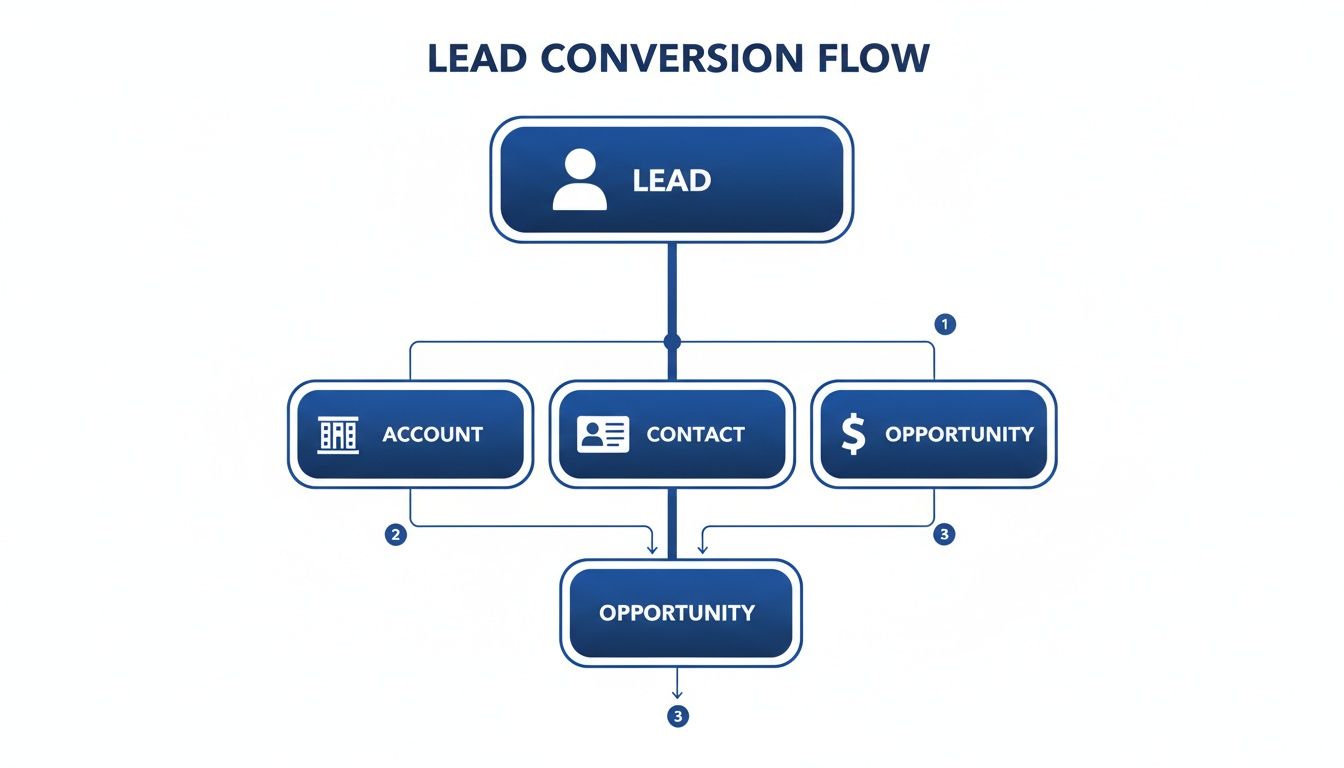
This single action creates a web of connected records. Without proper field mapping, you’re creating data black holes from day one.
Why Mapping Matters in the Real World
Imagine you’re a B2B SaaS company that just hosted a successful webinar. A high-potential lead fills out your form, and you capture a golden piece of information in a custom lead field named ‘Primary Pain Point’.
If you haven’t mapped that field, the moment your rep clicks "Convert," that insight vanishes. Your Account Executive (AE) then starts their first call completely cold, unaware that this prospect is grappling with a specific, urgent problem your solution can solve.
Proper mapping prevents this. You simply tell Salesforce to move the data from the lead’s ‘Primary Pain Point’ field to a matching custom field on the new Opportunity. With this simple step, your AE has the instant, actionable context needed to have a highly relevant first conversation.
Pro-Tip: Don't limit yourself to one-to-one mapping. Get creative with formula fields on the Lead object. For instance, you could combine a 'Webinar Topic' field and a 'Date Attended' field into a single 'Last Marketing Engagement' field. Map that to the Opportunity, and your reps get a quick history at a glance.
A Look at the Salesforce Mapping Interface
To accomplish this, navigate to the Map Lead Fields page in Salesforce Setup. You can find it by going to Object Manager and selecting the Lead object. The interface presents three tabs: Account, Contact, and Opportunity. This is your command center for aligning custom Lead fields with their new homes on the records created during conversion.
As you can see, you can pick a destination field on the Account, Contact, and Opportunity for each custom Lead field. This ensures your data flows exactly where it needs to. For those looking to build even more powerful connections, you can learn more about extending Salesforce functionality through deeper integration in your Salesforce CRM.
Don't Forget Attribution and Data Integrity
Field mapping isn't just about providing context for reps; it's absolutely critical for proving ROI. Take the Lead Source field. If that data doesn't carry over to the Opportunity, you lose the ability to attribute revenue back to your marketing campaigns.
The numbers don't lie. For example, some studies show webinar leads can convert at 11.2% with a $60–$80 cost-per-lead, which often smokes other channels. But if you can't prove that value because the source data was lost at conversion, good luck getting budget for your next webinar. Precise mapping is what connects those early marketing touches to real pipeline and revenue.
To maintain data integrity during this process, ensure your picklist values are identical between the source and destination fields. If a lead’s 'Industry' picklist has a value like "FinTech" but the Account's 'Industry' picklist doesn't have that exact option, the data gets dropped. Standardizing these values is a small but crucial step that will save you from massive reporting headaches down the line.

“Salesmotion has been a game-changer for me. I used to spend 12 hours a week on prospect research, now it's down to 4. Plus I'm finding stuff I was totally missing - podcasts, news mentions, the good bits.”
George Treschi
Account Executive, FY25 President's Club, Sigma
Preserving Your Most Valuable Data During Conversion
Lead conversion is much more than a status update; it's a critical transfer of intelligence. I've seen countless sales leaders get frustrated watching valuable context and attribution data evaporate the moment a rep clicks "Convert." This is where effective lead conversion salesforce mapping is a game-changer—it's the strategic process ensuring this intelligence survives the handoff.
When you get this right, your team preserves the lead's entire story. This isn't just about who they are, but the far more important question of why they engaged with you in the first place.
From Marketing Attribution to Sales Context
One of the most critical datasets to preserve is marketing attribution. Your marketing team invests heavily in campaigns, and you absolutely need to track what's working. This means mapping UTM parameters from lead fields directly to the new account, contact, and opportunity records.
It’s a straightforward process. By creating custom fields on your lead object for UTM_Source, UTM_Medium, and UTM_Campaign, you can capture this data from your web forms. From there, simply map them to corresponding fields on the Opportunity object. This simple action enables true closed-loop reporting, finally allowing you to tie real revenue back to the exact marketing efforts that generated the lead.
Preserving attribution isn't just about giving marketing credit. It gives your entire revenue team visibility into which channels produce your most valuable customers, directly influencing future budget and strategy decisions.
This level of detail is a cornerstone of good CRM hygiene and is non-negotiable if you want accurate reporting.
Don't Lose the "Why Now"
Beyond standard attribution, modern sales teams thrive on signal-based intelligence. This is the context that explains the timing of a prospect's interest—the "why now." Fields like ‘Trigger Event’ (e.g., "Series B Funding") or ‘Key Initiative’ (e.g., "Supply Chain Optimization") hold immense value.
Losing this information is like throwing away the key to the deal. When you map these custom lead fields to the opportunity, your account executive immediately understands the prospect's world. They can tailor their discovery questions and overall approach around the exact event or business priority that made the lead relevant in the first place, leading to a much more impactful conversation.
This simple mapping ensures the crucial intelligence gathered by marketing—or by powerful platforms like Salesmotion—isn't lost in a data silo. It becomes a permanent part of the account's story, visible to everyone from the AE to the CSM.
To see how this works in practice, here’s a quick breakdown of how a lead’s data correctly populates the new records, preserving both attribution and strategic context.
Data Preservation Post-Conversion Example
| Lead Field | Lead Data Example | Mapped Destination Object & Field | Outcome |
|---|---|---|---|
UTM_Campaign | q2_webinar_ai | Opportunity Initial_Campaign | Your team can directly attribute this opportunity to a specific webinar campaign. |
Trigger_Event__c | New CIO Hired | Opportunity Sales_Trigger__c | The AE has immediate context on a key personnel change to guide their outreach. |
Industry | Manufacturing | Account Industry | The new Account record is correctly categorized for segmentation and reporting. |
Job_Title | VP of Operations | Contact Title | The new Contact record has accurate seniority and role information. |
As you can see, proper mapping turns a simple data transfer into a strategic preservation of intelligence that empowers your entire team to be more effective.
How to Automate and Scale Your Conversion Process

Manually converting leads is a classic sales bottleneck. Having reps click a button for every single qualified lead is not a scalable growth strategy. The key to moving faster is to implement smart automation that converts leads based on clear, data-backed rules. This is where your hard work on lead conversion salesforce mapping truly pays off.
By using a tool like Salesforce Flow, you can build automations that act the moment a lead is ready. This frees your reps from administrative tasks and ensures a hot lead never goes cold while waiting for a manual handoff.
Building a Simple Conversion Flow
Let's make this practical. Suppose you want to automatically convert any lead as soon as it becomes sales-ready. You might define "sales-ready" with two simple rules: the lead's status is updated to 'Qualified,' and its 'Lead Score' surpasses 80.
You can configure a Salesforce Flow to monitor for these exact changes. When both conditions are met on a lead record, the flow triggers instantly. Behind the scenes, it executes the standard lead conversion process, creating the new Account, Contact, and Opportunity using your predefined field mappings, and assigns ownership to the correct person.
This single workflow guarantees a fast, consistent handoff from marketing to sales, every single time, without manual intervention.
Connecting Automation to Signal-Driven Sales
This is where things get really interesting. When you connect automation to a broader, signal-driven sales motion, your lead conversion salesforce mapping evolves from a simple data transfer task into a strategic workflow that actively accelerates deals.
Imagine a platform like Salesmotion detects a high-value event—for example, a target account just announced a new product line that your solution is a perfect fit for. This external signal can update a custom field in Salesforce, perhaps changing a ‘Sales Trigger’ field to “Product Line Expansion.”
This is where the magic happens. The updated field can, in turn, increase the lead's score, triggering your automated conversion flow and simultaneously creating a high-priority task for the account owner. The task description can even include the specific signal, ensuring your rep has the "why now" context for immediate, relevant follow-up.
This process is a core component of effective sales process automation, turning passive data into proactive sales plays.
Recent benchmarks highlight how critical this speed and context are. While average sales conversion rates often hover around a mere 2-3%, companies that properly use Salesforce mapping to capture, score, and track leads gain a massive competitive advantage. When you layer in AI-powered signals about executive moves or new funding, you provide your team with the "why now" context needed to surpass industry averages and achieve top-tier conversion rates. You can discover more insights about Salesforce lead conversion for additional data.

“The Business Development team gets 80 to 90 percent of what they need in 15 minutes. That is a complete shift in how our reps work.”
Andrew Giordano
VP of Global Commercial Operations, Analytic Partners
Testing and Troubleshooting Your Mapping Configuration
Never deploy a new lead mapping configuration directly into your live production environment. That's a rookie mistake. Smart RevOps teams treat this step with the seriousness it deserves, using a Salesforce Sandbox as a critical proving ground.
Think of it as a dress rehearsal for your data—a chance to find and fix issues before they can disrupt your reps' workflow or, worse, your revenue.
A robust testing plan is non-negotiable. This isn’t just about checking if the happy path works; it's about trying to break your setup intentionally. Your goal is to empower your operations team to stress-test every aspect of the new lead conversion salesforce mapping before it goes live.
This means getting creative with your test leads. Don't just use perfectly filled-out records.
- Test with messy data: Create leads with missing field information, special characters in text fields, or data that intentionally breaks your usual formats.
- Vary the record types: If you use different lead record types, make sure each one converts correctly and triggers the right post-conversion actions.
- Check automated workflows: Validate that your lead conversion correctly triggers any subsequent Salesforce Flows or automation you’ve built, like task creation or Chatter posts.
Common Conversion Roadblocks and How to Fix Them
Even with careful mapping, you'll encounter a few common roadblocks during testing. The key is to find them in the sandbox, not when a hot lead is on the line. Here are frequent issues I've seen repeatedly and how to resolve them.
Data Truncation Errors
This occurs when you map data from a larger field into a smaller one—for instance, moving a 255-character Lead_Notes__c text area into a 100-character Opportunity_Summary__c field. To prevent data loss, Salesforce will block the conversion.
- Solution: This is an easy fix. Go to the destination object's field settings and increase the character limit to match or exceed the source field. Problem solved.
Picklist Value Mismatches A classic problem. Your lead's 'Industry' picklist has a value of "SaaS," but your Account's picklist only has "Software." Since there isn’t an exact match, the data gets dropped during conversion, leaving a blank field.
- Solution: Standardize your picklist values across objects. You can either update the picklists manually to ensure they are identical or use Salesforce's global picklist feature to enforce consistency from the start.
Pro-Tip: During testing, always verify that your most critical custom fields—like
Trigger_Event__corPrimary_Pain_Point__c—are mapping correctly. The whole point of your detailed lead conversion salesforce mapping is to preserve this crucial context, so make sure it survives the trip from lead to opportunity.
Navigating Validation Rule Conflicts
Finally, watch out for validation rules that block conversion. This subtle but common issue can be frustrating. For example, a rule on the Opportunity object might require the Close_Date__c field to be filled out. Since the lead doesn't have this field, the conversion process fails, and the user receives an error.
- Solution: You need to adjust the validation rule's criteria. A common fix is to add a condition that makes the rule apply only when the Opportunity is not newly created from a lead conversion. You can do this by adding
ISNEW()to your rule logic, allowing the record to be created first and validated later when a rep works the deal.
Common Questions About Salesforce Lead Mapping
Even the best-laid plans raise questions during a real-world rollout. Let's address some of the most common issues revenue leaders face with lead conversion salesforce mapping. Getting these right is what separates a clean, useful CRM from a data graveyard.
How Does Salesforce Handle Duplicates During Conversion?
This is a classic and critical question. Salesforce has built-in duplicate management that activates the moment a lead is converted. It intelligently scans for existing accounts and contacts based on matching rules you define, such as company name, email domain, or other unique identifiers.
If Salesforce spots a potential match, it doesn't just blindly create a new record. Instead, it prompts the user to either merge the lead's information into the existing account or contact, or create a new one if they are certain it's not a duplicate. This is your first and best line of defense against a messy, untrustworthy CRM.
Who Becomes the Owner of New Records After Conversion?
By default, Salesforce keeps it simple: the user who clicks the "Convert" button becomes the owner of the new account, contact, and opportunity. This works for some, but it rarely fits a structured sales process where territories or account tiers dictate ownership.
Fortunately, this is completely customizable. You can use Salesforce Flow to build automation that assigns ownership based on your specific rules. For example, you could create a rule that assigns the new account to a specific AE team based on industry or employee count, ensuring a seamless handoff without any manual steps.
Will My Old Lead Reports Still Be Accurate After Conversion?
This is a major point of confusion for many teams. Once a lead is converted, it technically vanishes from the Lead object and will no longer appear in your standard lead reports. This is by design.
This is precisely why your lead conversion salesforce mapping is so important. By mapping attribution fields like 'Lead Source' from the lead to the new opportunity, you preserve that crucial data. To get a complete picture of your funnel, you'll need to build reports that join data from the Opportunity and Contact objects, allowing you to track performance all the way from initial lead generation to closed-won revenue.
This shift in reporting is essential for understanding true funnel metrics. Recent SaaS industry benchmarks, for instance, show an average lead conversion rate of just 5.1%. As you can discover more about these lead generation benchmarks, you'll see that maximizing each conversion requires flawless data tracking from start to finish.
Ready to stop wasting time on manual research and inconsistent messaging? Salesmotion deploys AI agents that autonomously track your target accounts, surface critical "why now" signals, and turn them into actionable sales plays. See how you can build more pipeline with less effort.