Last quarter, a global telecom provider told us their CRM isn't just a system of record anymore. It's an orchestration layer. Every vendor in their evaluation had to answer the same question before anything else: "Does it live inside Salesforce?" Not alongside it. Not linked to it. Inside it. They're even exploring how to pipe intelligence data into internal Microsoft Copilot agents via API, building custom workflows that start and end in their CRM. The standalone sales intelligence tool, the one that lives in its own browser tab with its own login, is dying. And most vendors haven't figured that out yet.
TL;DR: CRM integration is now the number one buying criterion for account intelligence tools. Buyers aren't evaluating features in isolation. They're asking whether intelligence lives natively inside Salesforce or HubSpot, writes structured data back to CRM fields, and exposes an API for custom agent development. The three integration patterns that matter: embedded views, field-level data mapping, and headless API access. If your intelligence tool requires another tab, your team won't use it.
The CRM Became the Operating System
Something shifted in how enterprise buyers evaluate sales intelligence. Five years ago, the conversation started with data coverage: how many contacts, how many signals, how fresh is the intent data? Today, the first question is almost always about integration. Not "do you integrate with Salesforce?" but "how deeply do you integrate with Salesforce?"
This isn't surprising when you look at where the market is heading. Salesforce is embedding AI directly into its platform through Agentforce, available even at SMB-tier Suite pricing. HubSpot ships its own AI assistants inside the CRM. The CRM vendors themselves are betting that intelligence should be native, not bolted on. And buyers are following that logic.
The data backs this up. The average sales team uses 10 or more tools, but reps actually touch about three of them on a given day. The rest collect dust. 67% of purchased software features go unused, and the average rep spends just 28% of their time actually selling while burning 17% on manual CRM data entry. Tools that live outside the CRM are competing for attention in an environment where attention is already maxed out.
The conclusion buyers are drawing: don't add more tabs. Make the CRM smarter.
What Buyers Actually Require Now
When we talk to sales leaders evaluating account intelligence, their requirements have converged around a consistent pattern. Here's what we're hearing across different segments.
Enterprise: The CRM Is the Platform
A top-5 CRO recently surveyed their internal users about what would drive adoption of account intelligence tools. The feedback was unambiguous: "Salesforce would be key." Their reps live in Salesforce eight hours a day. Anything that pulls them out of that environment, even briefly, faces an uphill adoption battle.
This mirrors what Analytic Partners experienced during onboarding. Their team confirmed Salesforce integration was visible and began training with 1,000 accounts loaded directly into the platform. The integration wasn't a nice-to-have. It was the prerequisite for the entire rollout.
The enterprise pattern is clear: the CRM is the platform, and intelligence tools need to operate as components within it. Not as destinations reps navigate to separately.
SMB and Startups: Everything Must Flow Into the CRM
At the other end of the market, a medical device startup had a simpler but equally firm requirement: all intelligence data must flow into HubSpot. No exceptions. Their sales team is small, their tech budget is lean, and they cannot afford to maintain another system. If the data doesn't appear in their CRM, it doesn't exist.
A customer experience AI company took this a step further. They didn't just require HubSpot integration as a checkbox. They confirmed the integration was active and immediately started using it to track signals on target accounts directly inside their existing workflow. For smaller teams, the bar is even higher than for enterprise, because there's no ops team to build workarounds.
The Broken CRM Problem
Here's a scenario that doesn't get discussed enough. A life sciences executive recruiter described a pattern they see constantly: $60 million or more in revenue, profitable companies with completely disorganized CRM data. Contacts are outdated. Account hierarchies are wrong. Activity logging is inconsistent. These companies haven't figured out their CRM yet, and they may not for years.
For these organizations, account intelligence needs to serve a dual role. It has to function as a quasi-CRM, a reliable source of account context, while also being ready to push structured data into the CRM once the organization matures. This is a segment that most intelligence vendors ignore entirely, because their architecture assumes a clean, well-maintained CRM as the starting point. But the reality is that many mid-market companies are operating with CRMs that are closer to digital filing cabinets than operating systems.

“We have very limited bandwidth, but Salesmotion was up and running in days. The template made it easy to load our accounts and embedding it in Salesforce was simple. It was one of the easiest rollouts we've done.”
Andrew Giordano
VP of Global Commercial Operations, Analytic Partners
Three Integration Patterns That Actually Matter
Not all CRM integrations are created equal. After evaluating dozens of buyer conversations, the integration requirements break down into three distinct patterns. Each solves a different problem, and the best platforms deliver all three.
Pattern 1: Embedded View Inside the CRM
This is the table stakes requirement. A Lightning component inside Salesforce or an embedded card inside HubSpot that surfaces account intelligence without the rep ever leaving the CRM. The rep clicks on an account, and right there in the record, they see signals, research summaries, and recommended actions.
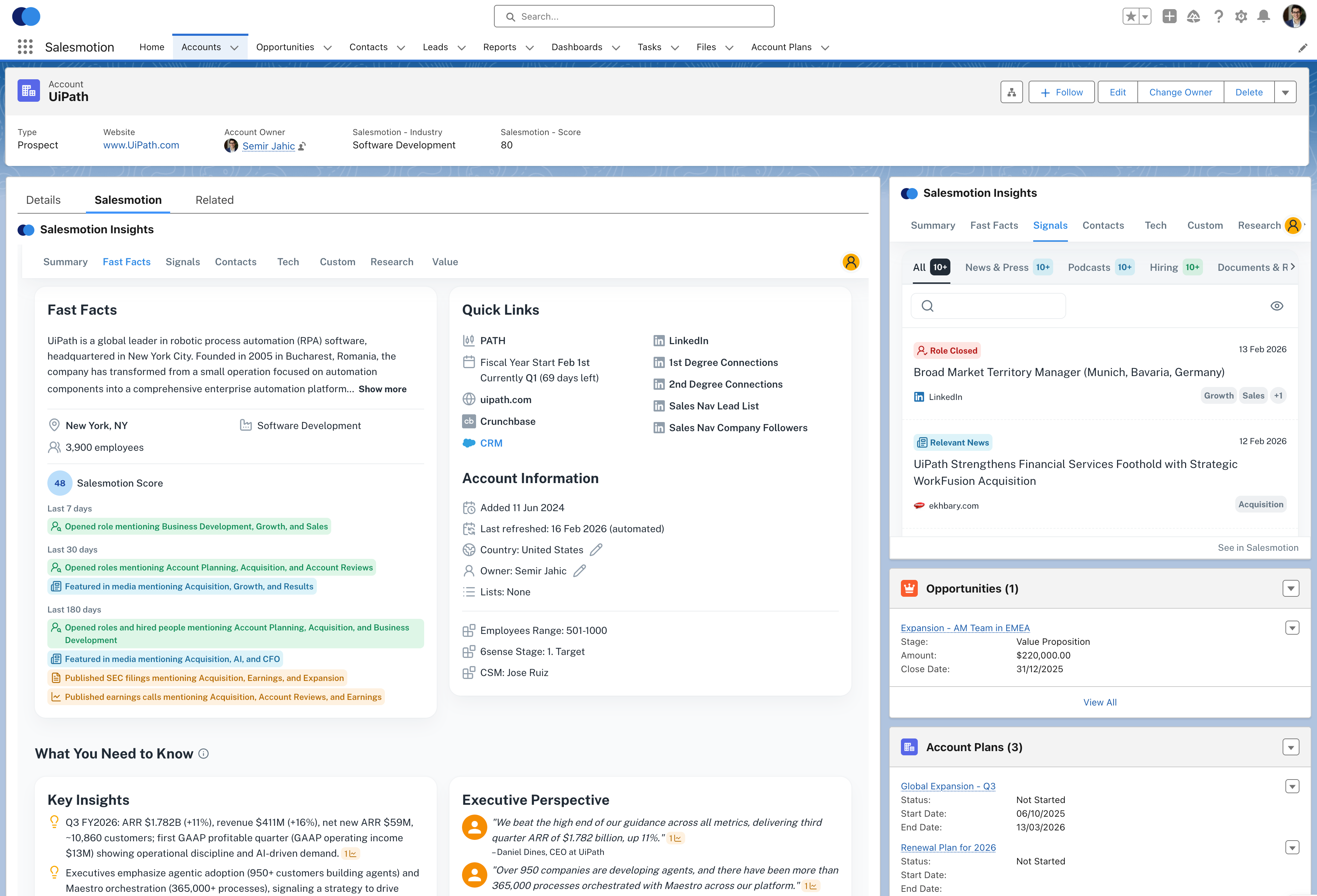 Account intelligence embedded directly inside a Salesforce account record. Reps see signals, research, and recommended actions without switching tabs.
The embedded view solves the adoption problem head-on. If reps never have to leave their CRM, the intelligence tool doesn't feel like a separate tool at all. It feels like a CRM feature. That distinction matters enormously. Teams that use embedded intelligence tools report significantly higher adoption rates than those relying on standalone platforms. Tools with strong integration achieve a 94% deployment success rate, compared to just 72% for tools with weak integration, according to industry research.
Pattern 2: Field-Level Data Mapping
Embedded views are valuable, but they only help the individual rep looking at a specific account. Field-level mapping writes structured intelligence data directly into CRM fields: account scores, signal categories, last signal date, research completion status, key decision-maker changes. This data becomes queryable, reportable, and actionable at scale.
Field mapping transforms account intelligence from a one-rep-at-a-time experience into an organizational capability. Sales managers can build Salesforce reports showing which accounts have active buying signals. RevOps can create workflows that route signal-rich accounts to the right rep automatically. Marketing can score accounts for ABM campaigns based on intelligence data sitting right in the CRM.
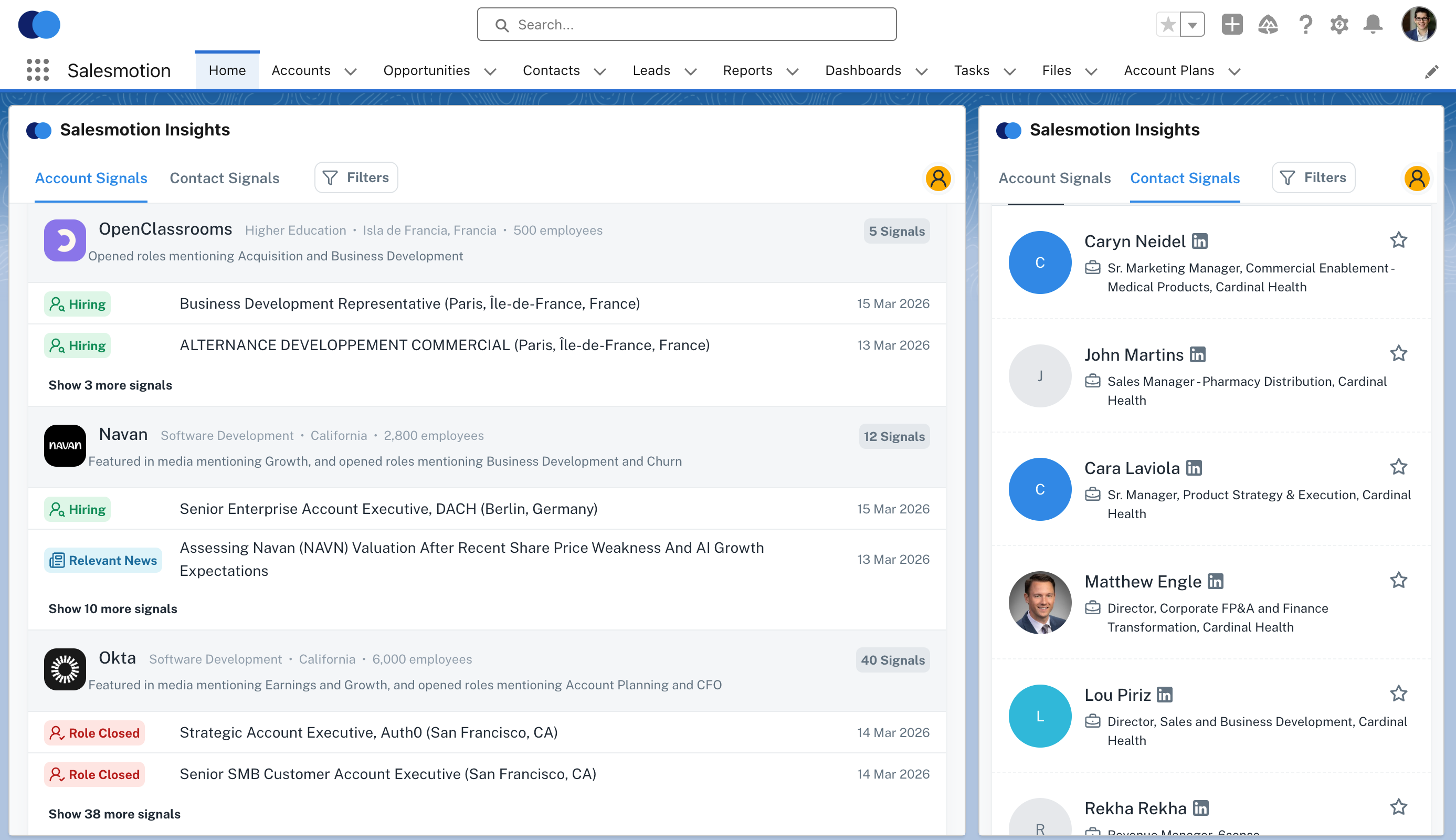 Signals and contact intelligence written directly to Salesforce fields. This data becomes reportable, automatable, and visible to the entire revenue team.
The difference between "we have account intelligence" and "our account intelligence drives workflows" comes down to field-level mapping. Without it, intelligence stays locked in a viewer that only helps the person looking at it right now.
Pattern 3: API Access for Custom Agent Development
This is the emerging pattern, and it's where the most sophisticated buyers are heading. A global telecom provider isn't just asking for Salesforce integration. They're evaluating whether they can feed intelligence data into their internal Microsoft Copilot agents via API, building custom workflows that combine account intelligence with proprietary data sources.
API access turns an intelligence platform from a tool into an infrastructure layer. Sales engineering teams can build custom alerting pipelines. RevOps can feed intelligence data into scoring models that blend first-party engagement data with third-party signals. Product teams can embed intelligence into customer success workflows.
The buyers asking for API access today are the same buyers who, five years ago, were asking for Salesforce integration. The pattern is the same: intelligence needs to live where the work happens. The difference is that "where the work happens" is expanding beyond the CRM into custom-built agent ecosystems and internal automation platforms.
Why Standalone Tools Are Losing
The standalone intelligence tool model, the one where you give reps a separate login, a separate interface, and a separate workflow, is fundamentally at odds with how modern sales teams operate.
Consider the math. Reps spend 28% of their time selling. The rest is consumed by administrative work, internal meetings, CRM data entry, and context-switching between applications. Every tool that requires a separate tab competes directly with selling time. And in that competition, the CRM always wins, because the CRM is where managers check activity, where pipeline reviews happen, and where forecasting lives. The CRM is mandatory. Everything else is optional.
This is why 67% of purchased features go unused. It's not that the features are bad. It's that accessing them requires leaving the workflow that matters. Sales teams abandon intelligence tools not because the data is wrong, but because the delivery mechanism creates friction.
The most honest framing: if your intelligence tool requires its own browser tab, you're asking reps to volunteer their scarce selling time to use it. Most won't. And you can't solve that with training, gamification, or manager mandates. You solve it by eliminating the tab entirely.
A senior sales leader at an IT services firm told us an org-chart tool was pushed for a year and almost nobody logged in, because it was passive: it showed a chart and told nobody what to do.
See Salesmotion on a real account
Book a 15-minute demo and see how your team saves hours on account research.
The Future: Headless Intelligence
The next evolution isn't a better dashboard. It's no dashboard at all.
Headless intelligence means the platform operates as an infrastructure layer. It monitors signals, synthesizes research, and scores accounts continuously, but the outputs surface wherever the user already works. Inside the CRM as embedded components and field data. In Slack or Teams as real-time alerts. Through email as morning briefings. Via API as inputs to custom agents and automated workflows.
Salesmotion is building in this direction. The Salesforce embedded experience puts intelligence directly inside account records. Field mapping writes structured data back to CRM fields for reporting and automation. And the API layer enables custom integrations for teams building their own agent workflows.
The implication for buyers evaluating tools today: ask about the integration architecture, not just the feature list. The platform with the best standalone dashboard will lose to the platform that disappears into your existing workflow. Every time.
Look at how the B2B sales tools stack has evolved. The winners aren't the tools with the most features. They're the tools that integrate most deeply into the systems teams already use. The same pattern that killed the standalone CRM (remember ACT! and GoldMine?) is now killing the standalone intelligence tool.
What to Evaluate Before You Buy
If you're evaluating account intelligence platforms right now, run every vendor through these integration-specific questions:
-
Embedded or linked? Does the tool render inside your CRM as a native component, or does it open in a separate window? Native components get used. Separate windows get ignored.
-
What data writes back? Can you query intelligence data in your CRM's native reporting? If signals and scores only live in the vendor's interface, you can't operationalize them at scale.
-
API access? Is there a documented API that lets your team build custom integrations? Even if you don't need it today, API access is a strong signal that the vendor sees itself as infrastructure, not just a tool.
-
Bidirectional sync? Does the platform read your CRM data (account lists, ownership, opportunity stages) to contextualize its intelligence? One-way data pushes are useful but limited.
-
Time to integrate? How long does the CRM integration take to deploy? If the answer involves "professional services engagement" or "6 to 8 week implementation," that's a red flag. The best integrations deploy in hours, not months.
For teams still running expensive standalone platforms, the alternatives to overpriced tools increasingly offer deeper CRM integration at a fraction of the cost. The premium you used to pay for data volume is shifting toward integration depth and workflow automation.
Key Takeaways
- CRM integration is now the #1 buying criterion for account intelligence tools. Every buyer asks "does it live inside my CRM?" before evaluating features.
- Three integration patterns matter: embedded views (Lightning components, HubSpot cards), field-level data mapping for reporting and automation, and API access for custom agent development.
- Standalone tools are losing the adoption war. Reps use about 3 of their 10+ available tools daily. Tools that require a separate tab compete against selling time and lose.
- The broken CRM is real. Many mid-market companies have disorganized CRM data. Intelligence platforms need to deliver value even when the CRM isn't clean, not assume a perfect starting point.
- Headless intelligence is the future. The winning platforms won't have the best dashboards. They'll disappear into existing workflows, surfacing intelligence where reps already work.
- Evaluate integration architecture, not feature lists. Ask about embedded components, bidirectional sync, field mapping, and API access before anything else.
Frequently Asked Questions
What does "account intelligence CRM integration" actually mean?
Account intelligence CRM integration refers to the ability of a sales intelligence platform to operate natively inside your CRM (Salesforce, HubSpot, or similar) rather than as a standalone application. This includes embedded views that surface insights within account records, field-level data mapping that writes intelligence data to CRM fields for reporting and automation, and API access that enables custom integrations. The goal is to eliminate the separate tab and make intelligence a seamless part of the rep's existing workflow. Platforms with deep CRM integration see significantly higher adoption because reps never have to leave their primary work environment to access insights.
How do I evaluate whether a tool's Salesforce integration is "deep enough"?
Start with four questions. First, does the tool render inside Salesforce as a managed package or Lightning component, or does it just provide a link that opens a new browser tab? Native rendering wins. Second, does it write structured data back to Salesforce fields that you can report on and automate against? Third, is the sync bidirectional, meaning the tool reads your CRM data (account lists, opportunities, ownership) to contextualize its output? Fourth, how long does deployment take? Deep integrations that require multi-week professional services engagements often signal architectural limitations. The strongest integrations install in under an hour and start delivering value the same day. Also ask about Salesforce-specific intelligence capabilities like signal alerts inside the activity feed and research briefs attached to account records.
Can account intelligence tools work if our CRM data is messy?
Yes, but this is a critical evaluation point most buyers overlook. Many intelligence platforms assume a clean, well-maintained CRM as their starting point, with accurate account hierarchies, current contacts, and consistent activity logging. In reality, many companies, including profitable organizations well above $60 million in revenue, have disorganized CRM data. The best intelligence platforms can function as a reliable source of account context regardless of your CRM's current state, enriching and correcting data rather than depending on it. Look for tools that bring their own data layer (signals, contacts, company information) and can write clean, structured data back to your CRM over time, gradually improving your data quality rather than breaking when it encounters gaps.
Is API access important if we just want basic CRM integration?
Even if your immediate need is an embedded Salesforce view and basic field mapping, API access is a strong signal of platform maturity and future flexibility. Teams are increasingly building custom workflows that combine account intelligence with internal data sources, feeding signals into Slack bots, scoring models, or AI agents like Microsoft Copilot. API access also makes it possible to integrate intelligence into tools beyond the CRM, like customer success platforms, marketing automation, or internal dashboards. More practically, vendors that invest in documented APIs tend to have better-architected platforms overall. It's a good proxy for engineering quality. If you're evaluating tools at different price points, prioritize the ones that expose an API even at lower tiers.