A leadership training company was paying $8,000 a year for software to track job changes. The promise was simple: when a former buyer moves to a new company, alert the sales team so they can reach out while the relationship is still warm. In practice, the execution was "very manual and inconsistent." Leads were created sporadically. Reps did not know which contacts had moved. The breaking point came when a rep was working an account and the buyer turned out to be a former customer from a different account, but the rep had no idea. The warm lead sat there for months, untouched.
That gap between what job change tracking promises and what most teams actually capture is the subject of this guide: why job changes convert, how to track job changes manually for free, what the dedicated tools cost, and the workflow that turns an alert into a meeting.
TL;DR: Roughly 20% of the contacts in your CRM change jobs every year, and a past champion landing in a new role is one of the warmest paths to pipeline that exists. You can track job changes for free with LinkedIn alerts and quarterly CRM audits, but the manual approach breaks past a few hundred contacts. Dedicated tools work but are priced for enterprise: UserGems starts at $40,000/year and Champify at $2,000/month. Broader signal platforms like Salesmotion include job change tracking as one of 50+ signal types from $85/month. Whichever route you pick, the playbook is the same: detect fast, research the new company, and reach out within 30 days.
Why Job Change Leads Convert Better Than Cold Outreach
When a buyer who already trusts your product takes a new role, three things work in your favor at once: they know your value proposition, they have a mandate to make changes, and the trust is pre-built. The vendor-published data on this is striking, and worth reading with the usual skepticism applied to vendor research, but the direction is consistent across sources.
Champify's value report puts the average win rate on opportunities with former advocates at 39%, versus under 19% for the SaaS average. The same report found former advocates convert 6.3x more efficiently from first touch to closed-won.
UserGems reports a similar pattern from its customer base: previous customers are 3x more likely to buy again.
The timing dynamic explains why. New executives arrive with a mandate for change and review tools, vendors, and processes in their first months. Harvard Business Review's work on leadership transitions describes the first 100 days as the window when new leaders set direction and make their early moves. A champion in that window is not just warm, they are actively shopping.
A fintech payments company evaluating sales intelligence platforms put it bluntly: champion tracking was "really the only capability I'd really want." Not a nice-to-have buried in a roadmap, but the primary reason to evaluate new software.
For the channel-level economics, response rates, conversion math, and how job change signals compare to cold outbound at portfolio scale, see our companion piece on the pipeline math of job change signals.
See Salesmotion on a real account
Book a 15-minute demo and see how your team saves hours on account research.
What Is Champion Tracking?
Champion tracking is the practice of monitoring your past buyers, evaluators, and power users as they change jobs, then reaching out when they land at a new company. It differs from generic job change alerts in one important way: it focuses on contacts with a proven relationship to your product, where the outreach is a reconnection, not a cold touch.
Three groups belong on a champion list:
- Closed-won contacts. Anyone involved in deals you won. Your strongest champions.
- Active evaluators who did not close. Contacts who ran a full evaluation, saw the demo, and liked the product but lost budget or timing. Almost as warm as closed-won.
- Power users and advocates. Heavy product users, event attendees, and referrers. They may not have been the buyer, but they can influence the next one.
The scale of the opportunity is bigger than most teams assume. Champify's own headline stat makes the point: "Past customers convert 6-22x higher than all other outbound signals, yet teams miss 89%." The leads exist. Most teams simply never see them.

“Salesmotion helps you spot signals from prospect accounts, news items / job hiring alerts etc that indicate that now is a good time to reach out with a well-crafted message.”
Rob Douglas
Director of Sales, icit business intelligence
How to Track Job Changes for Free (The Manual Playbook)
You do not need software to start tracking job changes. These methods cost nothing but time, and they are the right starting point if your champion list is under a few hundred contacts.
LinkedIn Sales Navigator alerts. Save your champion contacts as leads in Sales Navigator and it will flag job changes in your alerts feed. This is the most reliable manual method. The limits: it requires saving every contact individually, alerts live in LinkedIn rather than your CRM, and you get a name and a company with no context about the new employer.
Free LinkedIn monitoring. Connect with key champions and watch for the "congratulate X on the new role" notifications. Free, but dependent on LinkedIn's algorithm choosing to show you the update, which it often does weeks late or not at all.
Google Alerts. Set alerts for your top 20-50 champions by name, plus terms like "appoints" or "joins" combined with target account names. Works well for executive-level moves that generate press, useless for everyone below VP.
Email bounce monitoring. When emails to a known contact start hard-bouncing, they have probably left. This is a lagging indicator, but it catches the people who never update LinkedIn.
The quarterly CRM audit. Export your top 200-300 contacts, check each profile on LinkedIn, flag the movers. Expect 2-4 hours per quarter. This is the floor of a real process: scheduled, owned by someone, and logged in the CRM.
Where Manual Tracking Breaks
The math is the problem. If 20% of contacts change jobs in a year, a 2,000-contact database produces roughly 400 moves, more than one per day. A quarterly audit catches them an average of six weeks late, well into or past the window when the new leader is forming vendor opinions. Manual tracking also tells you nothing about the new company: whether it fits your ICP, what initiatives are underway, or who else is on the buying committee. Detection is half the job. Context is the other half.
Job Change Tracking Tools: UserGems vs Champify vs Salesmotion
Two companies built businesses on this single signal, and both now publish pricing, which is rare in the category. Here is the honest landscape, including where a broader signal platform fits.
| UserGems | Champify | Salesmotion | |
|---|---|---|---|
| Starting price | $40,000/yr (Core) | $2,000/mo (Core) | $85/mo individual, self-serve monthly |
| Implementation fee | $3,000-$10,000 one-time | None advertised | None, plug and play |
| Contract | Priced per year | Priced per month | Monthly, no annual commitment |
| CRM support | Salesforce, HubSpot | Salesforce-native; no native HubSpot integration | Works standalone; Salesforce and HubSpot sync on enterprise |
| Signal coverage | Job changes + 30+ signal types | Job changes, new executive hires, closed-lost deals | Job changes among 50+ signal types, plus deep account research |
| Best for | Enterprise teams with large CRM databases and RevOps support | Salesforce-native teams that want focused champion tracking | Teams that want job changes in context with research and other signals |
UserGems is the premium option. Published tiers run Core at $40,000/year, Advanced at $75,000/year, and Elite at $150,000/year, each with a one-time implementation fee of $3,000 to $10,000. The tiers are sized by credits rather than seats, and every tier includes unlimited admin and end users, so adding reps is not what moves the price. Buyer-reported data from Vendr shows negotiated contracts from $13,300 to $69,530 per year (Vendr, 173 purchases). The product has expanded well beyond job changes into AI outbound (Gem-E) and ABM orchestration. It is strong, and it is priced and packaged for teams with a real RevOps function. Our UserGems pricing guide breaks down every tier, and our UserGems alternatives page covers the field if the price is the sticking point.
Champify is the focused option: Salesforce-native, with published pricing from $2,000/month (Core, 15,000 tracked contacts) to $6,000/month (Enterprise) and a $500K ROI guarantee. The trade-offs are no native HubSpot integration and a deliberately narrow signal set (job changes, new executive hires, closed-lost). We compared the two head-to-head in Champify vs UserGems, and the Champify alternatives page covers cheaper and broader options.
The common failure mode for both is not the software, it is the operational reality around a standalone tool. The team loads contacts and gets early wins. Then list maintenance drops off, nobody owns the process, alerts arrive without context, and at renewal leadership looks at a five-figure line item with inconsistent results. The leadership training company from the intro lived exactly this pattern.
Salesmotion approaches the problem from the other direction. Job changes and executive moves are one of 50+ signal types the platform monitors continuously, surfaced in a People Updates section inside every account brief alongside earnings commentary, hiring patterns, funding, and news. The move arrives with the context already attached: what the new company is working on, who the other stakeholders are, and what the outreach angle should be. Pricing is $85/month for the individual plan, self-serve monthly with no annual commitment, and custom team pricing with unlimited users on team plans (see pricing).
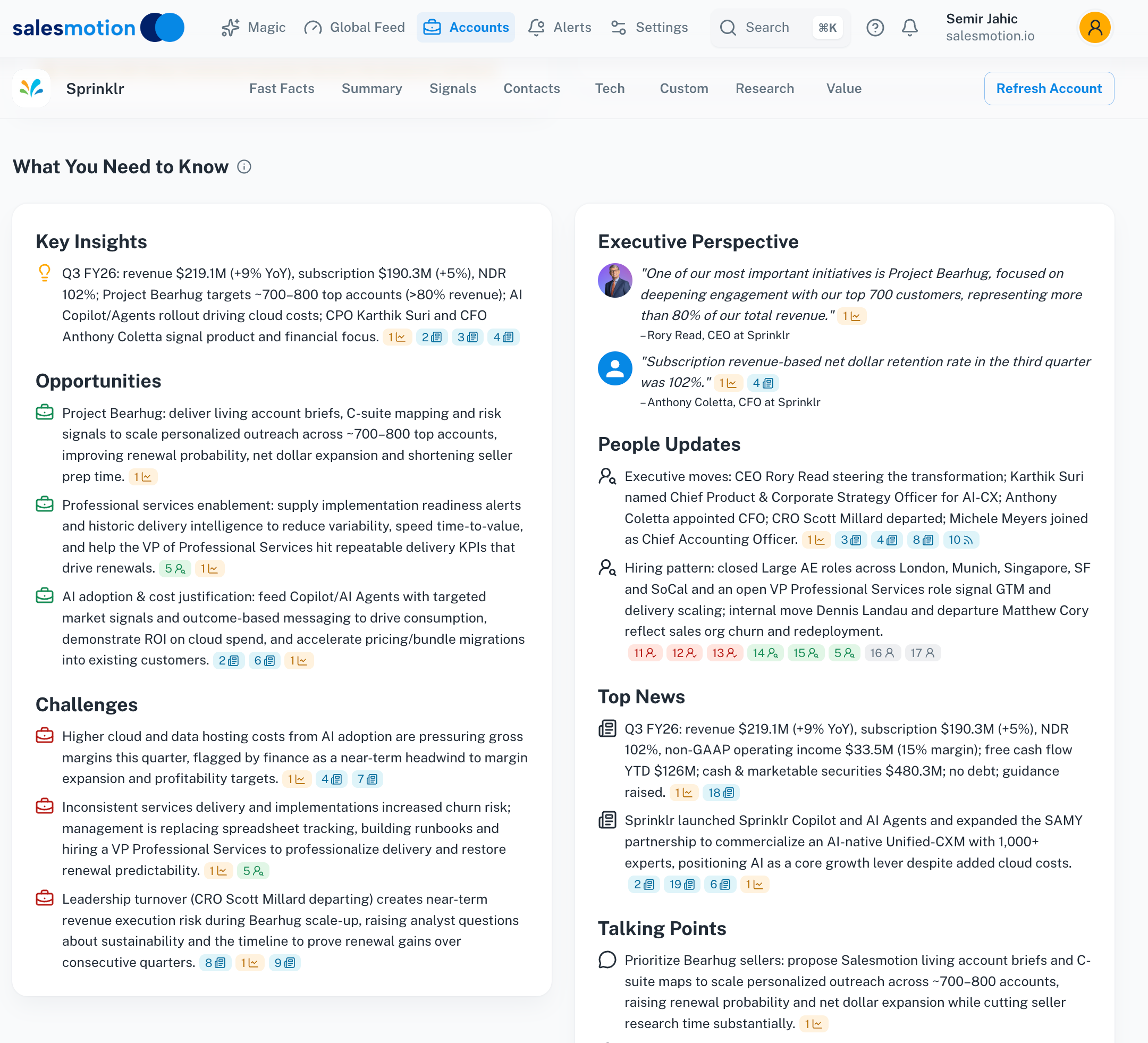 People Updates inside a Salesmotion account brief: executive moves, new appointments, and departures appear next to the account's initiatives and challenges, so the job change arrives with its context.

“The account and contact signals are key for reaching out at important times, and the value-add messaging it creates unique to every contact helps save time and efficiency.”
Daniel Pitman
Mid-Market Account Executive, Black Swan Data
From Alert to Meeting: The Champion Tracking Workflow
Whatever detects the move, the work that converts it follows the same four steps. Here is what it looks like end to end.
1. The trigger fires. A former champion, say the Director of Sales Ops who drove your deal at Company A, starts as VP of Revenue Operations at Company B. The alert lands within days of the move, not at the next quarterly audit.
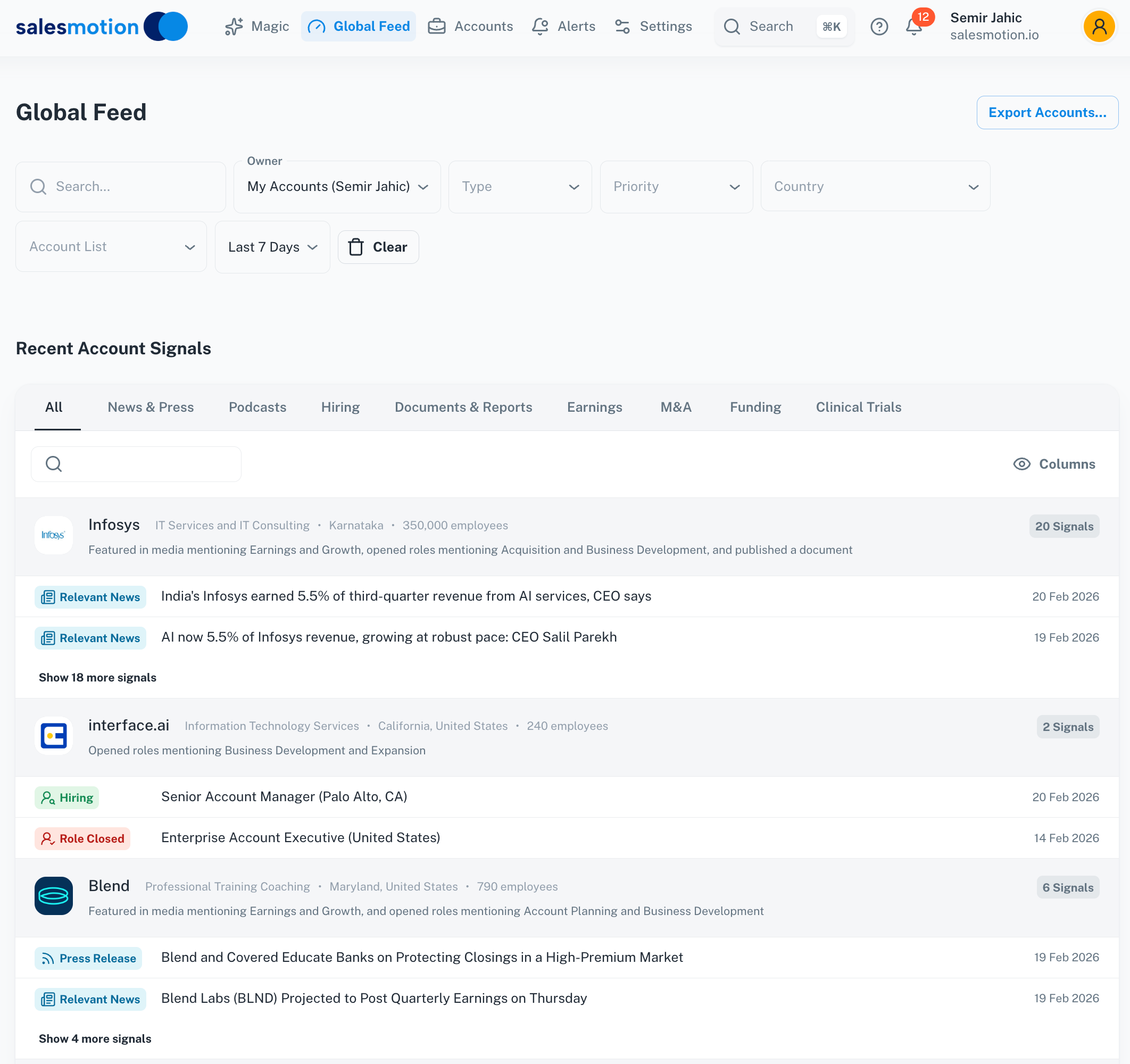 A signal feed surfaces role changes and hiring alerts across all tracked accounts in one place, so champion moves are caught in days rather than discovered at the next CRM audit.
2. Research the new company before writing a word. Is Company B in your ICP? What did the last earnings call emphasize? Are they hiring in the function you sell into? This step is what separates a relevant reconnection from a generic "congrats, want to buy again?" email. A rep doing this manually burns 30-60 minutes per move; an account brief that already aggregates the signals cuts it to minutes.
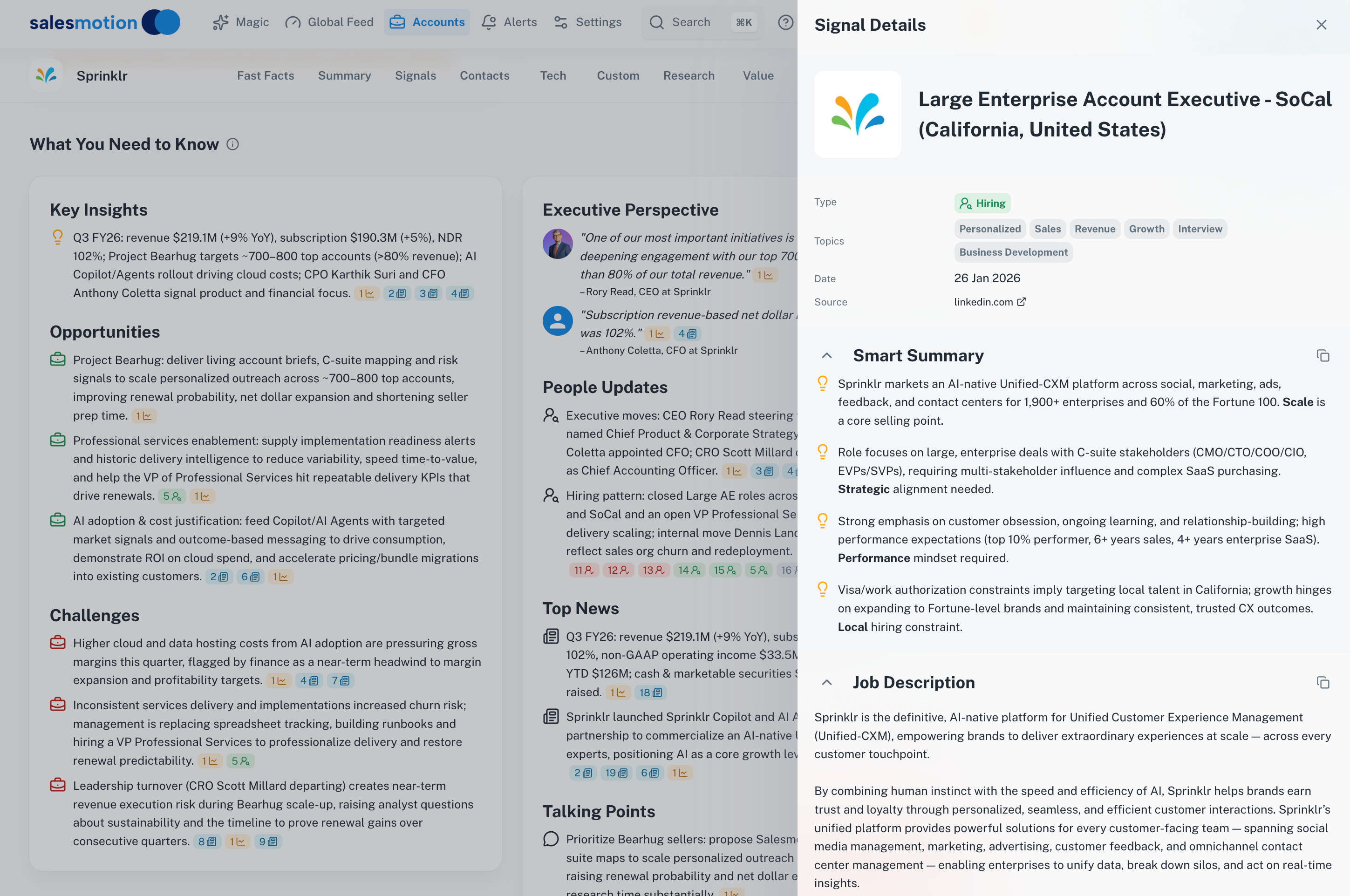 Drilling into a hiring signal shows the full job posting and what it reveals about the account's priorities, which is exactly the context a rep needs before reconnecting with a champion who just landed there.
3. Run the 30-day cadence. The first 30 days after the move are the highest-conversion window.
- Day 1-3: Personal congratulations. No pitch. Just reconnect.
- Day 7-14: Share something useful: a relevant case study, an industry insight, or an introduction.
- Day 14-30: Tie value to the new role. "I noticed Company B is expanding into X. When you were at Company A, we helped with exactly that. Want to grab 15 minutes?"
4. Measure the program. Four numbers tell you if it works: detection speed (days from move to alert), response time (alert to first touch), conversion rate (outreach to meeting), and pipeline sourced from champion moves. Teams running this as a process, alongside the broader signal-based selling motion and the other buying triggers worth monitoring, typically treat it as a standing pipeline channel rather than an occasional play. Cacheflow, for example, used signal-driven prep to cut meeting prep 60% while tripling average deal size, because every conversation started from live account context rather than a blank page.
Key Takeaways
- Job change tracking is one of the highest-converting plays in B2B sales: Champify's value report shows a 39% average win rate on opportunities with former advocates versus under 19% for the SaaS average, and UserGems reports previous customers are 3x more likely to buy again.
- Roughly 20% of CRM contacts change jobs each year, and CRMs are missing 78% of former champions with qualified moves. The pipeline exists whether or not you see it.
- Manual tracking (Sales Navigator alerts, Google Alerts, quarterly CRM audits) is free and works under a few hundred contacts, then breaks on volume and lack of context.
- Dedicated tools are enterprise-priced: UserGems from $40,000/year plus implementation fees, Champify from $2,000/month. Broader platforms like Salesmotion include job changes among 50+ signals from $85/month with no annual commitment.
- The workflow beats the tool: detect within days, research the new company before reaching out, and run a no-pitch-first cadence inside the 30-day window.
Frequently Asked Questions
How do I track when a contact changes jobs?
The free methods are LinkedIn Sales Navigator lead alerts, Google Alerts on key names, email bounce monitoring, and a quarterly LinkedIn audit of your top 200-300 CRM contacts. Past a few hundred contacts, automated tracking is necessary: dedicated tools like UserGems and Champify monitor your CRM contacts continuously, and signal platforms like Salesmotion surface job changes alongside the new company's hiring, earnings, and news context.
What is champion tracking?
Champion tracking is monitoring your past buyers, evaluators, and power users as they move to new companies, then reconnecting while the relationship is warm. It differs from generic job change alerts because it targets contacts with proven product experience, which makes the outreach a reconnection rather than a cold touch. The strongest lists cover closed-won contacts, past evaluators, and product advocates.
Do job change leads really convert better?
The published data says yes, with the caveat that most of it comes from vendors in the category. Champify's value report puts the average win rate on opportunities with former advocates at 39%, versus under 19% for the SaaS average, with 6.3x more efficient conversion from first touch to closed-won. UserGems reports previous customers are 3x more likely to buy again. The mechanism is intuitive: no education phase, pre-built trust, and a new leader with a mandate to make changes.
How much do job change tracking tools cost?
UserGems publishes three tiers priced per year: Core at $40,000/year, Advanced at $75,000/year and Elite at $150,000/year. Every tier includes unlimited admin and end users. One-time implementation fees run $3k/$5k/$10k by tier. Champify publishes Core at $2,000/month, Pro at $3,000/month, and Enterprise at $6,000/month. Salesmotion includes job change tracking among 50+ signal types at $85/month for the individual plan, self-serve monthly with no annual commitment, with custom team pricing and unlimited users on team plans.
When should I reach out after a champion changes jobs?
Within the first 30 days. Start with a genuine congratulations in the first few days with no pitch attached, follow up in week two with something useful, and move to a value conversation tied to their new role by weeks three and four. After about 90 days the window narrows sharply as the new leader settles into existing vendors and processes.