
Your reps are active all day, but leadership still asks the same question in pipeline review: “What happened on this account?” The CRM shows partial notes, a few stale stages, and maybe a task or two. Salesloft has the complete activity history, but it sits in a separate workflow unless the integration is configured properly. That gap creates friction everywhere. Reps log things late or not at all. Managers coach on incomplete information. Forecasts drift because the system of record never captured the system of execution.
That’s why salesloft and salesforce works best when you treat it as an operating model, not just an app connection. Salesforce should hold the account, opportunity, and reporting backbone. Salesloft should drive outreach execution, sequencing, and rep workflow. When they’re synced well, leaders get a clean view of effort against outcomes, and reps stop wasting time on double entry.
The demand for that model is real. Salesloft passed $100 million in annual recurring revenue in August 2021, just eight months after reaching a $1 billion valuation, which reflected strong demand for sales engagement software that integrates tightly with core CRMs like Salesforce, according to Business Insider’s reporting on Salesloft’s ARR milestone.
Why Connecting Salesloft and Salesforce Changes Everything
Disconnected systems create bad habits fast. Reps start treating Salesforce like a compliance task instead of a selling tool. Managers pull reports they don’t trust. RevOps spends more time reconciling activity than improving process.
For many organizations, the problem isn’t effort. It’s fragmentation. Calls happen in one system. Emails happen in another. Cadences run somewhere else. Opportunity management lives in Salesforce, but the complete story of buyer engagement sits outside the CRM unless the sync is deliberate.
What the before state looks like
Before a solid integration, most revenue teams deal with a familiar mess:
- Manual logging drags down rep time. Reps finish a call, send a follow-up, then have to decide whether to log it now, later, or never.
- Forecast calls become opinion-heavy. Managers can see stage movement, but they can’t always see the quality and consistency of outreach behind it.
- Coaching is built on anecdotes. A rep says an account is engaged. Another says a sequence is working. The CRM doesn’t hold enough evidence to confirm either.
- Handoffs get messy. SDR-to-AE and AE-to-CS transitions suffer when activity history isn’t visible in the right place.
Salesloft and Salesforce change the day-to-day reality. The integration creates a practical bridge between execution and recordkeeping. Salesforce stays the source of truth for customer and pipeline data. Salesloft captures the rep motions that move deals forward.
What the after state actually improves
When the sync is right, the CRM stops being a graveyard. It becomes a usable operational system. Salesloft activity can update Salesforce automatically, which removes the worst kind of admin work and gives leaders a better way to inspect pipeline quality.
According to Clay’s overview of Salesloft vs Salesforce, Salesforce has over 150,000 customers worldwide, and the combination of Salesforce plus deep integrations like Salesloft creates a “high-speed data highway” that automates activity tracking and helps the CRM reflect total sales effort.
Practical rule: If reps have to choose between selling and logging, logging will lose. Good integration removes the choice.
That matters for more than efficiency. It matters for data fidelity. If emails, calls, cadence steps, and contact updates flow into Salesforce consistently, leaders can inspect early-stage behavior against opportunity outcomes. That’s how coaching gets sharper. That’s how stalled deals become visible sooner. That’s how forecast conversations become less speculative.
Why this is foundational now
A modern revenue team can’t scale on partial data. High-velocity sales environments depend on fast outreach, clean account ownership, and visibility across handoffs. Salesloft and salesforce gives you the infrastructure for that if you configure it with discipline.
The upside isn’t abstract. Reps work faster. Managers see more. RevOps spends less time cleaning up after the process. And the entire revenue engine gets more predictable because effort and outcome finally live in the same system.
Your Pre-Integration Strategic Checklist
The technical setup is rarely the hard part. The hard part is deciding how your team wants the system to behave before anyone clicks “connect.” If you skip that work, you’ll get sync noise, field conflicts, and reporting that looks polished but tells the wrong story.
Start with ownership, not settings
Salesforce is broad. That’s part of its value. It supports lead and opportunity management, reporting, customization, and a large integration ecosystem. In practical terms, that means your Salesloft setup can either fit cleanly into Salesforce or create a second operating system by accident. This overview of Salesforce integration strategy is a useful framing reference because the CRM layer needs clear ownership before workflow automation starts.
Get the core stakeholders in one room. Usually that means Sales, RevOps, Marketing Ops, and anyone who owns handoffs into customer success. Then answer a few uncomfortable questions early.
Decide what each team needs from the integration
Don’t define success as “the systems are connected.” Define it by workflow.
A sales manager usually wants complete activity history on the account and opportunity. RevOps wants consistent reporting and fewer exceptions. Marketing may care about lead conversion hygiene and contact routing. Customer success may want pre-sale activity context to survive the handoff.
A simple alignment table helps:
| Team | What they need in Salesforce | What they need from Salesloft |
|---|---|---|
| Sales managers | Reliable activity history tied to pipeline | Easy rep execution inside cadences |
| RevOps | Clean field logic and stable reporting | Controlled automation rules |
| Marketing Ops | Good lead/contact hygiene | No duplicate or conflicting outreach |
| Customer success | Clear pre-sale engagement trail | Enough context to understand deal motion |
If one group wants every touchpoint logged and another wants only selected activities, resolve that now. Don’t leave it to admins later.
Audit the CRM before you sync anything
Most sync problems are really data model problems wearing a technical disguise. If Salesforce is full of duplicate contacts, inconsistent lead sources, unused picklists, and old validation rules, the integration will expose those issues immediately.
Focus on a few practical cleanup areas:
- Duplicate records. Decide how Leads and Contacts should be matched, and who owns dedupe.
- Field standardization. If one team uses free text and another uses controlled values, reporting will break.
- Lifecycle clarity. Be explicit about when a Lead becomes a Contact and how account association works.
- Archived clutter. Old cadences, inactive users, and legacy fields create mapping confusion.
Bad integrations don’t usually fail because the connector is weak. They fail because nobody agreed on what “correct data” meant.
Define the source of truth at field level
Experienced RevOps teams save themselves months of rework by clarifying field ownership. For every important field, decide which platform owns it. Not theoretically. Operationally.
For example, contact-level outreach status may be driven by Salesloft activity, while account ownership should remain mastered in Salesforce. Opportunity stage should almost always stay controlled in Salesforce. A cadence-related field may originate in Salesloft and sync into Salesforce for reporting.
Write these decisions down in a field governance sheet. At minimum, include:
- Field name
- Business purpose
- System of entry
- System of record
- Allowed values
- Who can change it
That document sounds bureaucratic. It isn’t. It prevents silent conflicts that later show up as broken reports, rep confusion, and endless “why did this overwrite that?” tickets.
Set rollout boundaries
Don’t launch every workflow on day one. Start with the motions that create the clearest operational value. Usually that means core activity sync, basic contact and account mapping, and selected automation rules for rep workflows.
Then expand. Add nuanced routing, custom activity analytics, or more advanced multi-team reporting after the foundation is stable.
The teams that get the most from salesloft and salesforce treat setup as a governed rollout. They don’t chase feature completeness first. They chase clean execution first.

“Salesmotion empowers me to cultivate a great buyer experience. I'm able to challenge prospects' thinking and be a trusted consultative seller. A major part of this is Salesmotion insights.”
Austin Friesen
Account Executive, FY25 #1 President's Club, Clari
The Core Integration Process Step by Step
Once the strategy is clear, the build gets much easier. The goal isn’t just to make records move between systems. The goal is to make the right records move, at the right time, with the right field behavior.
Salesloft uses a hybrid synchronization method that combines real-time pushes for activities with scheduled polling for field updates, and the integration can achieve over 98% accuracy in bidirectional syncing while mapping over 30 activity properties into Salesforce records, according to 360 Degree Cloud’s breakdown of the Salesloft-Salesforce sync model. If you want a separate operational reference during implementation, this Salesforce integration setup guide is useful for comparing your own process controls.
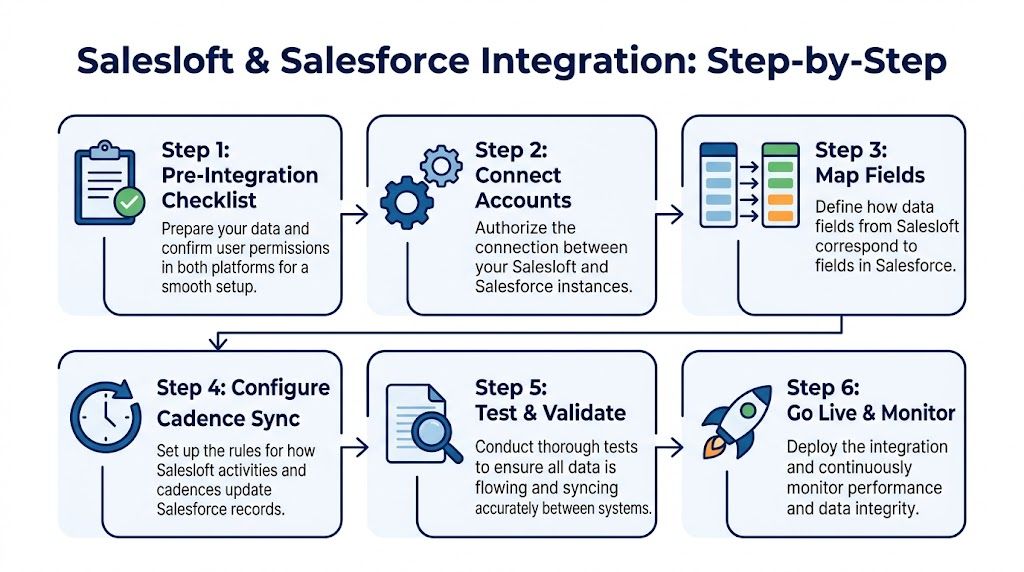
Step one connects the platforms cleanly
Use a dedicated integration user in Salesforce whenever possible. That gives you a stable permission model, cleaner auditability, and fewer surprises when an admin changes roles or leaves the company.
The integration user should have access to the objects and fields Salesloft needs, but not broad, unnecessary permissions. Keep it functional and controlled. If the user can’t see required objects, syncs will fail. If the user can see too much, governance gets weak.
A good authentication setup usually includes:
- A named integration owner in RevOps or systems administration.
- A dedicated Salesforce user for the connection.
- A permission review covering Leads, Contacts, Accounts, Opportunities, Tasks, and custom fields.
- A documentation note on what connected app access was approved and why.
This is boring work. It also prevents half the incidents teams call “random.”
Step two maps core records before edge cases
Start with standard objects first. Leads, Contacts, Accounts, and Opportunities carry most of the operational load. Get those stable before you touch custom reporting fields or experimental workflow data.
The mistake I see most often is trying to map everything in one pass. Don’t. Map by business importance.
A practical order looks like this:
| Priority | Object or field area | Why it matters first |
|---|---|---|
| High | Lead and Contact identity fields | Prevents duplicate outreach and bad matching |
| High | Account linkage | Keeps people connected to the right company |
| High | Opportunity association | Ties activity to pipeline outcomes |
| Medium | Ownership fields | Supports routing and accountability |
| Medium | Cadence-related custom fields | Helps with reporting and workflow triggers |
| Later | Nice-to-have enrichment fields | Useful, but not critical for go-live |
Where teams get into trouble is conflict resolution. If Salesloft updates a contact field and Salesforce has different logic, which one wins? You need priority rules before launch. Some setups use “Contact over Lead” logic. Others define Salesforce as the master for specific ownership or lifecycle fields. What matters is consistency.
Step three configures activity sync with intent
For the front line, the integration's value becomes apparent. Emails, calls, and other rep actions should flow into Salesforce in a way that helps managers inspect pipeline without forcing reps to maintain two systems.
Salesloft supports mapping of a wide set of activity properties, such as call duration, disposition, sentiment, email counts, and cadence identifiers. That gives RevOps room to decide how detailed the CRM activity layer should be.
The question isn’t “can we log it?” It’s “should we log it?”
What to log automatically
Generally, these are strong candidates for default sync:
- Completed calls with outcome context
- Emails sent from sequenced outreach
- Replies and engagement signals that inform coaching
- Cadence association data when you want reporting by sequence motion
- Meeting-related activity if your reporting model uses activity-to-opportunity inspection
What to be selective about
Not every event belongs in Salesforce. If you log too aggressively, the CRM becomes noisy and hard to read. That hurts managers more than it helps them.
Be careful with:
- Low-value task clutter
- Internal-only rep actions
- Minor engagement events with no operational use
- Fields that have no dashboard or process purpose
Operational advice: Log what a manager would inspect, what a rep would need in a handoff, and what RevOps can actually report on. Skip the rest.
Step four adds automation rules that support process
After the base sync is working, configure automation carefully. With careful configuration, Salesloft can enforce process, not just capture activity. For example, your team may want rules that stop duplicate outreach across account teams, or rules that route actions based on object type and ownership.
Keep the first automation layer narrow. A few high-confidence rules beat a long list of half-tested ones.
Common early wins include:
- Preventing duplicate account-based outreach
- Standardizing how new contacts enter the right motion
- Aligning ownership changes with outreach behavior
- Creating reliable cadence attribution for later analysis
Step five tests with live scenarios, not just sample records
Teams typically test whether a record syncs. Fewer teams test whether the workflow behaves correctly under normal rep behavior. Do both.
Run scenario-based tests like these:
- A rep adds a new contact and enrolls them in a cadence.
- A manager reassigns account ownership in Salesforce.
- A Lead converts and the downstream contact history remains usable.
- An opportunity advances while activity logging continues cleanly.
- A validation rule in Salesforce blocks an expected update.
Look at sync logs closely. Salesloft provides logs that show fields, records, timestamps, sync direction, and retries. Use them. They’ll tell you whether you have a field issue, permission issue, or logic conflict.
Step six goes live with monitoring turned on
Go-live is not the end of setup. It’s the start of observation. Watch for mapping drift, user confusion, and record exceptions in the first few weeks.
The best RevOps teams review:
- Failed sync logs
- Unexpected duplicate creation
- Rep complaints about missing activity
- Dashboard oddities tied to field values
- Validation rules that block normal sales motions
When salesloft and salesforce is configured this way, the integration becomes durable. Not just connected. Durable.
Activating Your Integrated Sales Workflows
The technical connection matters. The workflows matter more. A clean sync by itself doesn’t create pipeline. What creates pipeline is a system where reps can work fast, managers can inspect what matters, and RevOps can enforce the right process without slowing anyone down.

Salesloft’s integration with Salesforce supports configurable automation rules, can push over 30 activity properties into Salesforce automatically, and enables analytics that connect cadence performance to opportunity outcomes, based on Salesloft’s Salesforce integration overview.
A rep’s day looks simpler when the systems agree
A good rep workflow in salesloft and salesforce should feel almost invisible. The rep shouldn’t be thinking about sync mechanics during the workday. They should be working accounts, contacts, and follow-ups while the system keeps the CRM current.
A common day looks like this.
The rep starts in Salesloft with a prioritized call and email block. They open a target account, review the associated people, and add a contact if needed. If the field mapping and matching rules are clean, that contact lands in Salesforce correctly without creating downstream mess.
The rep places a call, logs the disposition, sends a follow-up email, and moves the person into the next cadence step. Those actions flow back to Salesforce automatically. When the manager checks the account later, the activity history is there. When the opportunity owner reviews deal momentum, the timeline reflects actual execution.
That’s the key difference. The rep stays in motion. The CRM stays current.
A strong integration doesn’t ask reps to become admins. It lets admins build a system reps can trust.
A RevOps manager’s week becomes more analytical
The RevOps view is different. You’re not trying to save a few clicks. You’re trying to turn execution data into process control and forecasting signal.
Once the sync is stable, Salesforce dashboards become much more useful because they’re no longer based only on stage movement and rep-entered notes. You can inspect activity patterns by team, by segment, by owner, and by opportunity cohort.
A few dashboards tend to deliver value quickly:
| Dashboard view | What it answers |
|---|---|
| Activity by rep against pipeline creation | Are top-activity reps also creating the right opportunities? |
| Cadence performance by segment | Which motions are producing meetings or progression? |
| Stalled opportunity review | Which deals have weak recent engagement despite open pipeline? |
| Contact coverage by account | Are target accounts being worked broadly enough? |
Automation is where governance starts to scale
Salesloft’s workflow controls matter. If your team runs account-based motions, configurable automation rules can help enforce ABM deduplication and stop overlapping outreach from different reps or teams.
That’s not just a rep experience issue. It’s a governance issue. Without rules, one account can get hit from multiple angles with no coordination. With rules, you can make account ownership and outreach motion align.
Here are a few workflows worth activating early:
- ABM deduplication rules that prevent multiple reps from working the same account in conflicting ways
- Standard cadence enrollment logic for new contacts tied to the right segment or owner
- Activity visibility rules so managers see the interactions that matter without drowning in task clutter
- Opportunity-linked reporting that shows whether outreach intensity and timing are aligned with stage progression
The best examples are specific
Take a mid-market outbound team working named accounts. An SDR adds three new buying committee contacts in Salesloft, enrolls them in a role-based cadence, and logs call outcomes through the day. Because the contact creation, account mapping, and activity sync rules were designed up front, Salesforce reflects the added contacts, their account association, and the rep’s engagement trail without manual cleanup.
Later that week, RevOps reviews a dashboard that compares cadence engagement against open opportunities in the same account set. One sequence is generating replies but not meetings. Another is getting call connects that convert into booked conversations. That’s not abstract reporting. That’s actionable process feedback.
What doesn’t work
A few patterns break this operating model fast:
- Logging every possible event until Salesforce becomes unreadable
- Letting reps create custom workarounds outside the agreed motion
- Skipping ownership logic for accounts, leads, and converted contacts
- Treating automation as a substitute for governance
If your salesloft and salesforce setup is doing its job, the rep sees less admin, the manager sees better evidence, and RevOps has fewer cleanup projects.

“We have very limited bandwidth, but Salesmotion was up and running in days. The template made it easy to load our accounts and embedding it in Salesforce was simple. It was one of the easiest rollouts we've done.”
Andrew Giordano
VP of Global Commercial Operations, Analytic Partners
Adding Autonomous Intelligence with Salesmotion
A clean integration gives you visibility into what reps did. It doesn’t always tell them what they should do next, or why a specific account matters right now. That’s the limitation of an execution stack built mostly on internal data.

Why external intelligence changes the quality of outreach
Even when your CRM and engagement platform are synced perfectly, reps still face a familiar problem. They know who to contact, but not always why now.
That’s where an external intelligence layer becomes useful. Instead of relying only on what happened inside your systems, it watches what’s changing at the account level and gives reps a reason to act. A new executive hire. A funding event. Hiring for a function that maps to your product. A competitive mention. A product launch. Those signals make sequences more relevant.
One option is Salesmotion’s Salesforce demo, which shows how an external sales intelligence workflow can sit alongside CRM and engagement tooling rather than replacing it. The practical value is that signals can be routed to reps in working channels like Slack, email, or CRM views without forcing your team to depend entirely on one deep connector for every insight.
How the model works in practice
Think about a target account that just announced an expansion into a new market. Your rep gets that signal with context on why it matters. The rep can then use Salesloft to launch a cadence customized for that development instead of sending generic messaging.
The workflow is stronger because each tool does a distinct job:
| Layer | Primary role |
|---|---|
| Salesforce | Holds account, contact, and opportunity structure |
| Salesloft | Executes outreach and captures rep activity |
| External intelligence layer | Supplies timely reasons to prioritize and personalize outreach |
That separation is operationally healthy. It means your team can keep selling even if one sync path is degraded or under review.
Resilience principle: Don’t make your only source of sales signal the same connection path that could become your point of operational failure.
Where this helps RevOps most
RevOps benefits in two ways.
First, external intelligence improves prioritization. Reps aren’t just working static lists. They’re working accounts where something changed and the change has context.
Second, it reduces pressure on the CRM integration to do everything. Salesforce and Salesloft should handle execution data well. They don’t need to be the only mechanism for account monitoring, signal detection, and research synthesis.
That’s a healthier stack design. It gives reps stronger outreach inputs and gives leaders a more resilient operating model if integrations become unstable, restricted, or temporarily unavailable.
Measuring Success and Troubleshooting Common Issues
Once salesloft and salesforce is live, the real work is maintenance and interpretation. If you can’t troubleshoot sync issues quickly and prove business value clearly, the integration turns into background plumbing that nobody trusts.

For teams building support playbooks around connected systems, this CRM integration troubleshooting reference is a helpful complement to your internal admin docs because most issues come down to process logic, permissions, or field governance rather than vendor instability alone.
The issues that show up most often
Most failures are predictable.
- Validation rule failures happen when Salesforce blocks a sync because required fields, stage logic, or record constraints don’t match the incoming update.
- Ownership conflicts appear when account, lead, or contact ownership changes in one system but the workflow assumptions in the other system don’t match.
- Field mapping errors show up when a custom field was renamed, changed, deprecated, or mapped with the wrong priority.
- Duplicate records happen when matching logic is weak or reps create records through multiple paths.
- API-related exceptions usually point to volume, retry behavior, or poor workflow design rather than one isolated error.
The fix is usually operational, not heroic. Review the sync log, identify the object and field involved, confirm which platform owns that field, then test the workflow with a real user scenario.
The metrics that prove the integration is working
Don’t measure success only by “sync uptime” or admin ticket volume. Those matter, but leadership cares about revenue process quality.
Use Salesforce dashboards to inspect metrics like:
- Activity-to-meeting conversion by rep or team
- Pipeline movement by cadence or outreach motion
- Lead response speed by ownership group
- Engagement patterns associated with closed-won outcomes
- Coverage across target accounts and buying committees
Look for trends, not vanity. If one cadence generates activity but no progression, it may be busywork. If another produces fewer touches but stronger meeting conversion, that’s the one worth scaling. If stalled deals consistently show weak recent engagement history, managers can intervene earlier.
The best reporting question isn’t “how much activity happened?” It’s “which activity patterns actually moved deals?”
Keep the system honest
Review field governance regularly. Audit failed syncs before they become habits. Remove low-value logging if dashboards get noisy. Tighten automation if reps find loopholes. Loosen it if rules block normal selling behavior.
A good integration isn’t self-sustaining. RevOps keeps it healthy by treating it like a revenue process, not a one-time install.
If your team already uses Salesforce and Salesloft but still struggles with weak “why now” signals, generic outreach, or heavy manual research, Salesmotion is worth evaluating as a complementary layer. It tracks account changes across public sources, turns them into usable context, and can help reps act on timely signals without depending on the CRM integration to do every job in the stack.