The best account intelligence software for most B2B sales teams is Salesmotion: it monitors 1,000+ public sources for 50+ signal types, turns them into cited account briefs, and starts at $85/mo on a monthly contract. Databook is the pick for enterprise revenue organizations that want executive-level points of view and account plans. ZoomInfo is the pick for teams that want account intelligence layered on a very large contact database.
TL;DR: The top three account intelligence tools are Salesmotion for sales teams of any size that need to know which accounts to work, why now and what to say, with every data point traced to its source; Databook for enterprise revenue organizations preparing executive conversations and account plans, sold with a 90-day proof of value; and ZoomInfo for teams that want Copilot's buyer signals and account summaries on top of 500M+ contacts. The other nine tools here approach account intelligence from a different starting point: LinkedIn data, person-level signals, build-your-own workflows, revenue agents, or intent and ABM.
| Tool | Best for | Starting price |
|---|---|---|
| Salesmotion | Cited account research and buying signals for sales teams | $85/mo for individuals. Custom pricing for teams & enterprise. |
| Databook | Executive points of view and account plans in the enterprise | Custom; outcome-based, 90-day proof of value |
| ZoomInfo | Account intelligence on top of a contact database | Custom, consumption-based |
Why Trust This Guide?
I'm Semir Jahic, CEO of Salesmotion. Salesmotion publishes this guide, and account intelligence is our home category, so Salesmotion sits at number 1 in the list. The review below explains what earns that position, and every other review says plainly what that tool is best at and when to choose it over ours.
Three things back the list:
- Every price and product fact about another vendor was checked against that vendor's own site on 10 October 2026. Each review links the page the pricing came from.
- Third-party figures are named. Where a vendor publishes no price, the guide says so. Where Vendr's marketplace reports a median for that vendor, it is quoted with the number of purchases behind it.
- It starts from what buyers ask. We sat in 55 sales and customer calls between August and October 2026. In 25 of them buyers pressed on whether the data was current and relevant, not on how much of it there was.
Two buyers in those calls put it this way:
"I'm not impressed by pulling a lot of data these days because any tool can do that. The question is relevant data."
Commercial lead, life sciences software
"So how confident are you that your data is up to date?"
Business development rep, CRO
See Salesmotion on a real account
Book a 15-minute demo and see how your team saves hours on account research.
Top Account Intelligence Tools Compared
Account intelligence tools answer the question that contact databases leave open: which accounts to prioritize, why they would buy now, and what to say when you reach them. The table compares all twelve on their main use, standout capability, pricing as published, and whether you can start free.
| Tool | Best for | Standout capability | Pricing | Free plan or trial |
|---|---|---|---|---|
| Salesmotion | Account research and buying signals | Cited account briefs from 1,000+ public sources | $85/mo for individuals. Custom pricing for teams & enterprise. | No free plan; interactive demo |
| Databook | Enterprise executive selling | Points of view and account plans with provenance on every fact | Custom; outcome-based, 90-day proof of value | Proof of value (90 days) |
| Draup | Global enterprise account planning | 50+ sales agents on proprietary enterprise datasets | Custom, demo-gated | Demo request |
| ZoomInfo | Intelligence on a contact database | Copilot on 500M+ contacts and 100M+ companies | Custom, consumption-based | ZoomInfo Lite free tier (10 credits a month) |
| LinkedIn Sales Navigator | Relationship-led account research | Account IQ on LinkedIn's member data | Core $119.99/mo; Advanced $159.99/mo | Free trial on Core and Advanced for eligible members |
| UserGems | Person-level signals for outbound and ABM | 30+ native signals with AI agents | Core $40,000/yr, Advanced $75,000/yr, Elite $150,000/yr | None stated on the pricing page |
| Common Room | First-party buyer intelligence | Person360 identity resolution | Essential $2,500/mo (billed annually) | None on the pricing page; demo request |
| Clay | Build-your-own account research | Account Agents on 150+ data providers | Free; Launch $185/mo, Growth $495/mo | Free plan; 14-day trial |
| Rox | An agent across the revenue cycle | Warehouse-native revenue agent | Individual $100/mo, Teams $255/mo | Free start |
| 6sense | Predictive account prioritization | Signalverse intent network | Custom, quote-only | Demo request |
| Demandbase | Account-based marketing and advertising | Marketing, advertising, sales and data in one package | Custom (platform fee + per-user fee) | Free tools on its site |
| Bombora | Third-party intent data | Company Surge across 25,300+ intent topics | Custom, quote-only | Quote request |
Clearbit, which earlier editions of this list included, is now part of HubSpot. Its enrichment ships as HubSpot data enrichment on paid HubSpot plans, so it no longer has a numbered slot. Poggio, which some buyers still have on a shortlist, announced that it joined Baseten on 1 October 2026 and that the Poggio product is no longer supported.
How the list is ordered. The order reflects fit for a B2B sales team that wants account research and buying signals in front of its reps. Research-first platforms come first (1 to 3), then data platforms with an account intelligence layer (4 and 5), then signal and orchestration platforms (6 to 9), then the intent and ABM platforms that marketing usually owns (10 to 12). A lower position is not a lower rating; the groups reflect where each tool starts, not how good it is.
1. Salesmotion
What it is: Salesmotion is an account intelligence platform built around three AI agents. The Signal Agent monitors 1,000+ public sources for 50+ signal types. The Research Agent synthesizes what it finds into cited account briefs. The Outreach Agent writes research-backed messaging and pushes the drafts to lemlist for a rep to review.
Why it is number 1: it is built for exactly the job this category names. A rep gets the timing (what changed at the account), the context (a brief with earnings commentary, leadership changes, hiring patterns, funding events and strategic initiatives) and the opening message, and can open the source behind each point. In the calls described above, 25 of 55 buyers pressed on whether data was current and relevant. Cited sources are the direct answer to that.
Best for: B2B sales teams with a defined list of target accounts that want deep account context with sources and want to start on a monthly contract.
What it is strong at:
- Cited account briefs. Every statement in a brief traces back to where it came from.
- Signal coverage. 50+ signal types across 1,000+ public sources, monitored continuously.
- Fitting the stack you have. Native Salesforce integration (managed package, one-way or bi-directional sync), a HubSpot integration, outreach drafts pushed to lemlist, a REST API, and an MCP server for Claude, ChatGPT and other assistants.
- Proven results. Analytic Partners cut account research time by 85% and grew qualified pipeline 40%. Cytel consolidated 5 tools to 1 and reduced research time 50%.
Pricing: $85/mo for individuals, with custom pricing for teams and enterprise. The Individual plan is a monthly contract with no annual commitment, covers up to 100 accounts, and includes 200 contact credits a month (verified email and phone). It is rated 4.8/5 on G2 (26 reviews).
Choose it if: your reps have accounts to work and the gap is knowing which ones to prioritize this week, what changed there and what to say. It sits alongside a contact database or sequencer as the account intelligence and signal layer.
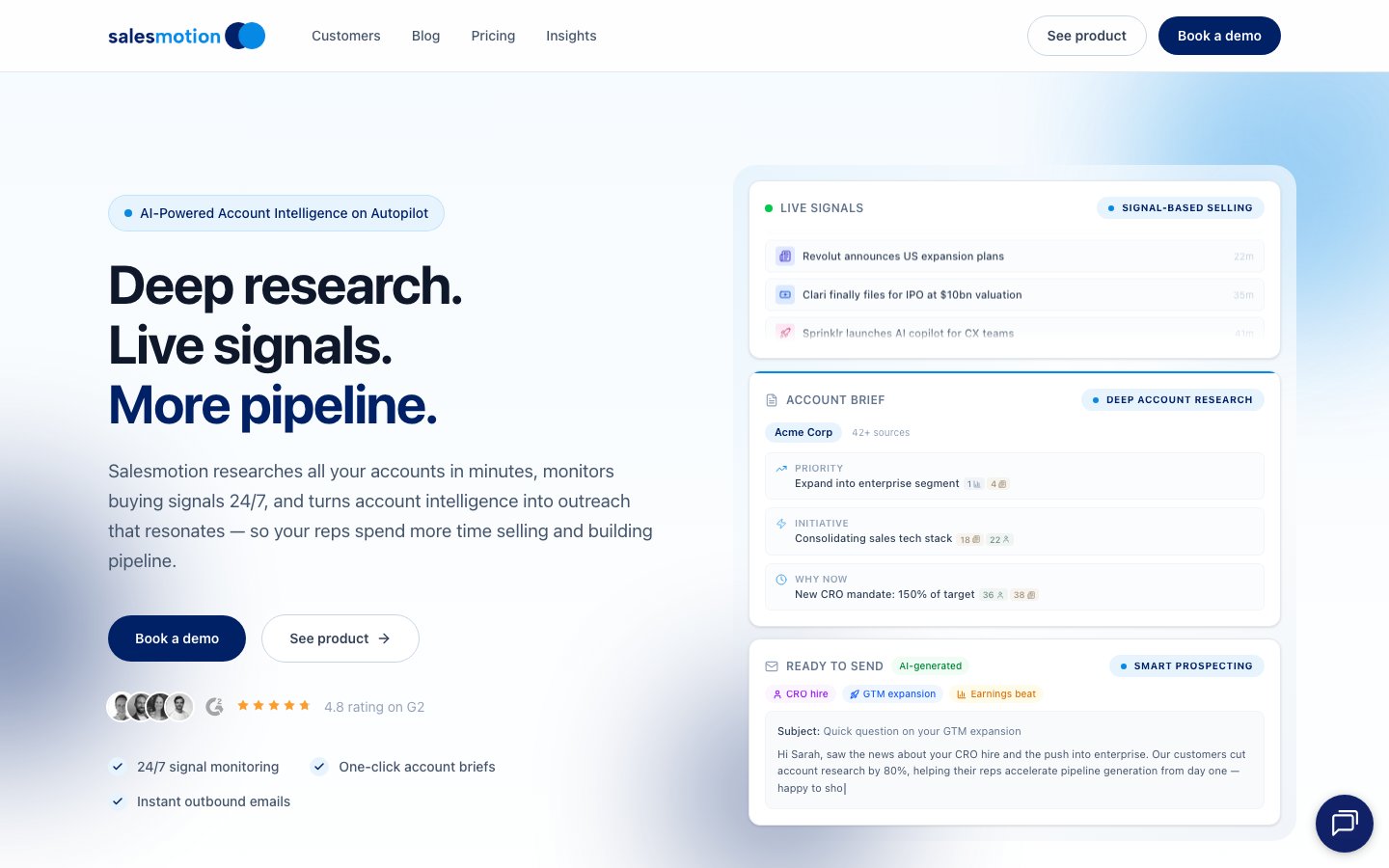 Salesmotion combines account research, live buying signals and research-backed outreach drafts in one platform.
2. Databook
What it is: Databook sells the GTM Decision System, which it describes as an AI-native operating system for revenue execution. It joins licensed, proprietary and human-verified third-party data with your own CRM, call and planning context, and it attaches source, date and provenance to every fact.
Best for: Enterprise revenue organizations that sell to large companies and prepare executive-level conversations.
What it is strong at:
- Executive points of view and account plans. Grounded in financial and strategic analysis, delivered as custom PowerPoint or Word outputs.
- Meeting sellers where they work. Databook runs inside Salesforce, Slack and Microsoft Teams, and every workflow is available as a REST endpoint and through an MCP server.
- Fees tied to outcomes. An outcome-based commercial model that starts with a 90-day proof of value against a baseline agreed up front.
- Reach beyond sales. Modular workflows across marketing, sales operations, value engineering and customer enablement.
Pricing: Databook does not publish list pricing; contracts are quoted per organization. Since September 2026 it sells the GTM Decision System on what it calls an outcome-based commercial model, starting with a 90-day proof of value. Source: databook.com.
Choose it if: you run an enterprise revenue organization that is ready to commit to a transformation program and wants a vendor whose fee depends on the result. Databook says it is selective about who it does this with. Salesmotion starts at $85/mo on a monthly contract.
3. Draup
What it is: Draup sells Draup Sales Agents, which it describes as an AI-native GTM operating system with 50+ agents. The agents automate deep account research at scale and monitor every account on a rep's book around the clock, tracking what changed across leadership, budget, hiring and competitive movement.
Best for: Sales teams working large enterprise accounts that want agent-run account research and monitoring.
What it is strong at:
- Proprietary enterprise datasets. Outsourcing and workload mapping, tech-stack footprint, business spend intent, and talent flow and hiring.
- Buying-committee identification and account planning. Agent workflows for account discovery, account planning, opportunity identification and buyer identification, with Microsoft quoted as a customer.
- An open integration surface. Model Context Protocol, Agent2Agent, data shares, a Sales Data API and CRM integration.
Pricing: Draup does not publish list pricing; contracts are quoted per organization. Its site is demo-gated with no pricing page and no self-serve plan.
Choose it if: your sellers work a book of very large enterprise accounts and the datasets above (outsourcing workloads, spend intent, talent flow) are the signals that drive your deals.
4. ZoomInfo
What it is: ZoomInfo provides one of the largest B2B contact and company databases, with verified data on 500M+ contacts and 100M+ companies, and it has built an AI layer on top. ZoomInfo Copilot, which it describes as its AI sales agent, surfaces buyer signals, assembles deal briefs and generates messaging. GTM Workspace adds agents for account research, meeting prep and deal prioritization.
Best for: Teams whose first need is finding and reaching contacts, and who want signals and account summaries in the same product.
What it is strong at:
- Data breadth with human verification. 300+ human researchers work on the data.
- A full AI layer. Copilot, GTM Workspace agents, GTM Studio workflows triggered by buying signals, plus ZoomInfo MCP and GTM.AI for developers.
- Integrations. Copilot connects to Salesforce, HubSpot, Outreach, Salesloft and Gong.
- A free tier. ZoomInfo Lite is permanent and includes 10 credits a month.
Pricing: ZoomInfo does not publish list pricing; contracts are quoted per organization. Its own pricing page states that no specific dollar amounts are published because pricing is consumption-based. Vendr reports a median contract of $33,500 a year based on 1,576 purchases, with a range of $7,233–$156,053. ZoomInfo Lite is a permanent free tier with 10 credits a month.
Choose it if: contact coverage is the main gap and you want intelligence features from the same vendor. ZoomInfo is built around its contact and company database, while Salesmotion is built around cited account briefs synthesized from earnings calls, filings and news, so many teams run both. For other options, see our ZoomInfo alternatives guide.
5. LinkedIn Sales Navigator
What it is: LinkedIn Sales Navigator is LinkedIn's sales product, built on a network of 1+ billion members. Its account intelligence comes from Account IQ, which delivers AI insights on target accounts, Lead IQ, which summarizes a lead's experience and recent activity, and Buyer Intent on the Advanced and Advanced Plus plans, which shows which companies are actively showing interest.
Best for: Sellers whose account research starts with people: who is there, who just joined, and who can introduce you.
What it is strong at:
- First-party access to LinkedIn's member graph. Job-change alerts, TeamLink and Relationship Map for mapping an account.
- Built-in AI research and drafting. Account IQ, Lead IQ and Message Assist on LinkedIn data.
- CRM reach. Integrations with Salesforce, HubSpot, Microsoft Dynamics and Oracle.
Pricing: LinkedIn publishes Sales Navigator pricing: Core at $119.99/month or $1,079.88/year, Advanced at $159.99/month or $1,799.88/year, and Advanced Plus on request. All three plans include 50 InMail credits a month.
Choose it if: relationships and stakeholder mapping drive your deals. Its signals come from LinkedIn data, so teams usually keep it alongside a platform that covers earnings, filings, funding and news.
6. UserGems
What it is: UserGems describes itself as the AI Command Center for outbound and ABM. It unifies buyer signals and first-party data into person-level intelligence, with 30+ native signals including job changes, contact-level intent, website visits, M&A and hiring. Its AI agents score accounts and contacts, write personalized outreach and create ad audiences. In September 2026 it launched a Research Agent, an improved Writing Agent and UserGems MCP, which brings the product into Claude and ChatGPT.
Best for: Teams scaling outbound and ABM from person-level signals, especially those with a large customer base whose champions change jobs.
What it is strong at:
- Person-level signals. Contact-level intent and website visits, past champions, new hires at target accounts, promotions and role changes among its native signals.
- Orchestrating sales and marketing from one scored list. Scoring across 600+ criteria per account, with workflows into Salesforce, HubSpot, Outreach, Salesloft and Gong Engage and ad audience sync to LinkedIn, Meta and Google.
- Unlimited users. Every tier includes unlimited admin and end users.
- A results guarantee. Its pricing page offers money back if you do not get ROI in closed-won revenue.
Pricing: UserGems publishes three tiers priced per year: Core at $40,000/year, Advanced at $75,000/year and Elite at $150,000/year. Every tier includes unlimited admin and end users. One-time implementation fees run $3k/$5k/$10k by tier.
Choose it if: job changes and contact-level intent are your strongest pipeline source and you want agents to act on them across sales and marketing channels.
7. Common Room
What it is: Common Room describes itself as complete buyer intelligence that turns intent into pipeline. Its core is Person360, which resolves signals to individual people, backed by a 400M+ contact directory. Its AI capabilities cover account research, contact research and message personalization. Zoom completed its acquisition of Common Room on 17 July 2026, and the product is still sold under its own name.
Best for: Teams with strong first-party signals across CRM, product and marketing engagement.
What it is strong at:
- Person-level identity resolution. Person360 ties activity from many sources to the same individual.
- Breadth of signal capture. Connections to Salesforce, HubSpot, Slack, Outreach and 50+ other integrations.
- A published entry tier. Seats and contact caps are stated on the pricing page.
Pricing: Common Room publishes its entry tier at $2,500/month billed annually (Essential, 5 seats, 100k contacts). Advanced and Enterprise are quote-only. There is no free tier or self-serve trial on the pricing page.
Choose it if: the signals that predict a deal for you come from your own product and engagement data, and you want them resolved to named buyers.
8. Clay
What it is: Clay is a data orchestration platform with its own people and company database and access to 150+ data providers. For account intelligence, its Account Agents reason over what you know about an account, monitor a book of business and track what changed. Clay's account research use case refreshes research on a schedule and notifies reps when signals such as website intent or job changes occur.
Best for: RevOps teams and GTM engineers who want to design their own account research and signal workflows.
What it is strong at:
- Multi-provider enrichment on one bill. No charge when an enrichment returns no result.
- A build surface that reaches reps. Functions, Workflows, Account Agents and an MCP for Claude, ChatGPT and Codex with budget guardrails and admin controls.
- Native signals. Job changes, company news and social listening on Launch and above; web intent on Growth and above.
- Unlimited seats on every plan, including Free.
Pricing: Clay publishes its pricing: a free tier, Launch from $185/month and Growth from $495/month (about $167 and $446 on annual billing), then custom Enterprise on an annual commitment. Paid plans start with a 14-day trial, include unlimited seats, and meter usage in Actions and Data Credits.
Choose it if: you have someone who will build and maintain the workflows and you want full control over sources and logic. Teams that want briefs and signals ready on day one choose a packaged platform.
9. Rox
What it is: Rox describes itself as the revenue agent for the Global 2000: a warehouse-native, pre-built agent that works every account across the revenue cycle. Account intelligence is one of five agent capabilities it lists, alongside prospecting, revenue intelligence, sales engagement and conversation intelligence.
Best for: Teams that want one agent spanning pipeline generation, deal management and expansion.
What it is strong at:
- A single agent across the revenue cycle. Available in a web app, Slack, Microsoft 365, Google Workspace, a Chrome extension and through MCP and API.
- Self-serve, usage-based entry. A free start, then monthly plans metered in agent actions.
- Enterprise readiness. SOC 2 Type II, SSO and SCIM support, and data warehouse sync on Enterprise. Rox was named a Major Player in the IDC MarketScape 2026 for Worldwide Unified Revenue Orchestration Platforms.
Pricing: Rox publishes its pricing: Individual at $100/month (10,000 actions a month), Teams at $255/month (15,000 actions a month, unlimited seats), then custom Enterprise.
Choose it if: you want an agent that also runs engagement and deal management on your warehouse data, with account intelligence as one part of it.
10. 6sense
What it is: 6sense is built on Signalverse, its own intent network, which the company says captures one trillion signals a day. Predictive Modeling and Account Prioritization tell marketing and sales which accounts to focus on, and RevvyAI provides account research, meeting prep and sales strategy grounded in account activity.
Best for: Enterprise marketing and sales organizations with large addressable markets that need predictive scoring to decide where to focus.
What it is strong at:
- Predictive account prioritization on 13 years of proprietary intent data.
- A marketing-plus-sales suite. Advertising, AI Email Agents and web deanonymization next to Sales Intelligence, with 111M+ verified business email addresses.
- Analyst recognition. Its homepage notes it was named a Leader in The Forrester Wave: Revenue Marketing Platforms for B2B, Q1 2026.
Pricing: 6sense does not publish list pricing; contracts are quoted per organization. Vendr's marketplace data reports a median annual contract value of $62,220 across 386 purchases, with a range of $11,234–$176,511. Source for the packaging: 6sense pricing page.
Choose it if: marketing and sales run account-based programs together and want predictive intent to set the priority list. Teams often pair intent with dated events such as leadership changes, funding and earnings language. For a head-to-head, see Salesmotion vs 6sense.
11. Demandbase
What it is: Demandbase is an account-based platform covering marketing, advertising, sales and data, sold as one package. It combines first-party and third-party data, and its sales product focuses sellers on the right accounts and buying groups.
Best for: Enterprise ABM programs that coordinate marketing and sales engagement across large account lists.
What it is strong at:
- One platform for the whole go-to-market team. Demandbase says it does not split the product into separate marketing and sales solutions.
- Account-based advertising. Offered as a starting point on its own.
- A wide integration surface. HubSpot, Microsoft Dynamics 365, Eloqua, Outreach, Salesloft, Adobe Analytics and LinkedIn.
Pricing: Demandbase does not publish list pricing; contracts are quoted per organization. Its pricing page describes a platform fee plus a flat fee per user. Vendr reports a median annual contract value of $68,591 across 187 purchases, with a range of $24,000–$164,037.
Choose it if: marketing owns the account program and advertising is central to it. Teams whose main need is rep-level account research and call preparation should weigh that focus. For a head-to-head, see Salesmotion vs Demandbase.
12. Bombora
What it is: Bombora is an intent data provider. Its Company Surge product identifies which companies are consuming content on specific topics, drawing on a data co-op of hundreds of publishers and brands and thousands of B2B sites.
Best for: Teams that need intent-based scoring to prioritize a large account list, often as a data layer inside other tools.
What it is strong at:
- The data co-op. Bombora says 86% of the co-op's data is shared exclusively with it.
- Scale and topic breadth. 25,300+ intent topics, 16B+ monthly events and 5M+ company domains.
- Distribution. Partners it lists include The Trade Desk, Reddit, Adobe and Apollo.
Pricing: Bombora does not publish list pricing; contracts are quoted per organization. Vendr reports a median annual contract value of $25,000 across 35 purchases, with a range of $13,000–$80,450.
Choose it if: you want topic-level intent to feed scoring or advertising. Company Surge reports at the company level, so reps add account research to find the person and the reason.

“All of the vendors that I've worked with, all of the onboarding that I have had to deal with, I will say, hands down, Salesmotion was the easiest that I have had.”
Lyndsay Thomson
Head of Sales Operations, Cytel
What Account Intelligence Tools Actually Do
Account intelligence is the layer between raw data (contacts, firmographics, technographics) and sales action. A contact database tells you that Jane Smith is VP of Sales at Acme Corp. Account intelligence tells you that Acme Corp just hired a new CRO, announced a strategic initiative to grow enterprise revenue 40%, posted 12 new sales roles this month, and mentioned competitive pressure on its earnings call.
The core capabilities:
| Capability | What It Does | Why It Matters |
|---|---|---|
| Signal monitoring | Tracks leadership changes, funding, hiring, earnings, competitive moves | Tells reps when to engage (timing) |
| Research automation | Aggregates public information into account briefs | Replaces hours of manual research per account |
| Stakeholder mapping | Identifies key decision-makers and their backgrounds | Tells reps who to engage |
| Competitive intelligence | Detects competitive evaluations and displacement opportunities | Tells reps what to say (positioning) |
| Account scoring | Prioritizes accounts by buying readiness | Tells reps where to focus effort |
The twelve tools above weight these capabilities differently. Research-first platforms lead with briefs and signals. Data platforms lead with contacts and add intelligence on top. Signal and orchestration platforms lead with acting on a trigger. Intent and ABM platforms lead with scoring.
How to Choose the Right Account Intelligence Tool
Identify Your Primary Bottleneck
| Bottleneck | What You Need | Best Fit |
|---|---|---|
| "Reps spend too much time researching accounts" | Research automation + cited account briefs | Salesmotion |
| "We don't know which accounts to prioritize this week" | Signal monitoring across the territory | Salesmotion; 6sense for predictive intent |
| "We need executive-level points of view for our largest accounts" | Financial and strategic analysis | Databook, Draup |
| "We can't find the right contacts" | Contact data with intelligence on top | ZoomInfo, LinkedIn Sales Navigator |
| "Our best leads are champions who changed jobs" | Person-level signals + outbound agents | UserGems |
| "Our signals live in our own product and engagement data" | First-party identity resolution | Common Room |
| "We want to build our own research workflows" | A data and agent build surface | Clay |
| "We want one agent across the revenue cycle" | A revenue agent | Rox |
| "Marketing and sales aren't coordinated on accounts" | ABM orchestration + intent | Demandbase, 6sense, Bombora |
Consider the Integration Stack
Account intelligence is most valuable when it flows into the tools reps use daily. Evaluate integration depth with your CRM (Salesforce, HubSpot), your sales engagement platform, your communication tools (Slack, email), and increasingly the AI assistant your team already uses. Several tools on this list now offer an MCP server for that purpose.
Evaluate Signal Diversity vs. Depth
Some teams need broad signal coverage (leadership changes, hiring, earnings, funding and competitive moves together). Others need depth in one signal family, such as person-level signals. Match the tool to the signals that most often precede a purchase in your market.
Decide How Much You Want to Build
Packaged platforms deliver briefs and signals on day one. Build surfaces give you control over sources and logic in exchange for someone owning the workflows. Outcome-based enterprise programs sit at the other end: more vendor involvement, and a proof of value before a full rollout. All three are valid; the choice depends on the team you have.

“The Business Development team gets 80 to 90 percent of what they need in 15 minutes. That is a complete shift in how our reps work.”
Andrew Giordano
VP of Global Commercial Operations, Analytic Partners
Key Takeaways
- Account intelligence tools fall into four groups: research-first platforms (Salesmotion, Databook, Draup), data platforms with an intelligence layer (ZoomInfo, LinkedIn Sales Navigator), signal and orchestration platforms (UserGems, Common Room, Clay, Rox), and intent and ABM platforms (6sense, Demandbase, Bombora).
- The top three picks are Salesmotion for cited account research and buying signals from $85/mo, Databook for enterprise executive selling with a 90-day proof of value, and ZoomInfo for intelligence on top of a contact database.
- Choose based on your primary bottleneck: research time, account prioritization, contact coverage, job-change tracking, first-party signals or ABM coordination.
- Intent data shows topic research at the company level. Combine it with dated, verifiable events (leadership changes, funding, earnings language) for a reason to reach out.
- Contact databases and account intelligence solve different problems. Having the right contacts and knowing when and why to engage them are both necessary, which is why many teams run one of each.
- Check where the intelligence lands. Briefs and signals that reach the CRM, the sequencer or the team's AI assistant get used.
Frequently Asked Questions
What is an account intelligence tool?
An account intelligence tool monitors external data sources to surface information about target accounts that helps sales teams decide which accounts to prioritize, when to engage and what to say. That includes leadership changes, hiring patterns, earnings commentary, competitive moves, funding events and strategic initiatives. The output is intelligence a rep can act on, such as an account brief or a dated signal, instead of raw data that still needs manual research.
What is the best account intelligence software for 2027?
For most B2B sales teams it is Salesmotion, which monitors 1,000+ public sources for 50+ signal types, produces cited account briefs and starts at $85/mo on a monthly contract. Databook is the strongest choice for enterprise revenue organizations that want executive points of view and account plans. ZoomInfo is the choice when you want account intelligence from the same vendor as a very large contact database, and UserGems when person-level signals such as job changes drive your pipeline.
How is account intelligence different from intent data?
Intent data identifies that an account is researching topics related to your solution. Account intelligence is broader: it combines signals like that with dated events (leadership changes, earnings call language, hiring surges, funding), synthesizes them into account briefs, and supports the outreach that follows. Intent data answers "who might be interested." Account intelligence answers "which account, why now, and what should we say."
Do you need account intelligence if you already have ZoomInfo?
Often, yes. ZoomInfo is built around its contact and company database, with Copilot adding buyer signals, account summaries and messaging on top. A dedicated account intelligence platform is built around cited research synthesized from earnings calls, filings and news, with signal monitoring across your account list. Many teams use both: ZoomInfo to find and reach contacts, and an account intelligence platform to decide which accounts to work and what to say. The question is whether your bottleneck is finding people or knowing where to spend the effort.
How much does account intelligence software cost?
Published prices start at $85/mo for Salesmotion's Individual plan, $100/month for Rox Individual, $119.99/month for LinkedIn Sales Navigator Core and $185/month for Clay Launch. Common Room's entry tier is $2,500/month billed annually, and UserGems starts at $40,000/year. Databook, Draup, ZoomInfo, 6sense, Demandbase and Bombora do not publish list prices. For those with Vendr data, the reported medians are $33,500 a year for ZoomInfo, $62,220 for 6sense, $68,591 for Demandbase and $25,000 for Bombora.
Which account intelligence tools work inside Salesforce?
Most of them connect to Salesforce in some form. Salesmotion has a native Salesforce integration, delivered as a managed package with one-way or bi-directional sync. Databook says it runs inside Salesforce, Slack and Microsoft Teams. ZoomInfo Copilot, LinkedIn Sales Navigator, UserGems, Common Room and Rox all list Salesforce integrations, and Clay offers native CRM integrations on its Growth plan and above. Ask each vendor which fields are written back and whether reps can act without leaving the CRM.
Which account intelligence tools have an MCP server?
Several do, which lets an AI assistant call the tool directly. Salesmotion offers an MCP server for Claude, ChatGPT and other assistants, plus a REST API. Among the other tools on this list, ZoomInfo, Databook, UserGems, Clay, Common Room, Draup, 6sense and Rox each list MCP access on their sites. If your team already works in an AI assistant, this is the quickest way to put account intelligence in front of them.
Can ChatGPT or Claude replace an account intelligence tool?
Buyers asked a version of this in 22 of the 55 calls behind this guide. A general-purpose AI assistant can research an account when you ask it to. A dedicated account intelligence tool adds three things on top: it monitors every account on your list continuously and tells you what changed, it cites the source behind each data point, and it delivers the result into your CRM and outreach tools. The two work well together, which is why vendors now connect them through MCP so the assistant can call the account intelligence tool.