
Your SDR books a meeting off an Apollo sequence. The prospect opened emails, clicked twice, visited the site, and looked warm. None of that made it cleanly into Salesforce. Meanwhile, the account executive opens the CRM, sees an incomplete contact record, no clear activity trail, and treats the lead like any other cold follow-up. That handoff failure is common, and it’s usually not a rep problem. It’s a systems problem.
The apollo salesforce integration fixes that only when it’s configured with intent. A loose connection between the two tools can create just as much damage as no connection at all. I’ve seen teams wire it up quickly, celebrate that the sync is live, then spend the next quarter cleaning duplicates, repairing field conflicts, and explaining why pipeline reports no longer match rep activity.
When it works, though, it changes the day-to-day rhythm of the sales team. Reps stop copying notes between systems. Managers stop arguing about whether engagement happened. RevOps gets a cleaner handoff from prospecting to pipeline management. Leadership gets reporting that reflects what the team is really doing, not what someone remembered to log.
Key Takeaways
- A loose Apollo-Salesforce integration is worse than none. Mis-mapped fields, duplicate records, and conflicting activity logs poison the CRM faster than separate systems do.
- Decide what should flow before you flip the switch. Sequence activity, opens/clicks, contact enrichment, and meetings booked each have different ownership and reporting consequences — set rules per object before connecting.
- Map fields once, then govern them. Standardize lifecycle stages, lead source, contact owner, and sync direction (Apollo → SFDC vs bi-directional) — and document the decisions so future RevOps owners don't break them.
- Use a deduplication strategy from day one. Match on email + company domain, set Apollo to update rather than create when matches exist, and audit weekly until duplicate rate sits under 2%.
- Layer account intelligence on top. Contact + activity sync is table stakes; the leverage comes from adding signals, research, and AI outreach drafts that work off the unified record.
See Salesmotion in action
Take a self-guided interactive tour — no signup required.
Unifying Your Sales Data with Apollo and Salesforce
A rep books a meeting from Apollo. An AE opens Salesforce ten minutes later and still cannot see the engagement history that explains why the account is worth fast action. At small volume, teams patch that gap with Slack messages and rep memory. At scale, that breaks reporting, slows follow-up, and creates risk around which system people trust.
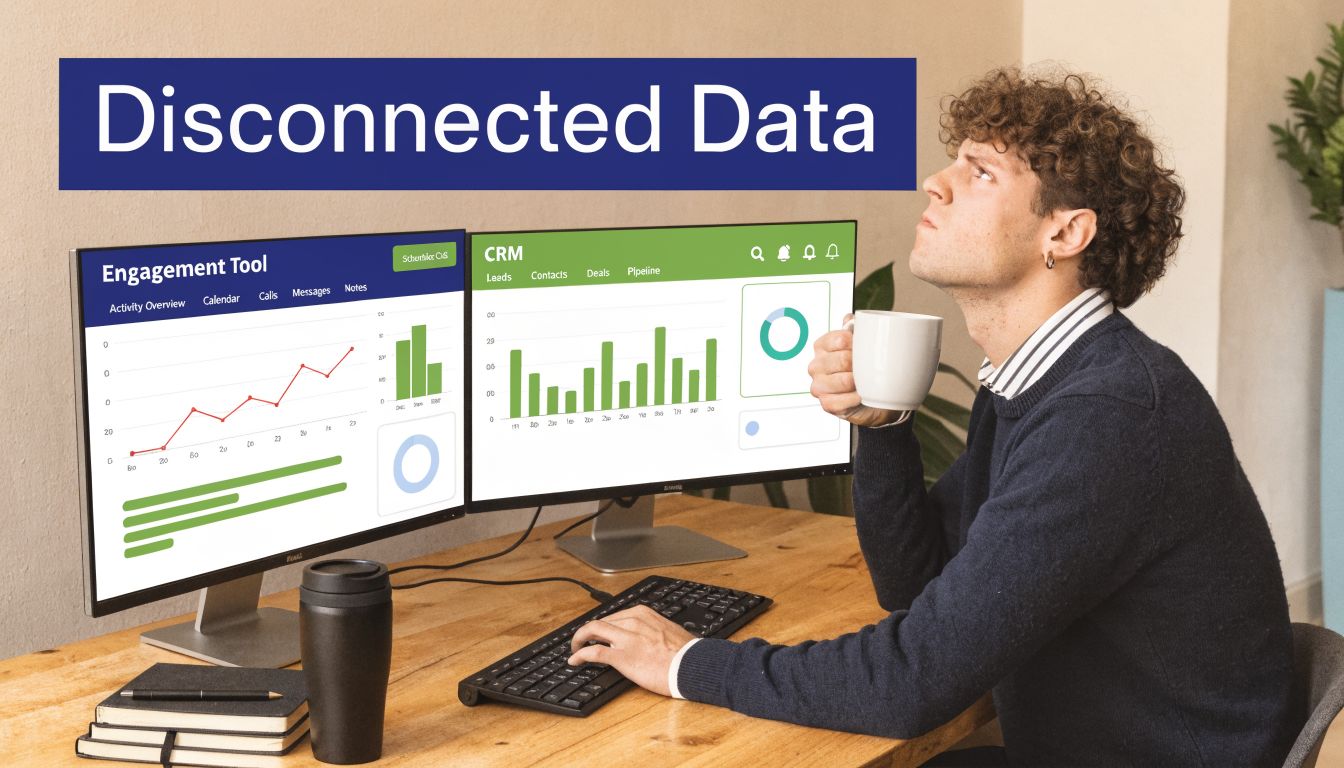
The objective isn't just connecting Apollo and Salesforce. The goal is deciding which prospecting activity, contact data, and account context should become operational inside the CRM. That distinction matters. A basic connection can move records between platforms. A well-run integration gives sales, managers, and RevOps one shared operating view without flooding Salesforce with junk activities, duplicate leads, or enrichment updates nobody asked for.
Sales teams feel the difference quickly. Reps stop guessing whether marketing, SDRs, and AEs are looking at the same account picture. Managers get cleaner activity history during pipeline inspection. RevOps gets a better shot at enforcing ownership rules, routing logic, and field governance before bad data spreads across reports, sequences, and dashboards.
This gets harder as volume rises.
High outbound teams do not struggle with the first 100 synced records. They struggle with thousands of new contacts, overlapping account ownership, enrichment jobs that overwrite good CRM values, and service accounts that end up with broad access no one reviews. Those are the operational problems that determine whether the apollo salesforce integration improves pipeline execution or inadvertently creates another cleanup project. If your team needs a technical reference alongside this strategy view, use this Salesforce integration setup guide.
What each team actually gets
For reps, the benefit is speed with context. They can work from current contact and account data instead of flipping between tools and filling gaps themselves.
For managers, the benefit is better inspection. Activity synced into Salesforce is more useful when it shows the signals that support coaching and deal review, not every low-value touchpoint.
For RevOps, the benefit is control over what enters the system of record. That includes sync direction, record creation rules, field precedence, and access boundaries for the non-human identities behind the integration. Teams that ignore that last point often focus on adoption and forget security until an over-permissioned integration user exposes far more data than intended.
A related lesson carries across the rest of the GTM stack. If you are also connecting marketing tools, the same governance standard applies. This guide on Salesforce and Constant Contact integration is useful because it shows the broader pattern. Salesforce only stays reliable when each connected system follows clear sync rules and ownership boundaries.
The integration should support sales execution, reporting accuracy, and data control at the same time. If it does only one of those well, the cracks show up fast.

“We're no longer fishing. We know who the right customers are, and we can qualify them quickly. Salesmotion has had a direct impact on pipeline quality.”
Andrew Giordano
VP of Global Commercial Operations, Analytic Partners
Essential Prerequisites for a Flawless Integration
Before connecting anything, slow down. Most failed Apollo-Salesforce rollouts don’t fail because the connector is broken. They fail because the environment, permissions, and ownership model were sloppy from the start.
Key requirements are straightforward. Successful Apollo-Salesforce integration requires admin-level access to both platforms, Salesforce version compatibility checks, reliable browser and internet conditions, correct authentication to the intended Salesforce instance, and explicit access authorization through OAuth or API key mechanisms, as outlined in this Apollo to Salesforce setup guide.
Start with access and environment control
If your team can’t answer “who owns the integration?” in one sentence, stop there first. This setup should sit with a designated admin or RevOps owner, not with whichever sales manager happened to click through the wizard first.
Use this checklist before you touch the connector:
- Confirm admin access in both systems: Partial permissions create confusing failures. The setup may appear complete while key objects or fields fail to sync, going unnoticed.
- Verify the right Salesforce instance: Production and sandbox are separate decisions. Teams regularly authenticate to the wrong environment, then wonder why expected records never appear.
- Check edition compatibility: If Salesforce access is restricted at the edition or API level, the connector won’t behave the way your design assumes.
- Document object scope early: Decide whether Leads, Contacts, Accounts, and Opportunities are all in scope, or whether you’re starting narrower.
A lot of teams treat these as technical details. They’re operational controls.
Create a dedicated integration user
This is the step teams skip when they’re in a hurry. It always comes back later.
Apollo guidance and implementation walkthroughs recommend a dedicated Salesforce integration user rather than a personal login. That’s the right move for auditability, access continuity, and change control. If the integration runs through a personal admin account and that person changes role, loses permissions, or leaves the company, your sync can degrade without anyone noticing right away.
Use the least privilege approach. Give the integration user access to the objects and fields required for the sync design. Don’t hand it broad permissions just because it’s faster.
Operational rule: If your integration user can do more than your sync design requires, your risk surface is wider than it needs to be.
That matters even more when the connector starts writing activity, enrichment, and notes back into Salesforce.
Test in sandbox before production
I don’t recommend first-run testing in a live production org unless the scope is tiny and the consequences are low. Mapping is often assumed to be obvious until the first test reveals missing data, wrong ownership, or duplicate behavior they didn’t anticipate.
A sandbox lets you answer the questions that matter:
| Question | Why it matters |
|---|---|
| Are the right objects syncing? | Prevents noise from entering Salesforce |
| Are required fields populated? | Stops broken or incomplete records |
| Are duplicate rules firing correctly? | Reduces cleanup after go-live |
| Are permissions sufficient but narrow? | Protects CRM data without blocking sync |
If you need a practical walkthrough for the setup groundwork, Salesmotion’s help resource on Salesforce integration setup is a useful operational checklist.
Write down the sync policy
It's common practice to configure the integration before defining policy. Reverse that.
Write a one-page internal policy covering:
- Which system is source of truth for each major object
- Which team approves mapping changes
- Which environment gets tested first
- What triggers a production rollback
- Who monitors logs after launch
That document saves more time than any fancy automation. It turns setup from a one-time admin task into a managed revenue system.
The Core Setup Process Step by Step
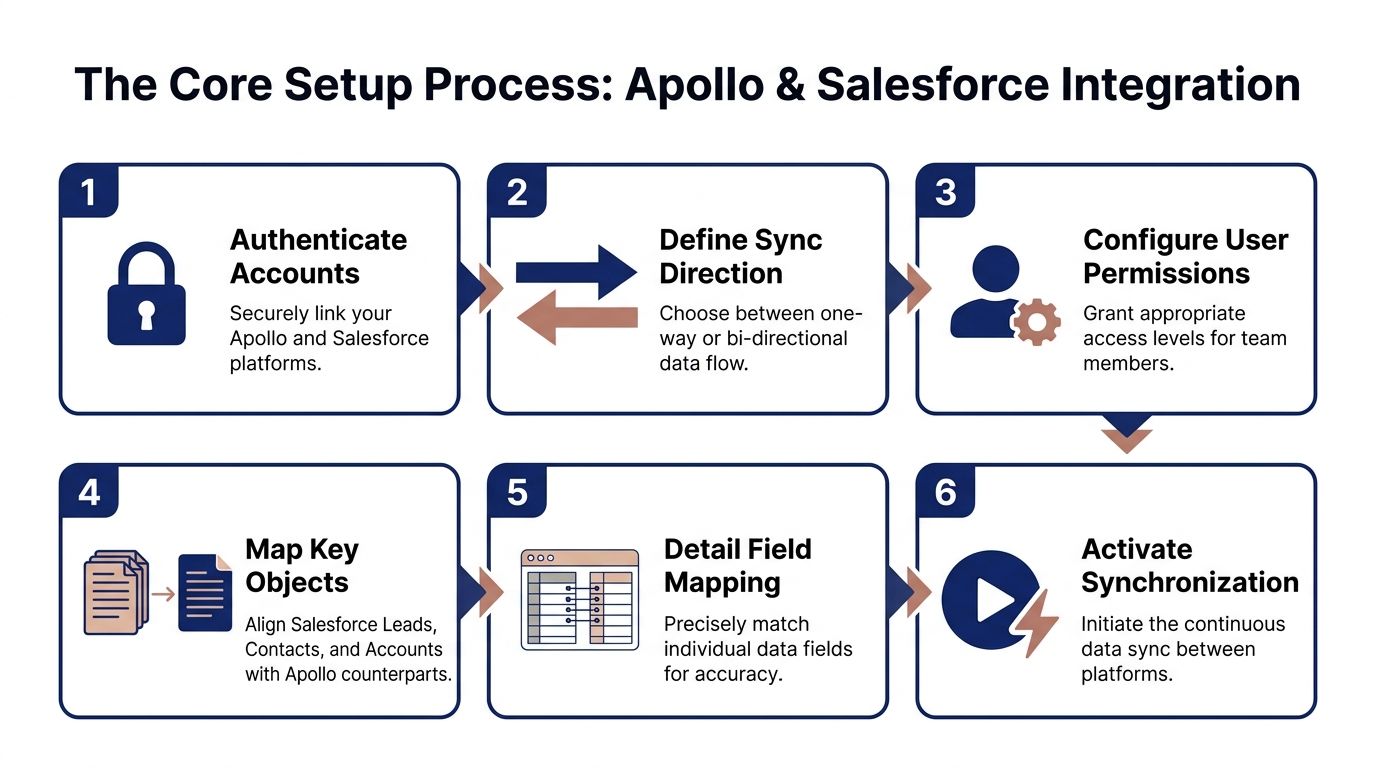
Monday morning is when bad Apollo-Salesforce setups show up. Reps open Salesforce and find duplicate leads, missing owners, or a wall of low-value activity logs. None of that starts with field mapping alone. It starts in the setup flow, where teams rush through connector choices that shape CRM behavior for months.
The native setup is quick. The consequences are not. Apollo can bring Salesforce records into Apollo and write prospecting data, enrichment, activities, notes, and meeting context back into Salesforce. It can also limit what moves based on workflow stage. Those options are useful, but at scale they create operational risk if you treat the wizard like a checklist instead of a revenue system.
Step 1 Authenticate the correct accounts
Connect the right Apollo workspace to the right Salesforce org. That is the first control point, and it matters more than teams expect.
In companies with sandbox, production, and multiple business units, one wrong login can put live CRM data into the wrong workspace or expose records to the wrong users. I treat this as both a RevOps step and a security step. Use a named owner for the integration, document which environment is being connected, and verify it before anyone clicks authorize. If your security team uses service accounts or other non-human identities for system access, review those permissions now, not after launch.
A simple rule helps here. The person who authenticates should not be the only person who verifies the target environment.
Step 2 Decide what should move first
Start with the minimum record set that helps reps work better. In most deployments, that means leads, contacts, and accounts before anything else.
Leads usually matter first for outbound creation and qualification. Contacts matter when reps need visibility into engaged people across open accounts. Accounts matter because ownership, territory logic, and segmentation often sit there. Opportunities are different. They affect forecasting, conversion reporting, and pipeline reviews, so a messy opportunity sync creates executive-level problems fast.
If the team is still proving the operating model, keep opportunities out of the first rollout or limit them to a narrow use case.
Step 3 Choose sync direction with intent
Bi-directional sync is not the mature default. It is often the fastest way to create conflicts if ownership rules are still loose.
Set direction by data type and business risk. Apollo is usually the better source for prospecting inputs, contact discovery, and some enrichment fields. Salesforce is usually the better source for ownership, stage, lifecycle control, and reporting fields that finance or leadership already depends on.
A practical starting model looks like this:
| Data type | Best initial direction |
|---|---|
| Net-new prospecting data | Apollo to Salesforce |
| Enrichment on approved records | Apollo to Salesforce |
| Record owner and account status | Salesforce to Apollo |
| Pipeline stage and forecast-related fields | Salesforce to Apollo |
| Sensitive admin fields | One-way, limited access |
That structure keeps the first release understandable. It also makes troubleshooting possible when sync volume climbs.
Step 4 Set enrichment behavior
Enrichment policy changes data volume, duplicate pressure, and rep trust in the CRM. Teams often frame this as a convenience setting. It is really a governance choice.
Automatic enrichment works when mapping is stable, duplicate controls are already defined, and the team can absorb a larger flow of updated data. Manual enrichment works better during a pilot, in regulated environments, or when the CRM has strict standards for what gets written back.
For many teams, the best answer is controlled automation. Auto-enrich approved record types or approved stages, then hold broader enrichment until the data quality holds up under real usage. That slows the rollout a bit, but it avoids the common failure mode where Apollo improves coverage while subtly making Salesforce harder to trust.
Step 5 Configure activity logging early
Activity sync is where the integration starts helping managers and hurting admins at the same time.
Reps and leaders need engagement history in Salesforce because pipeline decisions happen there. But if you log every email touch, every sequence action, and every low-signal event, the timeline becomes noise. Reps stop reading it. Managers stop trusting it. Admins inherit a storage and reporting problem they did not ask for.
Log the events that change sales decisions. Prioritize meaningful calls, meetings, replies, and engagement milestones. Be selective with routine outbound activity unless the team has a clear reporting use for it.
Step 6 Activate in phases
Roll this out in controlled waves. That is how you catch problems before they spread across every territory and every dashboard.
A good first phase is narrow by team, record type, or workflow stage. For example, sync only engaged outbound records into Salesforce first, then review what lands there each day. That gives RevOps a clean sample to inspect for ownership issues, duplicate creation, bad activity volume, and permission gaps. It also protects the CRM from top-of-funnel flood, which is where high-volume integrations usually start to break.
If your team needs a practical reference for cross-system connection choices, Salesmotion’s guide to connecting Salesforce and CRM integrations is a useful companion to the rollout plan.
What works and what doesn’t
What works is controlled scope, clear ownership, and a launch plan built for review. The best Apollo-Salesforce integrations do not start broad. They start with a narrow motion, prove data quality, and expand only after the sync behavior is predictable.
What fails is speed without policy. A fast setup can still create duplicate records, expose data through over-permissioned system access, and bury reps in activity spam. The setup flow is short. The cleanup is not.
“We have very limited bandwidth, but Salesmotion was up and running in days. The template made it easy to load our accounts and embedding it in Salesforce was simple. It was one of the easiest rollouts we've done.”
Andrew Giordano
VP of Global Commercial Operations, Analytic Partners
Mastering Field Mapping and Sync Logic
The apollo salesforce integration can be useful or dangerous. The connector can be live and still be wrong. Field mapping and sync logic decide whether your CRM gets cleaner over time or noisier every week.
The integration requires precise field mapping, explicit sync direction, and conflict resolution rules. It also supports stage-based filtering, such as pushing contacts only after they reach an engaged stage in Apollo workflows. Poor mapping and conflict logic can create duplication and incomplete enrichment that directly hurts sales productivity, according to this field mapping walkthrough.

Start with a source of truth map
Before you map anything in the connector, map it on paper. Every major field needs an answer to one question: which system wins?
If you skip that step, you’ll get random behavior disguised as automation.
A simple source-of-truth exercise should include fields like:
- Name and email: Usually stable identifiers
- Job title and company details: Often better enriched from Apollo
- Owner fields: Usually should stay controlled by Salesforce
- Lifecycle or status fields: Usually belong to CRM process design
- Free-text notes: High risk for accidental overwrite
This isn’t glamorous work, but it’s the difference between clean scale and recurring cleanup.
Problem and solution scenarios that show up in real rollouts
The easiest way to design sync rules is to work from failure cases.
Problem Apollo overwrites carefully maintained Salesforce notes
Salesforce notes often contain rep judgment, legal context, or meeting nuance. Apollo enrichment should not replace that.
Solution: Keep notes controlled from Salesforce only, or separate operational notes from enrichment fields so prospecting data never touches rep-authored CRM text.
Problem account ownership keeps changing unexpectedly
This usually happens when ownership fields are included in a broad bidirectional sync without clear logic.
Solution: Lock owner and routing fields to Salesforce. Apollo should read them if needed, not decide them.
Problem every discovered prospect gets pushed into Salesforce
That fills the CRM with names that haven’t earned a place there yet. Reps then lose confidence in lead views because too much of the data is unqualified.
Solution: Use stage-based filtering. Push only prospects who reach a meaningful threshold such as engaged status in Apollo.
Practical rule: Salesforce should store sales-operational records, not every possible person Apollo can find.
Problem curated CRM values get replaced by generic enrichment
This is common with industry, title variants, or account classifications where Apollo has useful but broader data.
Solution: Create directional rules field by field. Let Apollo fill blanks, but prevent it from overwriting validated Salesforce values unless there’s a deliberate review process.
Use bidirectional sync selectively
A lot of teams hear “bi-directional” and assume “best practice.” It isn’t. It’s just one option.
Bidirectional sync works well when both systems should continuously reflect the same operational reality. It works badly when one system contains strategic CRM decisions and the other contains dynamic prospecting data.
Here’s a practical way to understand this:
| Field category | Recommended approach | Why |
|---|---|---|
| Contact identifiers | Bidirectional with care | Both tools need consistency |
| Enrichment fields | Apollo to Salesforce | Apollo is adding value here |
| Ownership and routing | Salesforce to Apollo | CRM governance should lead |
| Internal notes | Salesforce only | Protects human context |
| Engagement activities | Apollo to Salesforce | Gives reps and managers visibility |
This is also where custom fields need discipline. If your team created Salesforce fields for segmentation, qualification, or routing, map them deliberately. Don’t let Apollo guess by rough name similarity or broad default behavior.
Conflict resolution is where good intentions break
Even with clean mapping, records eventually conflict. The same person changes title. A rep updates a field manually. Apollo receives fresher external data. Something has to win.
Your conflict rules should follow business importance, not data freshness alone.
Use this order of thinking:
- Would overwriting this field affect workflow or reporting?
- Was this field manually curated by the sales team?
- Is this field meant to be enriched repeatedly?
- Does this field support automation downstream?
If the answer to the first two questions is yes, Salesforce usually wins. If the answer to the third is yes, Apollo can often lead. If the field drives automation, test it harder than everything else.
Stage-based sync is the highest leverage control
This one choice can dramatically improve CRM quality. Apollo supports filtering records by workflow stage, which means you don’t have to push every cold prospect into Salesforce. You can hold records in Apollo while reps work early outbound motion, then push them once the signal is real.
That gives you several benefits:
- Cleaner CRM volume: Salesforce gets more meaningful records
- Better routing: Ownership happens when intent is clearer
- Less duplicate pressure: Fewer premature records entering the system
- Stronger reporting: Pipeline-facing data reflects actual engagement
I’d rather see a smaller volume of qualified synced records than a huge volume of untouched names.
If your team is refining lead object behavior and handoff logic, this guide on lead conversion and Salesforce mapping adds useful context.
Test the ugly edge cases
Don’t stop testing after one clean sync. Test what breaks systems:
- A contact that exists in both tools with slightly different names
- An account with manual Salesforce edits and new Apollo enrichment
- A rep-owned record with meeting notes
- A prospect that changes stage mid-workflow
- A lead converted after Apollo has already logged activity
That’s where your sync logic proves itself. The connector isn’t valuable because it can connect. It’s valuable because it can preserve trust while data keeps changing.
Handling High-Volume Data and Preventing Duplicates
A lot of Apollo content makes the integration sound clean and effortless. For a small or mid-sized rollout, that can be true. At scale, “set it and forget it” is the wrong mindset.
The issue isn’t that Apollo has too much data. The issue is that Salesforce is a governed CRM, and Apollo is a high-volume prospecting and enrichment platform. Those are not the same operating model.
Guides often gloss over this. Apollo’s contact scale can overwhelm Salesforce if the sync is too broad, and some users report 20 to 30% duplicate rates without custom approaches. The same analysis notes that syncing over 10,000 prospects daily can push API usage toward Salesforce’s 100,000 per day organization limit, creating scaling pressure that standard documentation doesn’t fully address, according to this high-volume Apollo-Salesforce integration analysis.
The native integration is not enough for enterprise hygiene by itself
For many teams, native sync is a solid starting point. For enterprise RevOps, it usually needs governance wrapped around it.
The first mistake is broad record ingestion. Teams pull too much into Salesforce too early, then rely on duplicate rules to save them. Duplicate rules help, but they are not a strategy. They catch some collisions. They don’t solve ownership conflicts, inconsistent identifiers, or badly timed record creation.
The second mistake is treating all synced data as equally valuable. It isn’t. A prospect discovered yesterday should not have the same CRM priority as a contact tied to active engagement or account strategy.
Duplicate prevention that actually works
If you’re operating at volume, use layers, not one rule.
Start with these controls:
- Gate records by stage: Only sync prospects who have crossed an engagement threshold
- Use consistent matching keys: Email is often the cleanest person-level anchor, but account matching also needs discipline
- Separate create from update logic: Decide when Apollo may update existing records and when it should be blocked from creating new ones
- Review ownership behavior: Duplicate records become harder to fix when multiple owners touch versions of the same contact
A practical rollout pattern is to treat Salesforce as the place where records become operational, not where all prospecting inventory lives.
At scale, the question is not “can we sync this?” It’s “should this exist in Salesforce yet?”
That one shift in thinking reduces noise fast.
Watch API consumption before it becomes a fire drill
API limits usually become visible only after the team has already built processes around the sync. Then a batch job slows down, records lag, and everyone blames the tool.
If you’re syncing large daily volumes, monitor how many objects and actions are hitting Salesforce. Leads, contacts, activities, notes, and enrichment updates all add up. High-frequency polling and broad activity logging can create load you didn’t intend.
Use these guardrails:
| Risk area | Better operating choice |
|---|---|
| Broad daily sync of cold prospects | Narrow by stage or segment |
| Constant enrichment on all records | Enrich only where action is likely |
| Logging everything | Log decision-useful activity |
| Unlimited rollout | Pilot by team or region first |
This is less exciting than a flashy automation plan, but it’s what keeps the integration stable.
Security is the overlooked part of the conversation
Most Apollo-Salesforce articles focus on setup screens. Few spend enough time on securing the integration itself, especially the non-human identity behind it.
It is worth remembering why: in 2018 Apollo left a database of roughly 212 million contact listings publicly accessible, exposing around 9 billion data points, as reported by Wired. That incident was a misconfigured database rather than anything to do with the Salesforce connection — but it is a useful reminder that teams often overlook granular permissions and monitoring for third-party integration risk.
That should change how you think about the integration user.
Use these security basics from day one:
- Limit permissions tightly: The integration user should access only required objects and fields
- Keep management access restricted: A small set of admins should control connector settings
- Review logs regularly: Permission failures and strange write behavior are often early warning signs
- Document any sync changes: Treat connector edits like production system changes, not casual admin tweaks
If your team wants a practical framework for sustaining data quality while these controls are in place, this piece on CRM hygiene is a good companion read.
What works versus what doesn’t
What works is controlled volume, staged sync, narrow permissions, and active monitoring.
What doesn’t work is assuming native sync alone will handle enterprise-scale volume, duplicate complexity, and integration security. It won’t. It needs operating discipline around it.
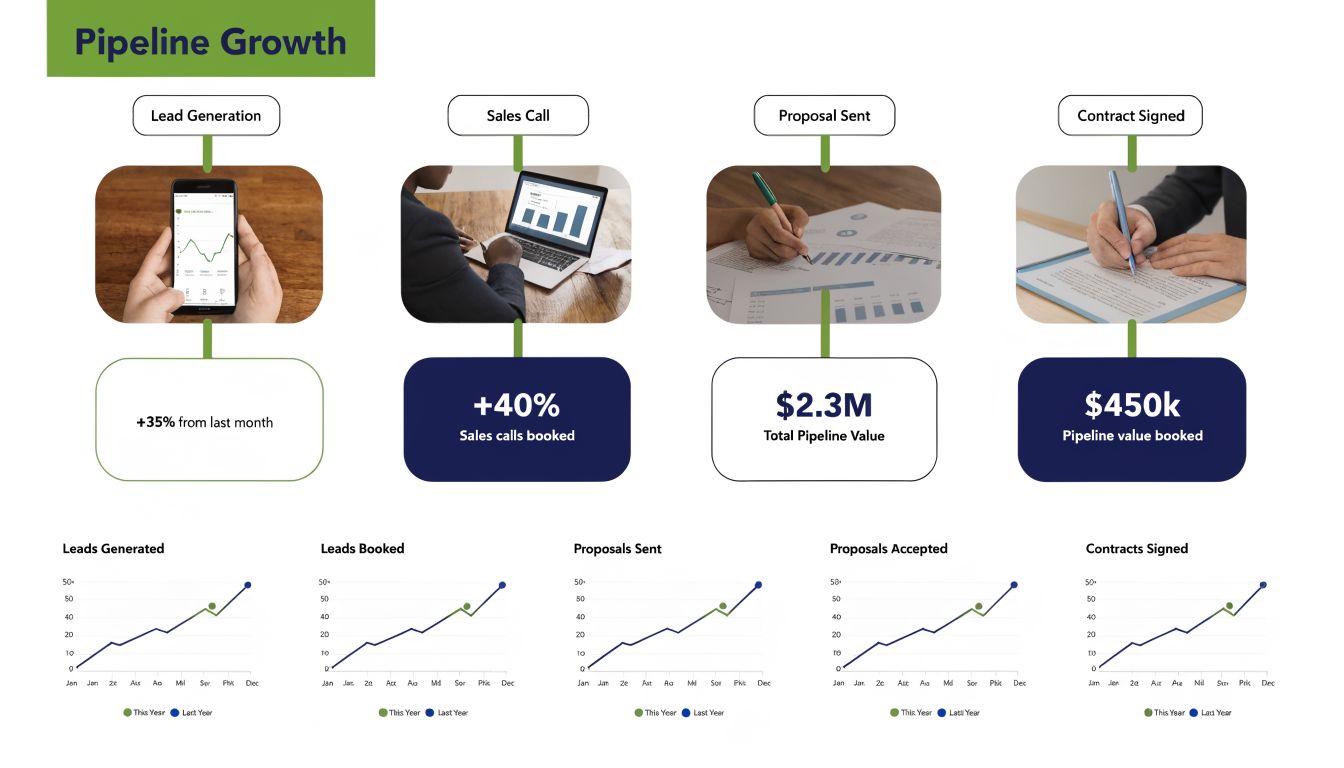
Activating Your Integrated Data for Pipeline Growth
The integration only pays off when reps use the data to make better decisions. Clean sync with no activation is just tidier plumbing.
The core value shows up when Apollo and Salesforce stop acting like separate tools and start acting like one working sales system. Apollo can process Salesforce data through its engine, surface patterns around conversion, and populate Salesforce with signals like tech stacks, hiring trends, and funding rounds. It also logs Apollo emails and calls as Salesforce activities, which gives reps more context for forecasting and live account work, according to this Apollo and Salesforce benefits overview.
Two reps with two different systems
Rep one has Apollo and Salesforce technically connected, but the setup is shallow. Contact records are inconsistently enriched. Activity logging is incomplete. Managers still ask reps to explain what happened on the account because the CRM timeline doesn’t tell the story well.
Rep two works in a cleaner environment. Apollo activity lands in Salesforce consistently. Account records include current context from Apollo enrichment. Ownership and stage fields stay stable. When the rep opens an account, they can see prior engagement, current company details, and enough context to make the next touch relevant.
The difference is not cosmetic. Rep two can prioritize faster and speak with more confidence.
Activation plays that are worth running
A strong apollo salesforce integration supports practical workflows like these:
- SDR prioritization by real engagement: Reps work the accounts where Apollo activity already shows traction inside Salesforce.
- Contextual account review before meetings: AEs can see current company signals alongside CRM history instead of hunting across tabs.
- Cleaner manager coaching: Pipeline reviews become more concrete because logged activities and account changes are visible together.
- Better segmentation for outbound: RevOps can build more targeted views using enriched account and contact data already sitting in the CRM.
The fastest route to pipeline isn’t more activity. It’s getting the right context in front of the rep before the next action.
Use analytics to refine targeting
Over time, the integration becomes smarter. Apollo can combine its scoring engine with Salesforce win and loss context to help teams see what converts. The point isn’t to obsess over one score. The point is to use combined platform data to sharpen who the team goes after and how they message.
That gives RevOps a stronger feedback loop:
- Prospecting and engagement happen in Apollo
- Deal and outcome data accumulate in Salesforce
- Patterns become easier to spot
- Targeting and prioritization improve
That loop is what turns the integration into a pipeline tool instead of a sync tool.
Make the CRM record useful in the moment
A rep does not need every possible data point. They need the few details that improve the next conversation.
Good integrated records usually answer these questions quickly:
| Rep question | Where integrated data helps |
|---|---|
| Who is this person and do we trust the record? | Enrichment and CRM history together |
| Has anyone engaged from this account? | Activity logging in Salesforce |
| Is there a reason to reach out now? | Current account signals and context |
| What happened previously? | Unified record and timeline |
If the record can answer those questions fast, rep behavior improves. If it can’t, the team still works from memory, side notes, and Slack threads.
The best integrations remove hesitation. Reps stop wondering whether the data is current enough to use. They just act on it.
Your Integrated Sales Engine A Summary
A strong apollo salesforce integration is not a connector project. It’s a revenue operations design choice.
The teams that get the most from it do a few things consistently. They lock down the prerequisites before launch. They use a dedicated integration user, test in sandbox, and define ownership before records start moving. They treat field mapping as a business decision, not a technical chore. They decide which system owns which fields, protect sensitive CRM inputs, and use stage-based sync to keep Salesforce focused on operationally meaningful records.
They also plan for scale earlier than they think they need to. High-volume sync, duplicate pressure, API usage, and integration-user security are not edge cases. They’re normal outcomes once the rollout gains traction. Teams that monitor them early keep the system clean. Teams that ignore them end up rebuilding trust in the CRM later.
The payoff is straightforward. Reps get better context. Managers get cleaner visibility. RevOps gets a more stable handoff from prospecting to pipeline. Leadership gets reporting they can use without adding a footnote to every dashboard.
The bigger point is that integration is the foundation, not the finish line. Once Apollo and Salesforce are working as one system, your team is in a much better position to layer on signal-based prioritization, sharper outreach, and faster action on account changes. That’s where the true advantage begins.
If your team has Apollo and Salesforce connected but still struggles to turn raw account activity into timely, actionable pipeline, Salesmotion is worth a look. Its AI agents monitor target accounts for meaningful changes, turn those signals into clear context and next steps, and deliver them through the channels your reps already use. That helps teams move beyond sync and enrichment into signal-driven selling without adding heavy operational overhead.