In 2024, 84% of sales reps missed their quota, according to Vena Solutions’ sales benchmarks. That number changes how you should think about managing sales performance. This isn’t a motivation problem first. It’s an operating system problem.
Many teams still manage sales the old way. They review pipeline after it stalls, inspect deals after close dates slip, and coach reps using output metrics that only explain what already went wrong. By the time revenue shows up on a dashboard, the actual mistake happened weeks earlier in account selection, timing, message relevance, or manager follow-through.
The better approach is more operational than inspirational. Use live account signals, clear leading indicators, and a scorecard that tells reps where to act now. Then use automation to remove the research burden and tighten the loop between what changed in an account and what your team does next.
Your Sales Performance Problem Isn't Your People
When quota attainment is weak across a team, leaders often default to the same conclusions. The reps need more hustle. The manager needs to be tougher. The team needs better talk tracks.
Sometimes that’s true. Often it isn’t.
A sales org can hire smart people, run solid onboarding, and still underperform because the management system is built around lagging indicators. Quarterly revenue, closed-won totals, and forecast accuracy matter, but they don’t help much when a rep needs to know what to do this morning. They also don’t help a manager separate a skill gap from a prioritization failure.
Good sales leaders don’t wait for quarter-end to learn what the market was already saying.
The practical shift is to stop treating performance management like a review process and start treating it like a daily operating rhythm. That means watching for buying signals, measuring whether reps act on those signals, and coaching from observable behavior instead of assumptions.
If you want a clean way to think about the shift, start with a more useful definition of productivity. This breakdown of how to measure sales productivity is useful because it moves the conversation away from generic activity counts and toward what creates pipeline.
What changes when you manage forward
Three things improve quickly when a team runs on real-time data:
- Focus improves: Reps stop treating every account like it deserves equal attention.
- Coaching improves: Managers can see whether the issue is low activity, weak conversion, or poor account choice.
- Forecasting improves: Pipeline quality gets clearer earlier, before deals become late-stage surprises.
That’s the point of managing sales performance well. Not more dashboards. Better decisions, earlier.
See Salesmotion in action
Take a self-guided interactive tour — no signup required.
Define What Winning Actually Looks Like
Quota is the scoreboard. It is not the playbook.
If your team only measures quota attainment, you’re managing the result after the fact. The teams that perform consistently track the behaviors and account conditions that produce the result. That’s what separates activity theater from a system that helps reps win.
Research on sales professionals found that top performers track both quantity metrics and quality metrics. That dual approach is used 27.7% more frequently by top sellers, and those sellers achieve 72% win rates versus 47% for their peers, according to the Purdue analysis on how top salespeople measure and manage success.
Split metrics into two buckets
Sales teams commonly over-index on quantity because it’s easy to count. Calls, emails, meetings booked. Those numbers matter, but only if they’re paired with quality indicators.
A practical scorecard usually needs both:
- Quantity metrics: outreach volume, meeting count, follow-up consistency, account coverage
- Quality metrics: conversion by stage, message relevance, deal progression, signal usage, account selection quality
A rep can make plenty of calls and still build weak pipeline if they’re calling dead accounts with generic messaging. Another rep can log fewer activities but create better pipeline because they act quickly on the right triggers with relevant outreach.
Use leading indicators, not just lagging ones
Lagging indicators tell you what happened. Leading indicators tell you what’s likely to happen next.
Here’s the distinction that helps in the field:
| Metric Type | What it tells you | Typical example |
|---|---|---|
| Lagging | Final outcome | Revenue closed, quota attainment |
| Leading | Behavior that shapes outcome | Response speed to signals, quality of account selection |
| Diagnostic | Why performance differs | Stage conversion, deal slippage, territory coverage |
Most managers already have the lagging metrics in CRM. The missing layer is the diagnostic one.
The 5 to 7 KPIs that matter most
You don’t need a giant spreadsheet. You need a short list that exposes the reason a rep is winning or losing.
A useful set usually includes:
-
Pipeline creation quality
Not just how much pipeline was created, but whether it came from accounts that fit your market and had a live reason to engage. -
Stage conversion
This shows where deals stall. A rep who gets meetings but can’t move to next step has a different problem from a rep who can’t book first conversations. -
Signal-to-outreach conversion
When a relevant account event appears, does the rep act on it? This is one of the cleanest leading indicators in a modern motion. -
Account brief utilization
If your team has access to account research and still sends bland messages, the problem isn’t tooling. It’s adoption and coaching. -
Follow-through discipline
Many opportunities die from inconsistency, not rejection. Watch whether reps complete the sequence and update next steps cleanly. -
Deal slippage trend
Slipping close dates are often an early warning of weak qualification or poor mutual action planning. -
Manager intervention timing
Strong managers don’t just inspect pipeline. They step in early on accounts with clear movement and coach the rep on the next action.
Practical rule: If a metric doesn’t help you decide who to coach, what to change, or where to focus, it doesn’t belong on the front page of your scorecard.
What doesn’t work
A few common mistakes show up in almost every underperforming sales org:
- Raw call counts without context: High volume can hide weak targeting.
- Meeting count as a vanity metric: A low-quality meeting is still low-quality pipeline.
- Quarterly review-only management: By then, the damage is already in the pipeline.
- One metric for every role: SDRs, AEs, and frontline managers need different operating metrics.
A better way to define winning
For reps, winning means working the right accounts at the right time with enough relevance to create movement.
For managers, winning means spotting behavior patterns early enough to change the outcome.
That’s the shift in managing sales performance that matters. Define success as a combination of effort, precision, and timing. If you don’t, your team will keep measuring activity while missing revenue.

“Consolidation of prospect company information that I can use frequently to be way better informed when I'm doing my outbound, preparing for a meeting, or building relationships. Ease of use and Customer Support is excellent.”
Werner Schmidt
CEO & Co-Founder, Lative
Build Your Real-Time Performance Dashboard
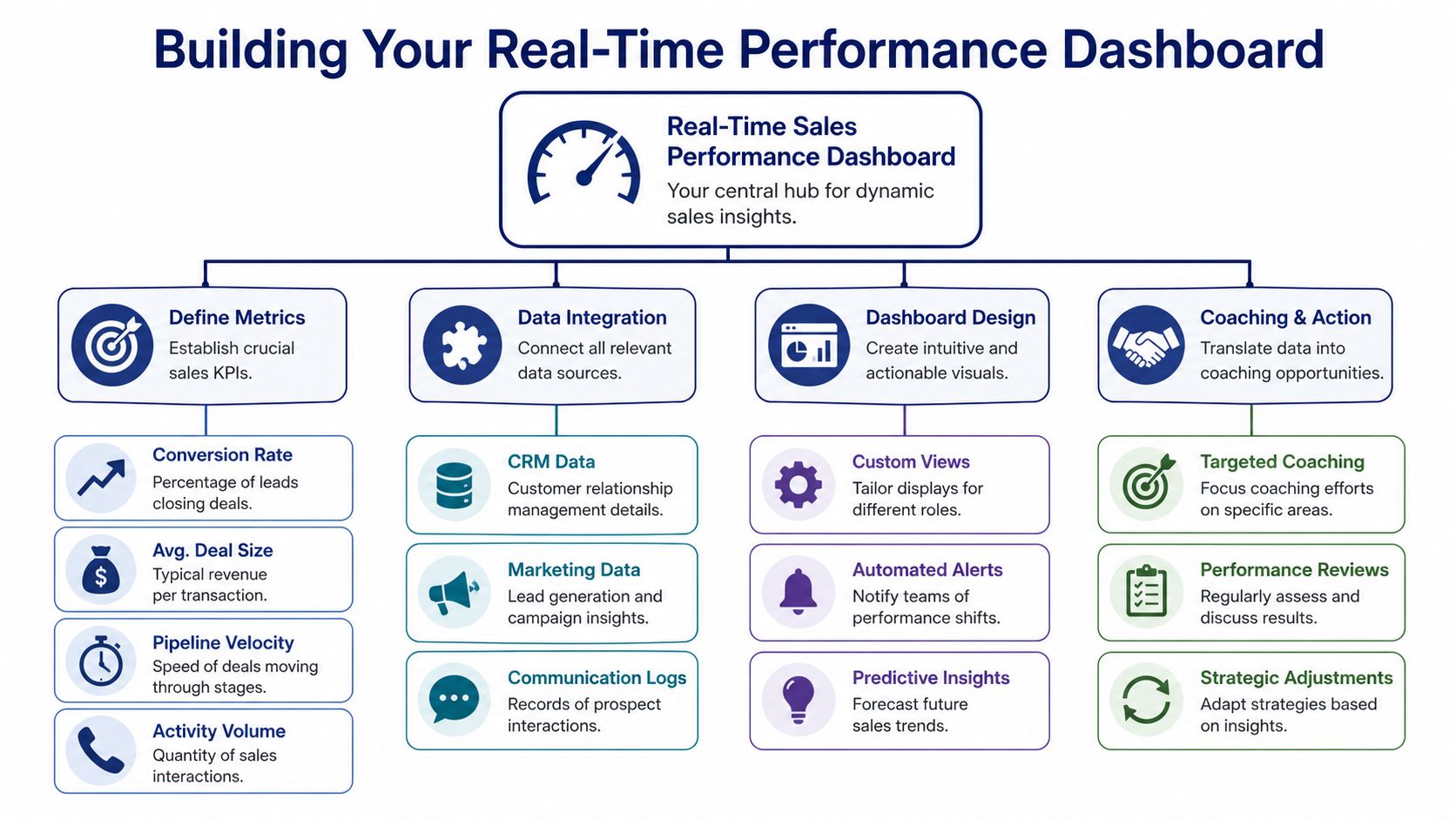
A performance dashboard should work like a control room, not a museum. If it only shows what happened last week, it’s too late.
High-performing teams track core KPIs tightly because missing them has real downstream cost. One of the clearest examples is deal slippage. CaptivateIQ’s breakdown of sales performance metrics notes that high-performing teams keep deal slippage below 15%, while poor monitoring can let it rise above 25%. That gap usually points to qualification issues, weak forecasting discipline, or both.
What a useful dashboard includes
The structure matters more than the software. If the dashboard doesn’t drive action in 1:1s and forecast calls, it’s decoration.
Build it in four layers:
Activity layer
This is your effort baseline.
Track the daily and weekly actions that show whether reps are doing enough to create opportunity flow. Keep it simple. You want enough detail to spot under-activity, but not so much that managers start rewarding motion over progress.
Include items like:
- Coverage across target accounts: Are reps spreading effort across the accounts that matter?
- Outreach consistency: Are they following through or starting and stopping?
- Response to live triggers: Are they engaging when an account gives them a reason?
Conversion layer
Here, quantity meets quality.
A rep with healthy activity and weak conversion usually needs message, call, or qualification coaching. A rep with low activity and decent conversion usually needs better discipline and tighter management.
Watch for:
- Meeting-to-opportunity conversion
- Stage-by-stage conversion
- Signal-to-meeting conversion
- No-decision patterns
Efficiency layer
This tells you whether pipeline is moving with enough speed and discipline.
The common mistake is to look at late deals one by one. The better move is to monitor the pattern across the book of business.
Use metrics such as:
- Sales cycle length
- Deal slippage
- Aging by stage
- Next-step hygiene
Management layer
This is the missing layer on many dashboards.
Managers need their own leading indicators. Did they review the right deals? Did they coach to the actual bottleneck? Did they reallocate focus based on account movement? If the dashboard only evaluates reps, leadership stays blind to management quality.
Modern Sales Metrics Scorecard
Here’s a practical comparison to use when redesigning your view.
| Metric Category | Traditional Metric (Lagging) | Modern Metric (Leading/Signal-Based) |
|---|---|---|
| Rep activity | Total calls made | Target-account coverage and signal response activity |
| Pipeline | Pipeline created this month | Pipeline created from active accounts with a live trigger |
| Forecast | Commit amount | Deal slippage trend and buyer engagement movement |
| Outreach | Emails sent | Signal-to-outreach conversion |
| Coaching | End-of-quarter review | Weekly behavior-based intervention on stalled stages |
| Account strategy | Named account list | Dynamic account priority based on current changes |
How teams actually use it
A dashboard like this should show up in three places every week:
- Rep 1:1s: diagnose one bottleneck and assign one behavior change
- Manager reviews: compare rep patterns, not just totals
- Leadership inspection: see whether problems are local, segment-specific, or systemic
For teams that still rely on manual rollups, a structured recap can help bridge the gap. This sales weekly update template is a solid example because it forces clarity around movement, blockers, and priorities without turning updates into essay writing.
A dashboard should answer three questions fast. What changed, why it changed, and who needs to act.
Automation matters more than formatting
Spreadsheets break because they depend on rep discipline and manager cleanup. The more manual the reporting process, the less trustworthy the dashboard becomes.
That’s why revenue teams increasingly connect CRM data, communication logs, and account intelligence into one operating view. If you need a useful primer on the category, this explanation of what revenue intelligence is lays out how teams centralize deal, activity, and buyer data into a more usable system.
When the dashboard updates itself, managers spend less time chasing numbers and more time changing outcomes.
Automate Prioritization with Account Intelligence
Static account lists are one of the biggest reasons teams waste good selling time.
A named-account plan gets built in Q1, territories are assigned, and the list stays mostly fixed while the market changes underneath it. Some accounts get new funding, change leadership, open a new initiative, or start hiring into a function tied to your product. Other accounts go quiet. Yet reps keep working the list as if all accounts are equal.
That’s not disciplined selling. It’s stale prioritization.
Salesgenie’s roundup of sales productivity benchmarks cites Forrester research showing that AI and automation can free up about 20% of a sales team’s capacity by removing non-selling work. The same benchmark says teams adopting AI agents for account monitoring see 2.5x faster pipeline generation. The practical takeaway is straightforward. Time spent manually hunting for context is time not spent creating or progressing deals.

What dynamic prioritization looks like
A modern book of business should change as accounts change. That doesn’t mean chaos. It means clear rules.
A simple operating model works well:
Tier 1 accounts
These accounts get immediate attention because something changed that creates urgency or relevance.
Examples include:
- Executive movement: a new CRO, COO, or VP who is likely to reset priorities
- Funding or investor updates: a signal that new initiatives may get budget and attention
- Hiring patterns: multiple open roles tied to a business problem your product solves
- Public strategic language: mentions in earnings calls, interviews, or press that map directly to your value
Tier 2 accounts
These accounts fit your market and deserve coverage, but they don’t yet have a reason for concentrated effort. Keep them warm. Don’t overwork them.
Tier 3 accounts
These accounts may fit on paper but show no real momentum. They stay in the background until something changes.
Where automation changes the game
Without automation, reps spend hours piecing together context from LinkedIn, press releases, podcasts, filings, and company websites. Most of that work is inconsistent because each rep has different habits, and most of it gets skipped when the week gets busy.
AI agents are integrated into the process. Tools in this category monitor accounts continuously, pull together the relevant change, and tell the rep why it matters. One option is Salesmotion, which uses a Research Agent to build account briefs, a Signal Agent to monitor target accounts for changes, and a Outreach Agent to turn those changes into personalized outreach. In practice, that means the rep doesn’t need to discover the trigger manually before deciding what to do next.
If you’re redesigning this motion, a practical place to start is a documented account prioritization framework that defines exactly how accounts move between focus tiers.
What works and what fails
The teams that get this right do a few things consistently:
- They define trigger rules clearly: not every alert deserves action
- They route alerts by role: SDR, AE, and manager should not all receive the same stream
- They connect prioritization to workflow: if an account becomes active, the next step should be obvious
- They review dead zones: if no one acts on a category of signal, remove it or retrain around it
What fails is the opposite:
- Signal overload without context
- Alert feeds with no prioritization
- Static territories that ignore live buying conditions
- Research tasks left entirely to rep discretion
Accounts don’t become good because they’re on your list. They become good when something changes that makes a conversation timely.
That’s why managing sales performance now has to include account intelligence. Not as an add-on. As the front end of where time gets spent.

“This is my singular place that very simply summarizes a company's top initiatives, strategies and connects them to my solution. Something I would spend hours researching manually, now it's automated.”
Derek Rosen
Director, Strategic Accounts, Guild Education
Run High-Impact Coaching and Enablement
Coaching works when it gets specific fast.
Most 1:1s fail because the manager reviews too much, too late, and too vaguely. “You need to prospect more.” “Your deals need urgency.” “We need better qualification.” None of that gives a rep a clear behavior to change on the next call.
The stronger method is diagnostic. Start with the scorecard. Find the bottleneck. Then coach the behavior closest to that bottleneck.

Diagnose before you advise
When a rep is underperforming, there are usually only a few root causes:
- Low activity: not enough quality attempts to generate top-of-funnel movement
- Weak conversion: enough activity, but poor discovery, relevance, or follow-up
- Bad prioritization: too much effort going into low-momentum accounts
- Territory drag: the rep has coverage, but the book itself lacks enough viable opportunity
That last one gets ignored far too often.
The common management mistake is to blame the seller before auditing the territory. The Salesscreen discussion on bottom performers and territory fit highlights this issue directly, noting that territory design can account for 20% to 30% of performance variance. When leaders miss that, they end up coaching the wrong problem or replacing reps who might perform well with a fairer book.
How to tell if it’s the rep or the territory
You don’t need a perfect model. You need a disciplined review.
Ask questions like:
-
Does the rep have enough accounts with visible buying activity?
If similar reps in other books are seeing more account movement, the issue may not be skill. -
Is the rep getting meetings from high-fit accounts but not progressing them?
That points more to execution quality than territory design. -
Are multiple reps struggling in the same segment or patch?
That usually signals a market or territory issue, not an isolated rep issue. -
Is the rep spending time on accounts with no live reason to engage?
That can be a prioritization issue, a territory issue, or both.
Don’t ask, “Why is this rep behind?” first. Ask, “What conditions are they selling into, and what are they doing with those conditions?”
A coaching agenda that actually helps
A useful 1:1 doesn’t need to be long. It needs to be sharp.
Try this structure:
| Agenda item | What the manager looks for | Likely action |
|---|---|---|
| Recent activity | Enough effort in the right accounts | Tighten focus or increase disciplined outreach |
| Conversion pattern | Stage where momentum breaks | Coach call quality, qualification, or follow-up |
| Account mix | Too many low-potential accounts | Re-rank the book and shift effort |
| Territory health | Weak signal density across patch | Rebalance accounts or adjust expectations |
| Next-week plan | Clear, observable behaviors | Commit to a small number of specific changes |
Enablement should support the manager, not replace them
Playbooks, templates, and training libraries matter. But enablement only improves performance when it connects to real opportunities and real rep behavior.
If you want a practical external reference, these sales enablement best practices are useful because they focus on making material usable in actual selling situations rather than treating enablement as content production.
A manager also needs a repeatable coaching method. This guide to sales coaching methods is a good framework for turning dashboard insights into behavior-based coaching conversations.
What strong coaching sounds like
Weak coaching says, “You need to get in front of more prospects.”
Strong coaching says, “You’re spending too much time in accounts without a current trigger. This week, move your focus to accounts with live change, write outreach anchored to that event, and I’ll review the first five messages with you.”
Weak coaching says, “Your pipeline isn’t progressing.”
Strong coaching says, “Your meetings are converting, but second steps are soft. Bring me two call recordings where you set next steps, and we’ll tighten the close on the call.”
That’s the difference between reviewing performance and managing it.
Translate Signals into Personalized Pipeline
Signals are only useful if they become outreach quickly.
Many teams still break the chain. They spot a relevant event, maybe even discuss it in Slack, then the rep sends a generic email that barely mentions the reason for reaching out. The signal was strong. The execution was weak.
The bigger miss is on the management side. Reps are usually measured on activity, but managers often aren’t measured on how effectively the team turns intelligence into action. The Saleslabel Consulting playbook for sales managers points to this gap directly, arguing that manager KPIs such as team signal response rate or whether an alert gets acted on within a day are often missing, even though high-skill managers drive 29% higher revenue.
Example one, new executive hire
A target account announces a new CRO.
Bad outreach sounds like this:
Congrats on the new role. We help sales teams improve productivity. Open to a quick chat?
That message wastes the trigger. It’s generic, easy to ignore, and gives the buyer no reason to believe the rep understands the moment.
Better outreach sounds like this:
Saw the CRO transition. New sales leadership usually means a fast review of coverage, pipeline quality, and rep efficiency. If those priorities are in motion, I can share how teams use account-level signals to focus reps on the accounts most likely to move now.
Same trigger. Different quality.
Example two, expansion signal
An account talks publicly about entering new markets.
A strong rep doesn’t just mention the announcement. They connect it to an operational problem that tends to follow expansion. New segments, new stakeholders, more account complexity, and more pressure on reps to prioritize correctly.
A useful sequence would do three things:
- Email one: reference the expansion and the likely commercial complexity it creates
- Email two: share a point of view on where reps usually lose time during expansion
- Email three: offer a concrete discussion around account prioritization, territory focus, or message relevance
Example three, hiring pattern
An account starts hiring into a function related to your product. That often signals budget, initiative ownership, or a known internal gap.
The message should stay anchored to the implication, not just the job posting itself.
For example:
Noticed the hiring push in your revenue operations team. That usually means one of two things. You’re adding capacity to support growth, or you’re cleaning up inefficiencies that are already visible. If account prioritization and rep focus are part of that work, I’ve got a few ideas worth comparing.
What managers should inspect
Manager review should not stop at “Did the rep send the email?”
Inspect these:
- Was the outreach tied to a real trigger?
- Did the message explain why the trigger matters?
- Was the ask proportional to the signal?
- Did the rep follow up while the trigger was still fresh?
The highest-leverage coaching point in modern outbound is often not volume. It’s whether the rep translated context into relevance.
This is also where AI-assisted drafting helps. If research and signals are already structured, a rep can start from a personalized draft instead of a blank page. That shortens the time between signal detection and outbound action, which matters because relevance decays quickly.
Managing sales performance at this stage is simple to say and hard to execute. Don’t praise awareness. Measure action.
From Reactive Manager to Proactive Leader
Managing sales performance well means building a system that catches opportunity earlier than your forecast does.
That system has a few clear traits. It defines winning with leading indicators, not just outcomes. It uses a live dashboard instead of stale rollups. It prioritizes accounts based on what changed, not on who was assigned them months ago. It coaches against observable behavior. It expects managers to own response quality, not just rep activity.
When teams operate that way, reviews get shorter and more useful. Reps spend less time researching and more time in timely conversations. Managers stop guessing why pipeline is weak. Leadership gets a cleaner view of what needs attention now, before quarter-end turns small problems into missed numbers.
This is the shift from reactive management to proactive leadership. Not more pressure. Better signals, tighter operating rhythms, and clearer actions.
If your team is trying to turn account signals into daily rep action without adding more manual work, Salesmotion is built for that workflow. It monitors target accounts for relevant changes, turns those signals into usable account context, and helps reps move from research to personalized outreach faster.